Welcome to the Vue feedback portal. We’re happy you’re here! If you have feedback on how to improve the Vue, we’d love to hear it!
Thanks for joining our community and helping improve Syncfusion products!
I have a multiselect component with customized itemTemplates and valueTemplates, which are specified using named slots:
<ejs-multiselect id='multiselect' v-model="orderStatusFilter" :dataSource='orderStatusChoices'
                 class="form-control" itemTemplate="iTemplate" placeholder="Etat..."
                 valueTemplate='iTemplate'>
  <template v-slot:iTemplate="{data}">
    <div>
      <span>
        <i class="bi" :class="'bi-order-status-' + data"/>
        <span class="ms-2">{{ t("Order_" + data) }}</span>
      </span>

    </div>
  </template>
</ejs-multiselect>
<script lang="ts" setup>
...
const orderStatusChoices = [OrderStatus.created, OrderStatus.partial, OrderStatus.paid, OrderStatus.expired];
const orderStatusFilter = ref<OrderStatus[]>([]);
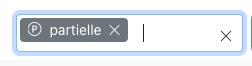
Both template work fine while I am making a selection: after adding an item the dropdown closes and the list of selected items are displayed in the control using the value template, with a blinking cursor at the end since the control has the focus.
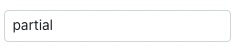
As soon as I click anywhere else on the page the control loses the focus and the list is displayed as a list of raw values.
The problem is new since upgrading to v.24.1.43, the same code used to work fine in v.22.2.5... did something change in the APIs?
Correct display:
Display after losing the focus:
 Bold BI
 Bold Reports
 BoldDesk