Welcome to the Blazor feedback portal. We’re happy you’re here! If you have feedback on how to improve the Blazor, we’d love to hear it!
Thanks for joining our community and helping improve Syncfusion products!
Hi,
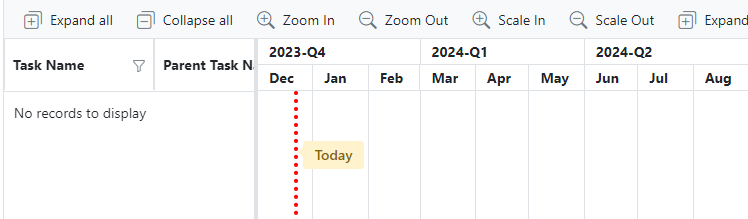
I would like to be able to group the top tier of a gantt chart by quarters. However, as per the following screenshot, I am not able to control the grouping of the count function. eg. I'd like the function to group by year (ie. Period 1 = January), but it in the below sample with no data, it has arbitrarily chosen to start the series in December. I wonder if we could get a GroupBy in the GanttTopTierSettings component where we could group based upon Date.Year, or is there another way that I could define the starting point of the Count function?
I note that we don't have the problem in the bottom tier as it is implicitly already grouped by the top tier.
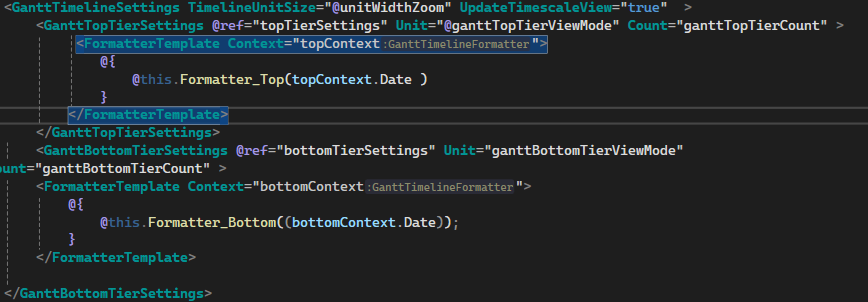
public string? Formatter_Top(DateTime dateTime)
{ganttTopTierViewMode = topTierSettings.Unit;
if (ganttTopTierViewMode != null)
{ if (ganttTopTierViewMode == TimelineViewMode.Month && ganttTopTierCount == 3) { return $"{dateTime.Year}-{GetQuarter(dateTime)}";}
}
return null;
}
public string GetQuarter(DateTime dateTime) {var month = dateTime.Month;
if (month >= 1 && month <= 3) {return "Q1";
} else if (month >= 4 && month <= 6) {return "Q2";
} else if (month >= 7 && month <= 9) {return "Q3";
} else {return "Q4";
}
}
 Bold BI
 Bold Reports
 BoldDesk