Welcome to the Blazor feedback portal. We’re happy you’re here! If you have feedback on how to improve the Blazor, we’d love to hear it!
Thanks for joining our community and helping improve Syncfusion products!
Greetings,
In some cases, on small viewport widths on a desktop browser, the header navigation drawer options can get cut off, such as the current view period.
I have taken a screenshot of this behavior below. I did this by testing your Default Functionalities demo page. I modified the page by removing the padding so the Scheduler takes up the full width of the page. Then I set the viewport width to 320px, a minimum testing scenario per the WCAG 1.4.10 criterion (I believe this passes 1.4.10 fine enough). Then I set browser zoom to 200% to resize text, resulting in a final viewport width of 160px. Since the component text uses fixed font size (px), resizing only the text via browser settings text did not work, which is why I used browser zoom instead.
Since I cannot read all of the content after resizing text via browser zoom and I cannot scroll to view the missing text, I would argue it is an accessibility issue under the WCAG 1.4.4 criterion. Is there a way this can be improved somehow?
If you need further details, please let me know. Thank You!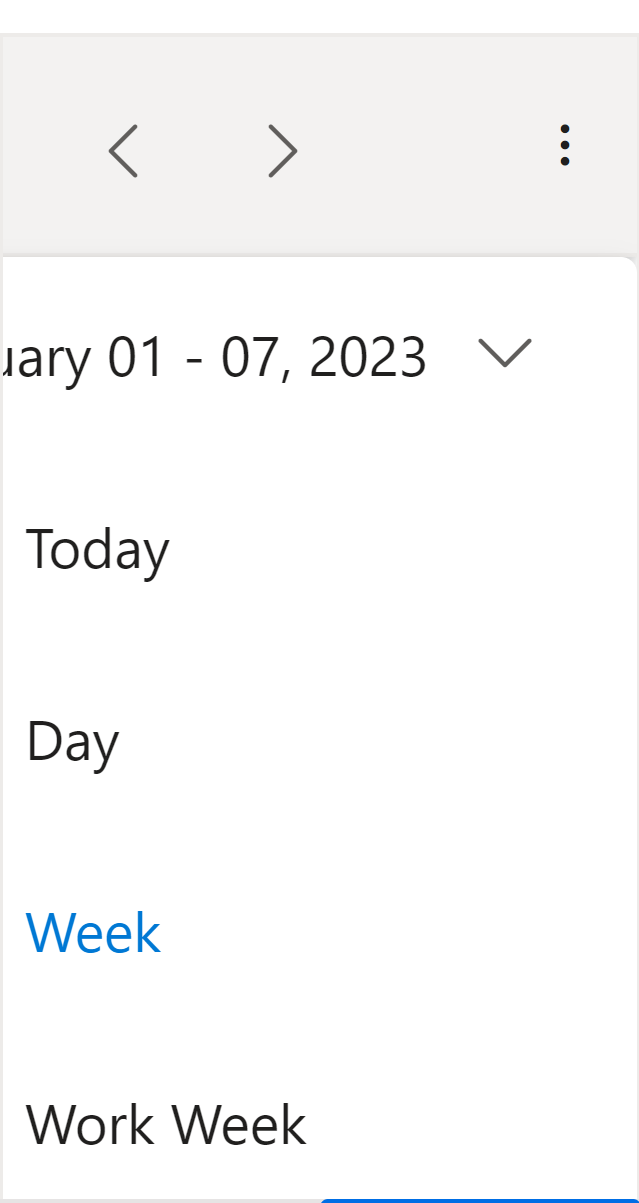
 Bold BI
 Bold Reports
 BoldDesk