Welcome to the Angular feedback portal. We’re happy you’re here! If you have feedback on how to improve the Angular, we’d love to hear it!
Thanks for joining our community and helping improve Syncfusion products!
Hello,
We have an app with 4 locales. For each language, we load translations as follow:
loadCldr(
require('../../../node_modules/cldr-data/main/fr-CH/ca-gregorian.json'), require('../../../node_modules/cldr-data/main/fr-CH/currencies.json'), require('../../../node_modules/cldr-data/main/fr-CH/numbers.json'), require('../../../node_modules/cldr-data/main/fr-CH/timeZoneNames.json'),);
L10n.load({ "fr-CH": require('src/assets/i18n/fr-CH.json').syncfusion });Each translation file contains at least the following values:
"syncfusion": { "datepicker": {"day": "jj",
"month": "MM",
"year": "aaaa",
"today": "Aujourd'hui"
},
"timepicker": {"hour": "hh",
"minute": "mm"
},
"schedule": { ... }Our app enables runtime language change. As soon as the language changes, we use
setCulture(culture);
to update syncfusion components.
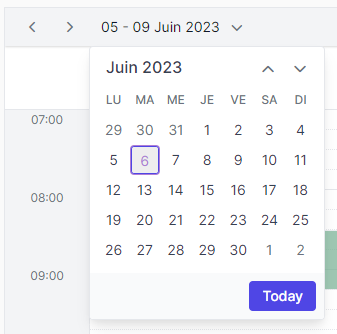
The schedule component seems to be updated properly, but concerning the datepicker components, we're facing two problems:
 Bold BI
 Bold Reports
 BoldDesk