Welcome to the ASP.NET Core feedback portal. We’re happy you’re here! If you have feedback on how to improve the ASP.NET Core, we’d love to hear it!
Thanks for joining our community and helping improve Syncfusion products!
Using structured references to tables in formulas return wrong values.
For example, using `MATCH` on `Countries[#Headers]` should return the index of string. In the example I attached it works. If I enable calculations on the sheet and do the same calculation with XlsIO, I get the wrong value.
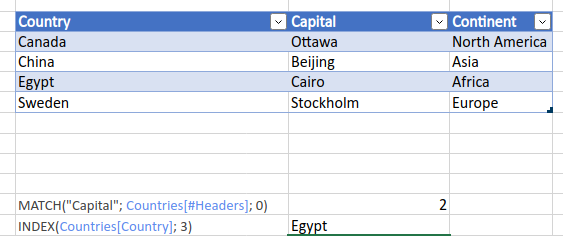
(Screenshot from Excel 365. Opening with XlsIO and enabled calculations gives wrong results.)
var sheet = (... omitted)
sheet.EnableSheetCalculations();
sheet["C10"].Formula = "=MATCH(\"Capital\", Countries[#Headers], 0)";
Console.WriteLine(sheet["C10"].DisplayText); //Prints "#N/A"
There is some support for the structured references: I can find `Countries` when looking at `workbook.Names`; if I set the formula to be just "=Countries[#Headers]" then I get a value; etc. But using it with array functions like MATCH or INDEX returns the wrong result when compared with Excel.
Thanks for your help,
Simon
 Bold BI
 Bold Reports
 BoldDesk