Welcome to the ASP.NET Core feedback portal. We’re happy you’re here! If you have feedback on how to improve the ASP.NET Core, we’d love to hear it!

  • Check out the features or bugs others have reported and vote on your favorites. Feedback will be prioritized based on popularity.
  • If you have feedback that’s not listed yet, submit your own.

Thanks for joining our community and helping improve Syncfusion products!

1
Vote

Hello,

when trying to Save the Spreadsheet document using ASP.NET Core API, in the `Save` method of the controller, the following error is thrown:

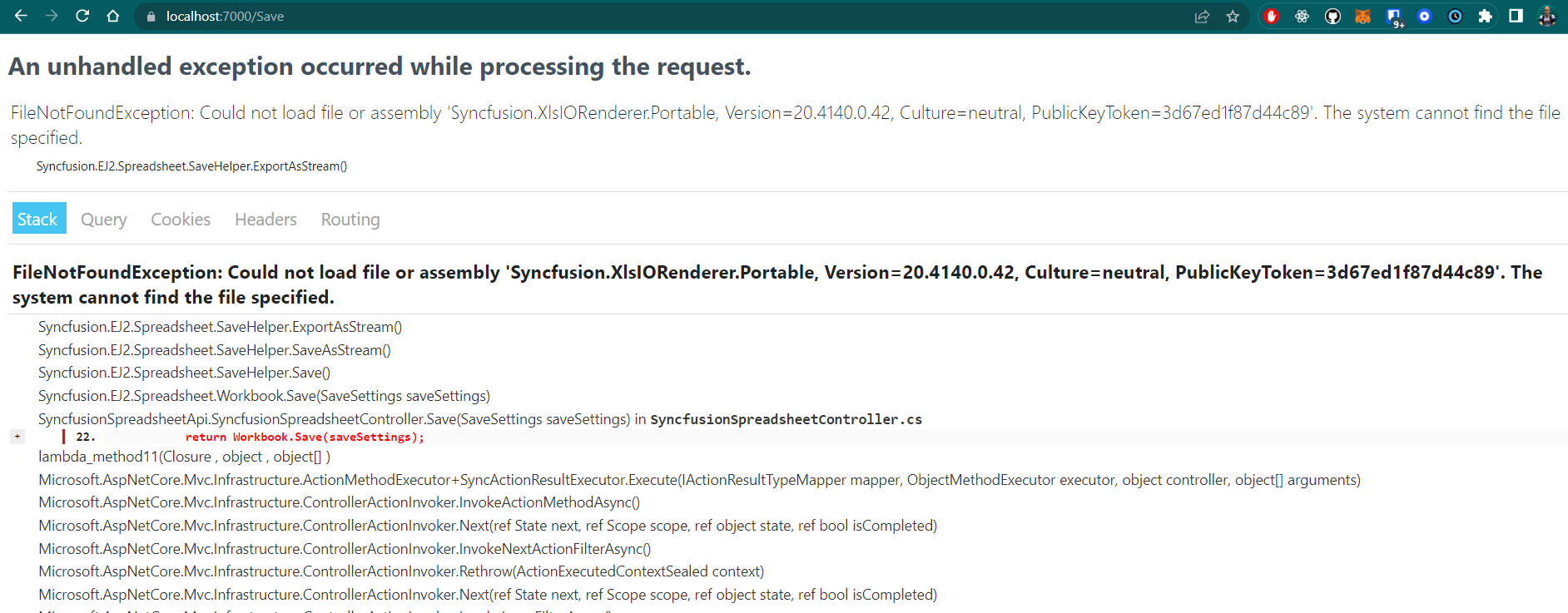
FileNotFoundException: Could not load file or assembly 'Syncfusion.XlsIORenderer.Portable, Version=20.4140.0.42, Culture=neutral, PublicKeyToken=3d67ed1f87d44c89'. The system cannot find the file specified.


This is all done in a very standard way. The controller looks as follows:


Empty


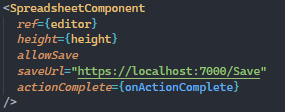
while the Spreadsheet React component is rendered in the following way:
Empty


Reproduction path
I attached sample apps (React and .NET) to this ticket.
In order to reproduce the issue:
  1. Download the attached .zip file and unzip it
  2. Open `SyncfusionShreadsheetApi` and run the .NET Core API application
  3. Go to `syncfusion-spreadsheet-react-app` and execute `npm install`, then `npm start`
  4. Try to save the Spreadsheet file with Ctrl+S
  5. See the exception page
Current behavior
An exception is thrown about missing DLL, so it's impossible to save the Spreadsheet file:
Empty


Expected behavior
No exception is thrown.

Additional info
I found this thread: 

https://www.syncfusion.com/forums/159833/could-not-load-file-or-assembly-syncfusion-xlsio-portable

However, the solution provided there is no longer applicable. When trying to add `using Syncfusion.XlsIO.Net.Core`, it is not recognized and there's no Nuget package with this namespace.