Welcome to the Blazor feedback portal. We’re happy you’re here! If you have feedback on how to improve the Blazor, we’d love to hear it!
Thanks for joining our community and helping improve Syncfusion products!
Hey,
when using the SfChart errors are thrown in the browser console:
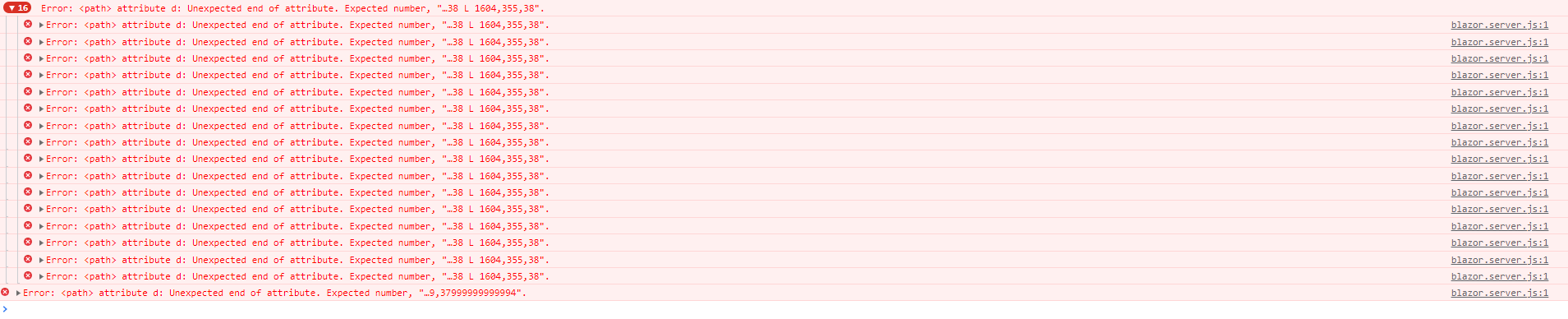
Also the performance of the tooltips and the refresh is very poor. The refresh is even blocking the whole page / browser / UI thread. Because of that you aren't able to work properly. Please try out some hovering over the chart -> it is stongly lagging behind.
Example to reproduce both of the issues mentioned:
@page "/ChartTest"

@using System.Threading
@using ValueType = Syncfusion.Blazor.Charts.ValueType

@implements IDisposable

<SfChart @ref="_sfChart" Title="Active Modules" Width="100%">
    <ChartZoomSettings EnableScrollbar="true" EnablePinchZooming="true" EnableSelectionZooming="true" Mode="ZoomMode.X"/>
    <ChartTooltipSettings Enable="true" Shared="true"/>
    <ChartPrimaryXAxis Title="Time" LabelFormat="T" ValueType="ValueType.DateTime" IntervalType="IntervalType.Hours"/>
    <ChartPrimaryYAxis Title="Modules" Interval="1" Minimum="0" Maximum="3"/>
    <ChartSeriesCollection>
        <ChartSeries DataSource="@_stepAreaChartData" Name="First Module" XName="@nameof(StepAreaChartData.XAxis)" YName="@nameof(StepAreaChartData.YAxisFirstModuleActive)" Opacity="0.7" Type="ChartSeriesType.StepArea"/>
        <ChartSeries DataSource="@_stepAreaChartData" Name="Second Module" XName="@nameof(StepAreaChartData.XAxis)" YName="@nameof(StepAreaChartData.YAxisSecondModuleActive)" Opacity="0.4" Type="ChartSeriesType.StepArea"/>
        <ChartSeries DataSource="@_stepAreaChartData" Name="Third Module" XName="@nameof(StepAreaChartData.XAxis)" YName="@nameof(StepAreaChartData.YAxisThirdModuleActive)" Opacity="0.3" Type="ChartSeriesType.StepArea"/>
    </ChartSeriesCollection>
</SfChart>

@code {
    private List<StepAreaChartData> _stepAreaChartData = new();
    private DateTime _lastDateTime;
    private Timer? _timer;
    private SfChart? _sfChart;

    protected override void OnInitialized()
    {
        for (var i = 0; i < 82800; i++)
        {
            var dateTime = DateTime.Today.AddDays(-1).Date.AddSeconds(i);

            _stepAreaChartData.Add(new StepAreaChartData
            {
                XAxis = dateTime,
                YAxisFirstModuleActive = 1,
                YAxisSecondModuleActive = 2,
                YAxisThirdModuleActive = 3
            });

            _lastDateTime = dateTime;
        }

        _timer = new Timer(RefreshChart, null, TimeSpan.FromSeconds(10), TimeSpan.FromSeconds(10));
    }

    private void RefreshChart(object? state)
    {
        var dateTime = _lastDateTime.AddSeconds(1);

        _stepAreaChartData.Add(new StepAreaChartData
        {
            XAxis = dateTime,
            YAxisFirstModuleActive = 1,
            YAxisSecondModuleActive = 2,
            YAxisThirdModuleActive = 3
        });

        _lastDateTime = dateTime;

        // Three different ways to refresh the chart but all of them have poor performance
        InvokeAsync(StateHasChanged);
        /*_sfChart?.RefreshLiveData();
        _sfChart?.RefreshAsync(false);*/
    }

    public void Dispose()
    {
        _timer?.Dispose();
    }

    public class StepAreaChartData
    {
        public DateTime XAxis { get; set; }

        public double? YAxisFirstModuleActive { get; set; }

        public double? YAxisSecondModuleActive { get; set; }

        public double? YAxisThirdModuleActive { get; set; }
    }
}
 Bold BI
 Bold Reports
 BoldDesk