Welcome to the ASP.NET Core feedback portal. We’re happy you’re here! If you have feedback on how to improve the ASP.NET Core, we’d love to hear it!
Thanks for joining our community and helping improve Syncfusion products!
When protecting the spreadsheet and then unlocking specific cells with spreadsheet.lockCells function, conditional formatting just isn't working as expected.
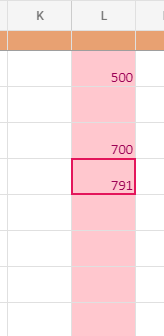
Above range has a rule of >700, but as you can see, all the cells are marked.
Also when the sheet is protected, using keyboard buttons doesn't allow to freely move to all the unlocked cells. When I reach L5 and go downwards, it automatically jumps to M5 (and that happens in every column), even though range D2:AA50 is unlocked and I can select the cells with my mouse, and then successfully edit them. Coincidentally, only first five rows have filled locked cells (through json).
 Bold BI
 Bold Reports
 BoldDesk