Welcome to the ASP.NET Core feedback portal. We’re happy you’re here! If you have feedback on how to improve the ASP.NET Core, we’d love to hear it!
Thanks for joining our community and helping improve Syncfusion products!
NOTE: Couldn't find an option in the drop down for Word processing.
How to reproduce:
Create a Word document with MS Word that has text highlighted in the first green (green 1 below):
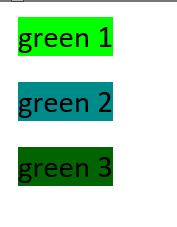
Create a DLS.WordDocument from it:
Syncfusion.DocIO.DLS.WordDocument doc = new Syncfusion.DocIO.DLS.WordDocument(MemoryStream, FormatType.Docx);
doc.Save(MemoryStream, FormatType.Html);
View the html in a browser. green 2 and green 3 come through correctly. green 1 does not.
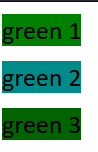
Open the original Word document and Save it as html. Examine the html and you'll see 'green 1' is lime (#00FF00):


 Bold BI
 Bold Reports
 BoldDesk