Welcome to the Angular feedback portal. We’re happy you’re here! If you have feedback on how to improve the Angular, we’d love to hear it!

  • Check out the features or bugs others have reported and vote on your favorites. Feedback will be prioritized based on popularity.
  • If you have feedback that’s not listed yet, submit your own.

Thanks for joining our community and helping improve Syncfusion products!

3
Votes

We are mainly interested in the view shown in https://ej2.syncfusion.com/angular/demos/#/material/schedule/group-custom-work-days
meaning:

  • Showing the resources side-by-side (Will Smith, Alice and Robson in the example)
  • Showing a range of dates for each resource’s calendar
    The date range limits would be the same for each resource of course, but we would for example want to NOT show Tue 6 for Alice (like in the example) but we WOULD want to show Tue 13, again for Alice,
    so therefore we cannot use “workDays” because these apply to EVERY week.
    The idea would be to show date ranges that span e.g. 10 days (Mon 5 until Wed 14), so in that range exactly 1 Tuesday should be shown for Alice (see also my mail from 7th Feb below).

 - What is your input to showcase the particular dates in the Scheduler? Is it Date collection for implicit/explicit?

Yes, our input would indeed be a list of explicit dates per resource.

Like I said, it’s very similar to the group-custom-work-days example, but there are 2 differences:

  • Instead of specifying weekdays per resource (like workDays: [1, 3, 5] in the example), we would have to specify explicit dates (Mon 2021-04-05, Wed 2021-04-07, Fri 2021-04-09)
    so it can be different from week to week (for date ranges > 1 week).
  • Instead of specifying the list of dates to show, we would actually prefer to specify the dates to hide since that list will be shorter,
    but that’s not a dealbreaker of course, as we could also invert the list ourselves.

 - Is there any screenshot/video demo that illustrates the requirement?
Actually, the best illustration I can give you is your own example.

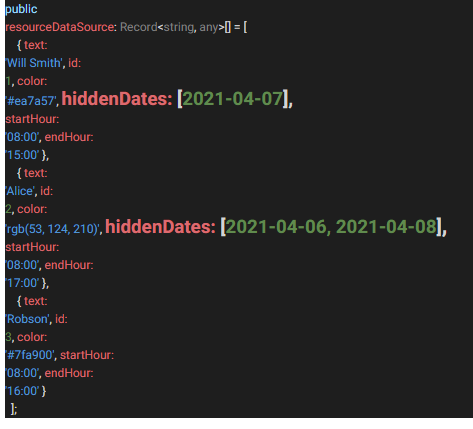
We just want to be able to provide specific dates as our input instead of weekday numbers, using for example a “hiddenDates” property like this:

Empty