Welcome to the Blazor feedback portal. We’re happy you’re here! If you have feedback on how to improve the Blazor, we’d love to hear it!
Thanks for joining our community and helping improve Syncfusion products!
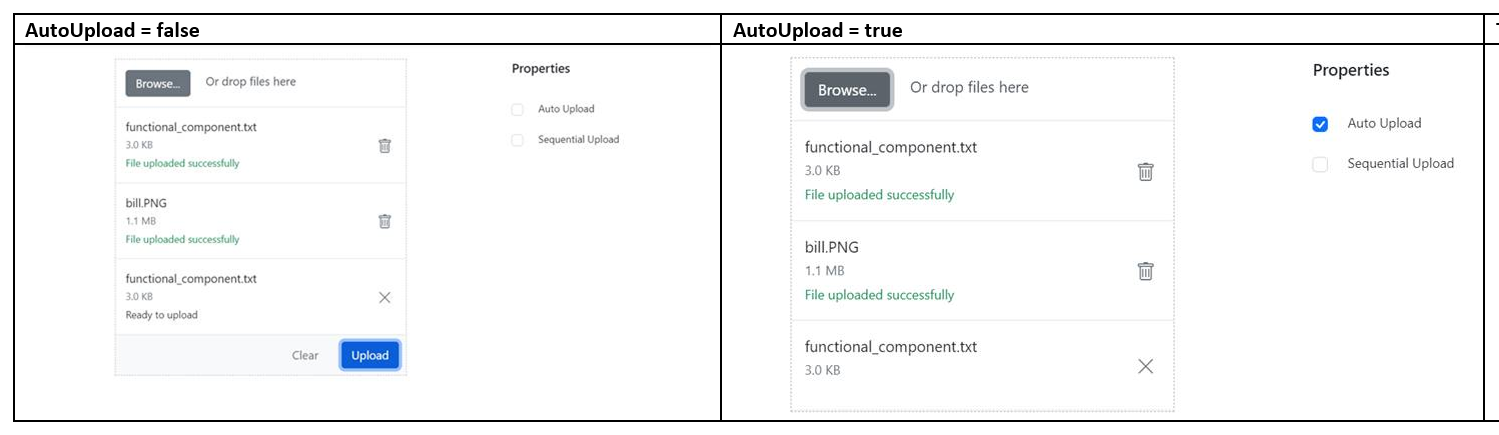
Issue reproducing sample: https://blazor.syncfusion.com/demos/file-upload/default-functionalities?_ga=2.258254794.1984752387.1635132747-712681924.1633616183
Replication procedure:
1. Open the attached URL
2. Click the “auto upload” option.
3. Choose one file in the Uploader.
4. Then choose another file in the Uploader component
5. Now, choose again already uploaded first file in the Uploader component.
6. We can see that we could not upload it again.
7. Do it again for auto upload false case.
 Bold BI
 Bold Reports
 BoldDesk