Welcome to the Blazor feedback portal. We’re happy you’re here! If you have feedback on how to improve the Blazor, we’d love to hear it!
Thanks for joining our community and helping improve Syncfusion products!
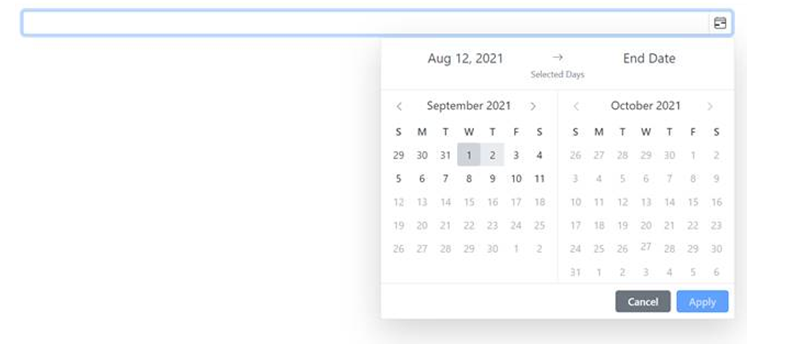
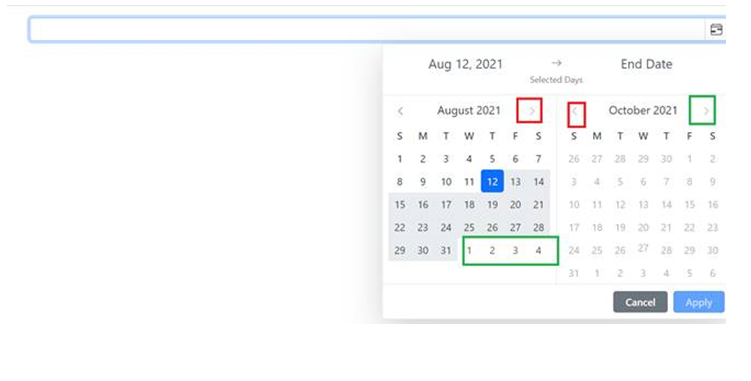
If we select the start date by navigating to the previous month, the right arrow icon is disabled.
Issue reproducing sample: https://www.syncfusion.com/downloads/support/directtrac/general/ze/Max_days_issue-618553837
Replication procedure:
1. Run the attached sample
2. Navigate to previous month using left arrow icon in the left calendar.
3. Now choose the value as “12” in the left calendar as start date.
4. We could not select end date from next calendar popup by using right arrow icon since its disabled.
5. Now, click the other month then we can choose the desired end date.
 Bold BI
 Bold Reports
 BoldDesk