Welcome to the Angular feedback portal. We’re happy you’re here! If you have feedback on how to improve the Angular, we’d love to hear it!
Thanks for joining our community and helping improve Syncfusion products!
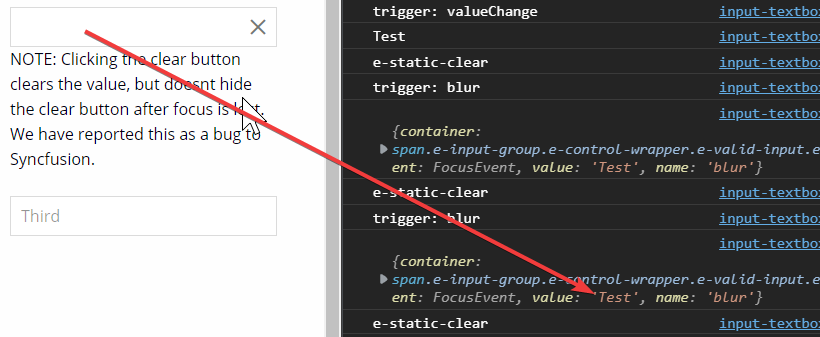
We have discovered a bug with the showClearButton feature when we tried to dynamically toggle the static approach (setting cssClass to 'e-static-clear). We need this so that we can have a static clear button, but one thats only visible when the input actually contains a value (hidden when there is no value). So the bug is that when the clear button is clicked and then focus is removed from the textbox the value of the input is not actually updated. Details below:
Using the following code:
HTML:
<ejs-textbox showClearButton="true" (blur)="lmao($event, 'blur')" (valueChange)="lmao($event, 'valueChange')" [cssClass]="cssClass" value="Third"></ejs-textbox>
TS:
lmao($event, trigger){
console.log( 'trigger: '+ trigger);
console.log( $event);
if($event.value === '' || $event.value === null){
this.cssClass = '';
}else{
this.cssClass = 'e-static-clear';
}
console.log(this.cssClass);
}

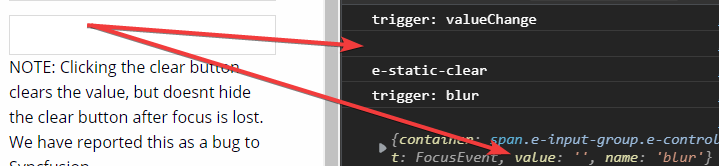
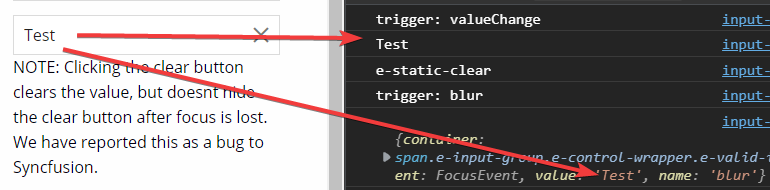
3. Focusing the input, the entering the value of 'Test', then clicking the clear button and then removing focus. This is the bugged behavior and does not work as expected - the clear button does not disappear (but it should)
With the value entered
<ejs-textbox #clearInput showClearButton="true" cssClass="{{clearInput.value ? 'e-static-clear' : ''}}"></ejs-textbox>
 Bold BI
 Bold Reports
 BoldDesk