When revisiting the filter settings for a row or column in the pivot field list when using the "Label" or "Value" tabs, the filter setting is remembered correctly, but the control always shows the Member tab.
This is reproducible in your current demos for the Pivot Table:
https://ej2.syncfusion.com/angular/demos/#/material/pivot-table/field-list
To reproduce:
- Click the filter icon on one of the row or column fields (i.e. Country, Products, Year, or Order Source).
- Click on the Label tab.
- Select an operator and value, and click OK.
- Verify the pivot grid filters based on settings. Filter icon for that column indicates there is an active filter.
- Click on the filter icon again.
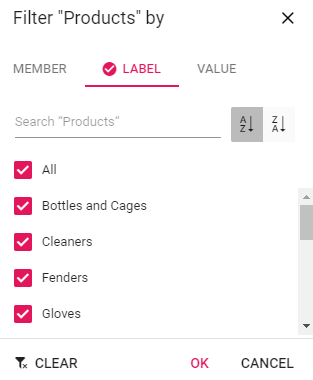
- The filter screen appears. The Label tab is checked but the controls displayed beneath it are those for the "Member" tab:
Clicking the Member tab produces a weird behavior where the Label tab controls are seen briefly and then are slid out of the way to show the Member tab controls again. Clicking on the Label tab now correctly shows the controls for the label tab including the saved filter.
This behavior also happens if you select the Value tab in step 2.
Is there a workaround to get the filter control to show the correct tab?
Thanks,
Michael
 Bold BI
 Bold Reports
 BoldDesk