Welcome to the Blazor feedback portal. We’re happy you’re here! If you have feedback on how to improve the Blazor, we’d love to hear it!
Thanks for joining our community and helping improve Syncfusion products!
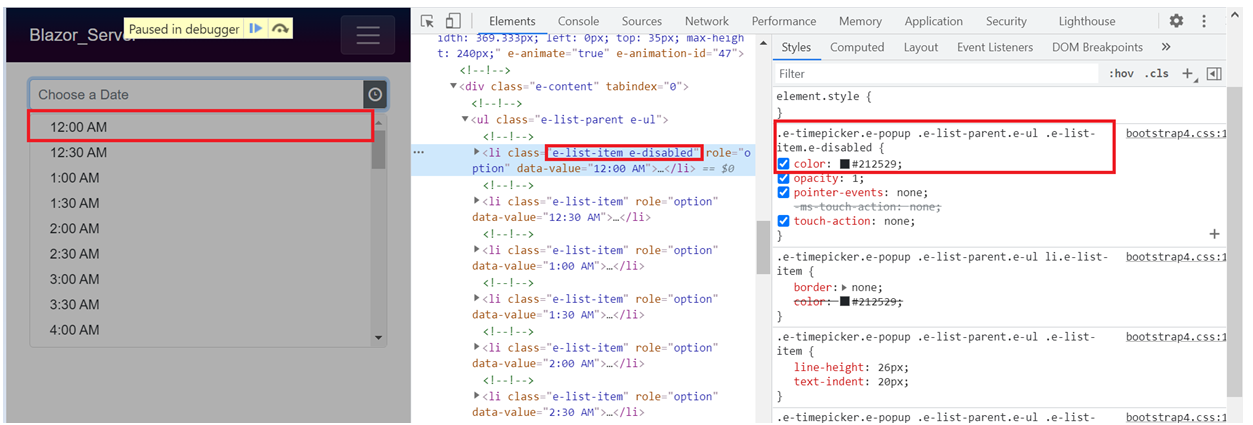
Disabled item text color did not change in the popup correctly.
<SfTimePicker TValue="DateTime?" CssClass="e-custom" Placeholder='Choose a Date'> <TimePickerEvents TValue="DateTime?" OnItemRender="itemRenderEvent"></TimePickerEvents> </SfTimePicker> @code{ public void itemRenderEvent(ItemEventArgs<DateTime?> args) { if(args.Text == "12:00 AM") { args.IsDisabled = true; } }
} |
We can resolve the issue by overriding the CSS as mentioned below.
<style> .e-custom.e-timepicker.e-popup .e-list-parent.e-ul .e-list-item.e-disabled { color: rgba(0,0,0,0.38); } </style> |
 Bold BI
 Bold Reports
 BoldDesk