Welcome to the JavaScript feedback portal. We’re happy you’re here! If you have feedback on how to improve the JavaScript, we’d love to hear it!

  • Check out the features or bugs others have reported and vote on your favorites. Feedback will be prioritized based on popularity.
  • If you have feedback that’s not listed yet, submit your own.

Thanks for joining our community and helping improve Syncfusion products!

1
Vote

HTML text measuring improvement to match MS Word pagination. 

There is technical limitation/behavior difference in the text size measured using HTML elements, compared to Microsoft Word display.

Detailed explanation about the technical limitation/behavior:

There is slight difference in the text size while rendering the document elements like paragraphs and tables based on HTML text measuring. Even though we have calculated the size of the text with the correct font and font size values, the difference lies; it may be as low as 0.00XX to 0. XXXX values compared to that in Microsoft Word.
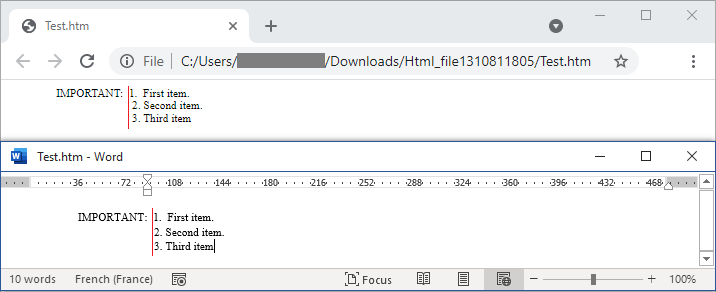

Please see the highlighted number start position difference in browser and Microsoft Word display. Both the application showing the same HTML file
We can visualize the alignment difference, when saving these three paragraphs with same formatting as HTML in Microsoft Word and opening the HTML in browser. 

Empty


Microsoft Word application's way of text size calculation has some special behavior, and it differs from simple HTML displayed by browsers. Document Editor follows html browser-based displaying and this slight difference in text size (width and height) results in pagination difference in some documents.

Hence addressing this problem requires more research and ensuring the most common fonts. 
We appreciate your patience till this feature is addressed.