Welcome to the Blazor feedback portal. We’re happy you’re here! If you have feedback on how to improve the Blazor, we’d love to hear it!
Thanks for joining our community and helping improve Syncfusion products!
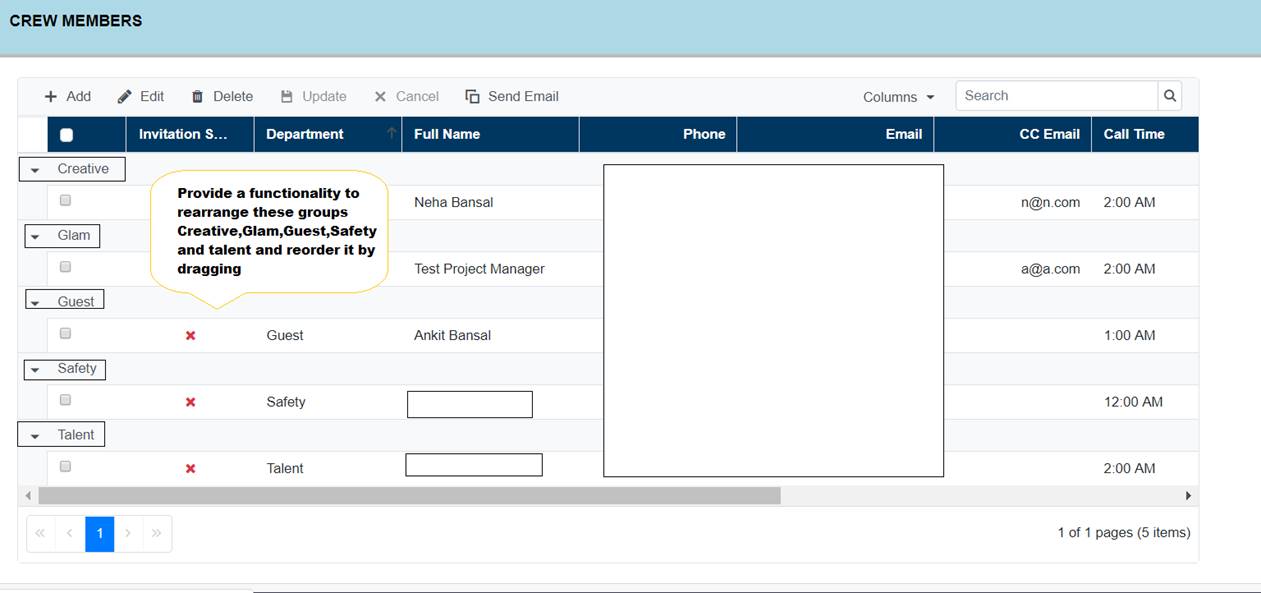
We have implemented Syncfusion SF Grid for Blazor and are using grouping functionality based on one column. Is it possible to move this grouping and rearrange by putting/dragging it up and down after the grid is rendered? (Eg. Dragging first group to a location below the third group)
Below is the screenshot of the Grid : (Grouped column - Department)
Code Snippet :
<SfGrid @ref="crewSfGrid" GridLines="GridLine.Horizontal" DataSource="@crewSaveRequest" ShowColumnChooser="!isCrewMember" EnableHover="false" AllowGrouping="true" AllowReordering="true" Toolbar="@(isCrewMember ? CrewTemplate : NonCrewTemplate)" AllowSorting="true" AllowPaging="true" AllowResizing="true" Width="1200">
<GridPageSettings PageSize="40"></GridPageSettings>
<GridSelectionSettings Type="SelectionType.Single" CheckboxOnly="false" CheckboxMode="CheckboxSelectionType.ResetOnRowClick" EnableSimpleMultiRowSelection="false"></GridSelectionSettings>
<GridTemplates>
<EmptyRecordTemplate>
<span>There are no crew member for this Project Day</span>
</EmptyRecordTemplate>
</GridTemplates>
<GridEvents OnActionComplete="OnActionComplete" OnActionBegin="BeginPerformCrewGridActionsAsync" OnToolbarClick="ToolbarClickHandler" TValue="CrewRecordSaveRequest" Created="@(() => CrewGridCreated?.Invoke())" RowSelected="RowSelectHandler" RowDeselected="RowDeselectHandler"></GridEvents>
<GridGroupSettings Columns=@GroupedColumns ShowDropArea="false" ShowGroupedColumn="true" AllowReordering="true">
<CaptionTemplate>
@{
var grp = (context as CaptionTemplateContext);
<div>@Enum.ToObject(typeof(PROJECT_ROLE), Convert.ToInt32(grp.Key)).ToString().Replace("_", " ")</div>
}
</CaptionTemplate>
</GridGroupSettings>
@if (isCrewMember == false)
{
<GridEditSettings AllowAdding="true" AllowDeleting="true" AllowEditing="true"></GridEditSettings>
}
<GridColumns>
</GridColumn>
<GridColumn IsIdentity="true" Field=@nameof(CrewRecordSaveRequest.Id) IsPrimaryKey="true" HeaderText="ID" TextAlign="TextAlign.Right" AllowEditing="false" Width="120" Visible="false" ShowInColumnChooser="false"></GridColumn>
<GridColumn Field=@nameof(CrewRecordSaveRequest.ProjectRole) HeaderText="Department" Width="150" AllowEditing="true" AllowAdding="true" EditType="EditType.DropDownEdit">
<Template>
@{
var grp = (context as CrewRecordSaveRequest);
<div>@Enum.ToObject(typeof(PROJECT_ROLE), Convert.ToInt32(grp.ProjectRole)).ToString().Replace("_", " ")</div>
}
</Template>
<EditTemplate>
<SfDropDownList ID="ProjectRole" Placeholder="Select Project Role" FloatLabelType="Syncfusion.Blazor.Inputs.FloatLabelType.Always" DataSource="@projectRoles" @bind-Value="@((context as CrewRecordSaveRequest).ProjectRole)" TValue="int" TItem="DropDown">
<DropDownListFieldSettings Text="Text" Value="Index"></DropDownListFieldSettings>
</SfDropDownList>
</EditTemplate>
</GridColumn>
<GridColumn Field=@nameof(CrewRecordSaveRequest.FullName) HeaderText="Full Name" TextAlign="TextAlign.Left" Width="180" AllowEditing="false" AllowAdding="true">
<EditTemplate>
<SfAutoComplete ID="FullName" TItem="UserInfoResponse" Placeholder="Type Crew Name" TValue="string" DataSource="@FilteredUsers" @bind-Value="@((context as CrewRecordSaveRequest).FullName)" @ref="fullNameAutoComplete">
<AutoCompleteFieldSettings Value="FullName" Text="FullName"></AutoCompleteFieldSettings>
<AutoCompleteEvents OnValueSelect="CrewNameChange" CustomValueSpecifier="CustomCrewNameChange" TItem="UserInfoResponse" TValue="string"></AutoCompleteEvents>
</SfAutoComplete>
</EditTemplate>
</GridColumn>
<GridColumn AllowAdding="true" Field=@nameof(CrewRecordSaveRequest.Phone) HeaderText="Phone" AllowEditing="false" TextAlign="TextAlign.Right" Width="160" Visible="!isCrewMember">
<EditTemplate>
@{
<SfTextBox @ref="PhoneTextBox" ID="Phone" @bind-Value="@PhoneNumber" ValueChange="((ChangedEventArgs args)=> (context as CrewRecordSaveRequest).Phone=args.Value)"></SfTextBox>
}
</EditTemplate>
</GridColumn>
<GridColumn AllowAdding="true" Field=@nameof(CrewRecordSaveRequest.Email) HeaderText="Email" EditType="EditType.DefaultEdit" AllowEditing="false" TextAlign="TextAlign.Right" Visible="!isCrewMember" Width="200">
<EditTemplate>
@{
<SfTextBox @ref="EmailTextBox" ID="Email" @bind-Value="@EmailAddress" ValueChange="((ChangedEventArgs args)=> (context as CrewRecordSaveRequest).Email=args.Value)"></SfTextBox>
}
</EditTemplate>
</GridColumn>
<GridColumn AllowAdding="true" Field=@nameof(CrewRecordSaveRequest.OtherEmails) HeaderText="CC Email" AllowEditing="true" TextAlign="TextAlign.Right" EditType="EditType.DefaultEdit" Visible="!isCrewMember" Width="160">
</GridColumn>
<GridColumn AllowAdding="true" Field=@nameof(CrewRecordSaveRequest.CallTime) HeaderText="Call Time" EditType="EditType.DateTimePickerEdit" EditorSettings="@(new DateEditCellParams(){Params=new DatePickerModel(){AllowEdit=true,Format="t",CssClass="CustomDateCSS"}})" Format="t" Type="ColumnType.DateTime" AllowEditing="true" TextAlign="TextAlign.Left" Width="150">
</GridColumn>
<GridColumn AllowAdding="true" Field=@nameof(CrewRecordSaveRequest.Notes) HeaderText="Crew Notes" EditType="EditType.DefaultEdit" EditorSettings="@NotesCommentEditor" AllowEditing="true" TextAlign="TextAlign.Justify" MaxWidth="250">
</GridColumn> </GridColumns>
</SfGrid>
 Bold BI
 Bold Reports
 BoldDesk