Welcome to the UWP feedback portal. We’re happy you’re here! If you have feedback on how to improve the UWP, we’d love to hear it!
Thanks for joining our community and helping improve Syncfusion products!
With a dataset that has a DateTimeOffset column I want to bind this to a GridDateTimeColumn in an SfDataGrid showing the date value in the local time zone with a FormatString applied to the value.
Currently through trial and error I can demonstrate that GridDateTimeColumn.FormatString only applies when neither of the ValueBinding or DisplayBinding properties are set.
This is problematic because the GridDateTimeColumn will only show the UTC value of the DateTimeOffset even when a local timezone is defined, the accepted workaround to this is to use ValueBinding to return the value as a DateTime object explicitly set to the value that you want to render. But by doing this the FormatString is ignored. I only want to show the Date component in this interface but the time is significant so we don't want to strip the time from the value in the dataset.
In this image you can see that when the FormatString does work, it shows the incorrect date, because it is formatting the UTC version of the value, this is not acceptable:

The last column, that is using the DisplayBinding solution is still not acceptable because the DateFilter options are no longer available to the user:
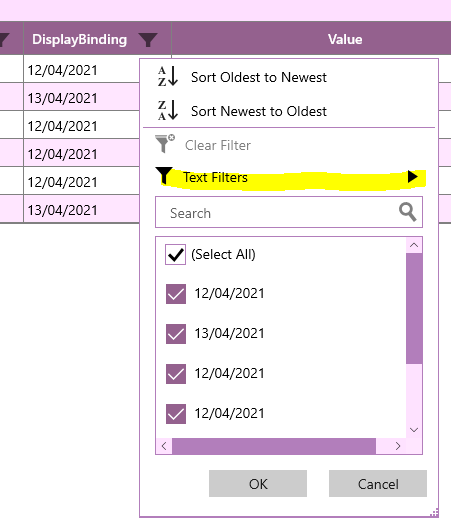
This is the XAML for the columns being tested:
    <sfGrid:GridTextColumn
    ColumnSizer="Star"
    HeaderText="Raw"
    MappingName="Timestamp" />
    <sfGrid:GridDateTimeColumn
    Width="200"
    HeaderText="Raw DateTimeOffset"
    MappingName="Timestamp"/>
    <sfGrid:GridDateTimeColumn
    Width="200"
    HeaderText="Raw DTO Formatted"
    MappingName="Timestamp"
    FormatString="dd/MM/yyyy"/>
    <sfGrid:GridDateTimeColumn
    Width="200"
    HeaderText="Local Date"
    MappingName="Timestamp"
    ValueBinding="{Binding Timestamp, Converter={StaticResource DateTimeValue}}"/>
    <sfGrid:GridDateTimeColumn
    Width="200"
    HeaderText="Local Date Formatted"
    MappingName="Timestamp"
    ValueBinding="{Binding Timestamp, Converter={StaticResource DateTimeValue}}"
    FormatString="dd/MM/yyyy"/>
    <sfGrid:GridDateTimeColumn
    Width="200"
    HeaderText="DisplayBinding"
    MappingName="Timestamp"
    ValueBinding="{Binding Timestamp, Converter={StaticResource DateTimeValue}}"
    DisplayBinding="{Binding Timestamp, Converter={StaticResource Date}}"/>
DateTimeValue is a simple converter that returns the DateTimeOffset value in the recorded timezone:
if (value is DateTimeOffset dto) return sto.DateTime;
return null;
 Bold BI
 Bold Reports
 BoldDesk