Welcome to the Blazor feedback portal. We’re happy you’re here! If you have feedback on how to improve the Blazor, we’d love to hear it!

  • Check out the features or bugs others have reported and vote on your favorites. Feedback will be prioritized based on popularity.
  • If you have feedback that’s not listed yet, submit your own.

Thanks for joining our community and helping improve Syncfusion products!

2
Votes

Conditions:

  • DataGrid with eight (8) columns (six read only, two editable)
  • DataGrid in batch edit mode
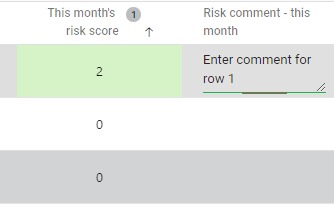
  • Multiline text edit in one column
  • Enter text in multiline edit box - as shown in image below
    Web capture_1.jpeg
  • Press [enter]

Displayed behavior:

  • Cursor moves to the text box on next row of DataGrid
  • Text entered in row 1 is NOT visible as per below:
    Web capture_2.png
  • Mouse Click anywhere else on the DataGrid and the text entered in row 1 text box is now visible in row 2 - as per below:
    Web capture_3.png 

Cut down Blazor page, code behind file, data view model included in zip file - by no means even a partial solution, but will show the configuration settings of the DataGrid and the methods etc I have acting on it.

Reproduced in production environment with Chrome browser as well as my dev machine using Edge.