Welcome to the Angular feedback portal. We’re happy you’re here! If you have feedback on how to improve the Angular, we’d love to hear it!
Thanks for joining our community and helping improve Syncfusion products!
Hi,
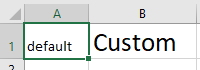
<html xmlns:o="urn:schemas-microsoft-com:office:office"
xmlns:x="urn:schemas-microsoft-com:office:excel"
xmlns="http://www.w3.org/TR/REC-html40">

<head>
<meta http-equiv=Content-Type content="text/html; charset=utf-8">
<meta name=ProgId content=Excel.Sheet>
<meta name=Generator content="Microsoft Excel 15">
<link id=Main-File rel=Main-File
href="file:///C:/Users/CP146ZD/AppData/Local/Temp/msohtmlclip1/01/clip.htm">
<link rel=File-List
href="file:///C:/Users/CP146ZD/AppData/Local/Temp/msohtmlclip1/01/clip_filelist.xml">
<style>
<!--table
{mso-displayed-decimal-separator:"\,";
mso-displayed-thousand-separator:" ";}
@page
{margin:.75in .7in .75in .7in;
mso-header-margin:.3in;
mso-footer-margin:.3in;}
tr
{mso-height-source:auto;}
col
{mso-width-source:auto;}
br
{mso-data-placement:same-cell;}
td
{padding-top:1px;
padding-right:1px;
padding-left:1px;
mso-ignore:padding;
color:black;
font-size:11.0pt;
font-weight:400;
font-style:normal;
text-decoration:none;
font-family:Calibri, sans-serif;
mso-font-charset:238;
mso-number-format:General;
text-align:general;
vertical-align:bottom;
border:none;
mso-background-source:auto;
mso-pattern:auto;
mso-protection:locked visible;
white-space:nowrap;
mso-rotate:0;}
.xl65
{font-size:20.0pt;}
-->
</style>
</head>

<body link="#0563C1" vlink="#954F72">

<table border=0 cellpadding=0 cellspacing=0 width=172 style='border-collapse:
collapse;width:129pt'>
<col width=64 style='width:48pt'>
<col width=108 style='mso-width-source:userset;mso-width-alt:3949;width:81pt'>
<tr height=35 style='height:26.25pt'>
<!--StartFragment-->
<td height=35 width=64 style='height:26.25pt;width:48pt'>default</td>
<td class=xl65 width=108 style='width:81pt'>Custom</td>
<!--EndFragment-->
</tr>
</table>

</body>

</html>
As you can see, first td, should have style as in td css selector:
td
{padding-top:1px;
padding-right:1px;
padding-left:1px;
mso-ignore:padding;
color:black;
font-size:11.0pt;
But it is getting ignored, second td has custom class(xl65)
.xl65
{font-size:20.0pt;}
 Bold BI
 Bold Reports
 BoldDesk