Welcome to the Blazor feedback portal. We’re happy you’re here! If you have feedback on how to improve the Blazor, we’d love to hear it!
Thanks for joining our community and helping improve Syncfusion products!
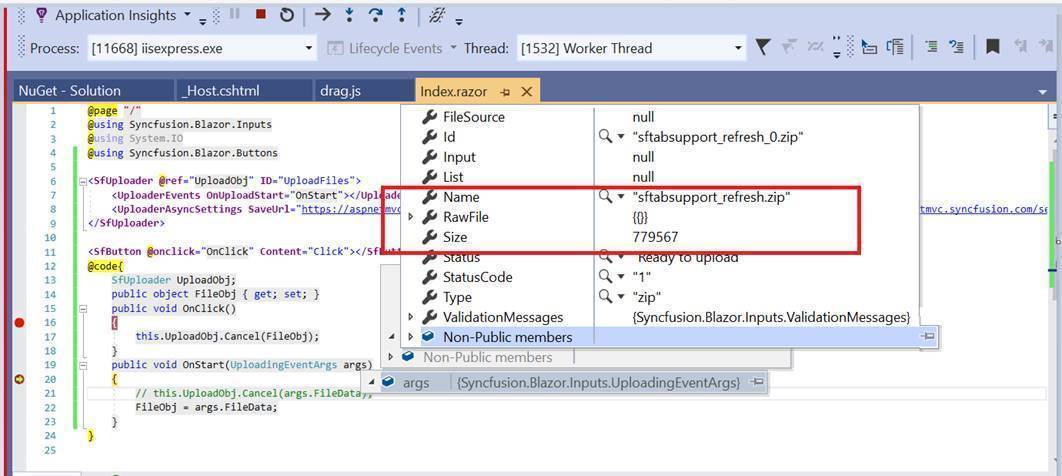
In the TS platform, fileData have the rawfile details of the uploaded file. So, the cancel method is triggered correctly. In the Blazor platform, rawfile is empty on the Uploading event. So, the cancel method is not working fine in Blazor platform.
Working fine sample in TS platform: https://stackblitz.com/edit/n6azlc?file=index.ts
Not working sample in Blazor platform: https://www.syncfusion.com/downloads/support/directtrac/general/ze/Uploader_cancel2031371345
|
@page "/" @using Syncfusion.Blazor.Inputs @using System.IO @using Syncfusion.Blazor.Buttons <SfUploader @ref="UploadObj" ID="UploadFiles"> <UploaderEvents OnUploadStart="OnStart"></UploaderEvents> <UploaderAsyncSettings SaveUrl="https://aspnetmvc.syncfusion.com/services/api/uploadbox/Save" ChunkSize="50000" RemoveUrl="https://aspnetmvc.syncfusion.com/services/api/uploadbox/Remove"></UploaderAsyncSettings> </SfUploader> <SfButton @onclick="OnClick" Content="Click"></SfButton> @code{ SfUploader UploadObj; public object FileObj { get; set; } public void OnClick() { this.UploadObj.Cancel(FileObj); } public void OnStart(UploadingEventArgs args) { // this.UploadObj.Cancel(args.FileData); FileObj = args.FileData; } } |
 Bold BI
 Bold Reports
 BoldDesk