Welcome to the Blazor feedback portal. We’re happy you’re here! If you have feedback on how to improve the Blazor, we’d love to hear it!

  • Check out the features or bugs others have reported and vote on your favorites. Feedback will be prioritized based on popularity.
  • If you have feedback that’s not listed yet, submit your own.

Thanks for joining our community and helping improve Syncfusion products!

1
Vote
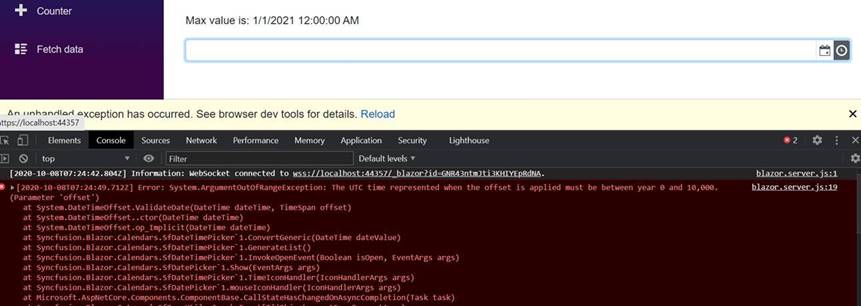
1. If the value property is default(DateTime) , clicking on Timepicker throws exception
2. If the value is property is normal DateTime value, timepicker shows only one li element

Sample Link                     : https://www.syncfusion.com/downloads/support/directtrac/general/ze/Datetimepicker2136768385


Issue 1: 

Code Snippet     :


<SfDateTimePicker
TValue="DateTime"
@bind-Value="@theScheduledTask.DPNextRunDate"
Min="@MinDate"
Max="@MaxDate"
Format="ddd dd MMM yyyy hh:mm tt"></SfDateTimePicker>


@code
{


    public
ScheduledTask
theScheduledTask = new
ScheduledTask();


    public
DateTime
MinDate = new
DateTime(2020,
1,
1);

    public
DateTime
MaxDate = new
DateTime(2021,
1,
1);


    public
class
ScheduledTask

    {

        public
DateTime
DPNextRunDate
{
get;
set;
} =default(DateTime);

    }

}


Replication Procedure    :


1. Run the attached sample.

2.Change the value to default(DateTime) (refer above code snippet).

3. Open the timepicker popup. Console error throws.

Screenshot:


Issue 2: 

Code Snippet     :


<SfDateTimePicker
TValue="DateTime"
@bind-Value="@theScheduledTask.DPNextRunDate"
Min="@MinDate"
Max="@MaxDate"
Format="ddd dd MMM yyyy hh:mm tt"></SfDateTimePicker>


@code
{


    public
ScheduledTask
theScheduledTask = new
ScheduledTask();


    public
DateTime
MinDate = new
DateTime(2020,
1,
1);

    public
DateTime
MaxDate = new
DateTime(2021,
1,
1);


    public
class
ScheduledTask

    {

        public
DateTime
DPNextRunDate
{
get;
set;
} =DateTime.Now;

    }


Replication Procedure    :


1. Run the attached sample.

2.Change the value to DateTime.Now (refer above code snippet).

3. Open the timepicker popup. Only one li element is shown.

Screenshot: