Welcome to the Vue feedback portal. We’re happy you’re here! If you have feedback on how to improve the Vue, we’d love to hear it!
Thanks for joining our community and helping improve Syncfusion products!
showHyperlink: It allows to set the visibility of hyperlink in all cells.showRowHeaderHyperlink: It allows to set the visibility of hyperlink in row headers.showColumnHeaderHyperlink: It allows to set the visibility of hyperlink in column headers.showValueCellHyperlink: It allows to set the visibility of hyperlink in value cells.showSummaryCellHyperlink: It allows to set the visibility of hyperlink in summary cells.headerText: It allows to set the visibility of hyperlink based on header text.conditionalSettings: It allows to set the visibility of hyperlink based on specific condition.I want to render a certain field as a hyperlink which is very close to the "headerText" way of rendering a hyperlink. But the issue I am facing right now is that I need to know the entire headerText not just the field name.
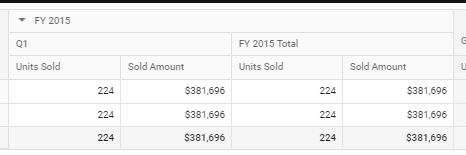
In order to render all "Units Sold" as hyperlink I will need to specify the headerText as "FY 2015.Q1.UnitsSold" and then again "
But the FY 2015 and Q1 may or may not be present because the user can change the aggregation which will also remove the hyperlinks.
Is there a way to specify hyperlinks just on the basis of fields names? Any help is greatly appreciated on this. Please let me know if you need more info on this.
Thanks & Regards,
Dhruv
 Bold BI
 Bold Reports
 BoldDesk