---
title: "From HTML to Structured Content: Why We Built the Modern Rich Text Editor"
published_at: "2026-10-22T15:08:44+00:00"
modified_at: "2026-10-22T15:08:47+00:00"
url: "https://www.syncfusion.com/blogs/post/structured-editing-modern-rich-text-editor"
excerpt: "Learn why Syncfusion built its Modern Rich Text Editor with ProseMirror and structured JSON editing. Explore how it compares with traditional HTML editing and simplifies rich-text content management."
taxonomy_category:
- "React"
- "React Development"
- "Rich Text Editor"
taxonomy_post_tag:
- "Content Management"
- "Front-End Development"
- "Headless Editor"
- "HTML Editing"
- "JSON"
- "ProseMirror"
- "React"
- "Rich Text Editor"
- "Structured Editing"
---
# From HTML to Structured Content: Why We Built the Modern Rich Text Editor
[Thangavel E](https://www.syncfusion.com/blogs/author/thangavele)
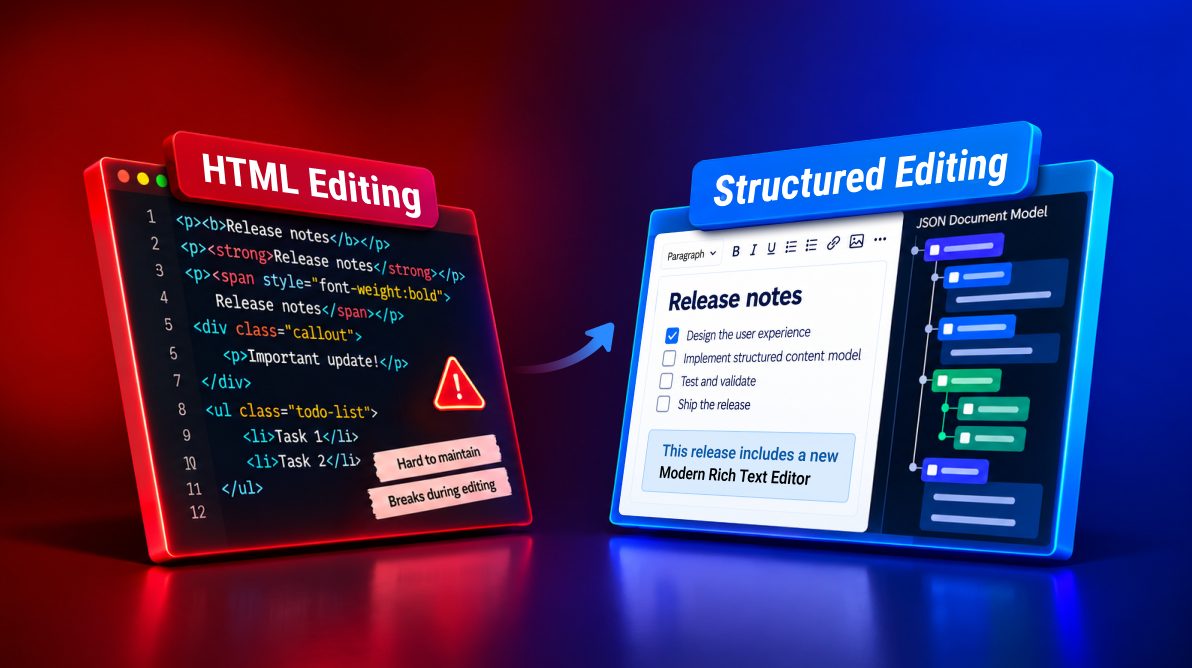
**TL;DR:** Traditional HTML editing can become challenging when applications need consistent, structured content. That’s why Syncfusion introduced its Modern Rich Text Editor in Essential Studio 2026 Volume 3 as a preview. Built on ProseMirror, it brings schema-driven editing and JSON-based document management. Explore why we built it, how HTML and JSON compare, and how to get started with React.
Most rich text editors still treat HTML as the document itself. That approach works well for basic text formatting, but modern applications increasingly need more: structured content, interactive components, reliable change tracking, workflow automation, AI-powered content experiences, and future collaboration capabilities.
As we evolved our editing platform, we repeatedly encountered limitations that stemmed from a single architectural decision: HTML was acting as both the presentation layer and the source of truth.
To address these challenges, we built the Syncfusion® [Modern Rich Text Editor](https://www.syncfusion.com/rich-text-editor-sdk/react-modern-rich-text-editor)
, introduced in the Rich Text Editor SDK Volume 3 2026 release. Instead of storing content as HTML, it uses a schema-driven document model powered by the Syncfusion Headless Editor and built on `ProseMirror`. Content is stored as structured JSON by default, while HTML remains available whenever applications need it.
In this blog, we’ll explore the challenges of HTML-based editing, how structured editing addresses them, why we created a new editor instead of extending the existing Rich Text Editor, and how to get started with the Modern Rich Text Editor in React.
## Why we built the Modern Rich Text Editor
Our existing Rich Text Editor is built around HTML editing. The HTML inside the editor is the document, and every edit modifies that markup directly.
That model works well for formatting content. However, as customers requested structured content experiences, custom interactive blocks, reliable change information, workflow integration, and pathways toward collaboration and AI-assisted authoring, we repeatedly encountered limitations that could not be solved without rethinking the underlying document model.
## The challenges of HTML-based editing
### Equivalent Content Can Have Different Markup
The following examples all render identically:
HTML
```
Release notes
Release notes
Release notes
```
Although visually identical, they produce different HTML structures. Browser behavior, pasted content, and editing actions can generate multiple variants over time, making content harder to compare, search, transform, and sanitize consistently.
### Interactive content can break during editing
Components such as:
- Callouts
- Checklists
- Collapsible sections
- Structured content blocks
often depend on HTML structure and CSS classes.
When users paste content, delete across boundaries, or perform unexpected editing actions, these structures can become invalid or partially broken, leaving content that no longer behaves correctly.
### HTML doesn’t describe user intent
Features such as:
- Autosave
- Audit history
- Comments
- Review workflows
- Track changes
need meaningful change information.
Comparing HTML only indicates that markup changed. It doesn’t tell applications that:
- A heading was added
- A paragraph became a list
- A checklist item was completed
### Extending the editor becomes increasingly complex
As more features are added, each one must account for:
- Browser editing behavior
- Copy and paste
- Serialization
- Selection handling
- Edge cases
Over time, new functionality becomes harder to maintain and evolve.
## How structured editing solves these problems
The Modern Rich Text Editor takes a different approach.
Instead of treating HTML as the document, it treats content as a structured, typed document model governed by a schema.
Every edit is validated against rules that define:
- Which content is allowed
- Where content can exist
- How content behaves
HTML becomes an output format rather than the source of truth.
### Consistent content representation
Whether users:
- Click **Bold**
- Use keyboard shortcuts
- Paste HTML from another source
the content is normalized into a single representation within the document model.
This prevents content drift and creates a canonical format for storage and processing.
### Schema-protected content blocks
Interactive content such as callouts, checklists, and collapsible sections are defined as document nodes with explicit rules.
As users edit content, the schema helps maintain valid document structure instead of allowing partially broken markup.
### Reliable information about changes
Every modification is represented as a structured operation on the document model.
Applications can understand:
- What changed
- Where it changed
- Which nodes were affected
without comparing large HTML strings.
### Extensibility built into the architecture
New functionality integrates with the document model rather than relying on browser editing behavior.
Developers can:
- Execute commands through a typed API
- Customize keyboard shortcuts
- Intercept actions
- Extend behavior through the Headless Editor architecture
## Why we built a new editor instead of modifying the existing one
The limitations discussed above trace back to a fundamental design decision: **`HTML is the document`.**
Changing that assumption would affect:
- Value handling
- Event contracts
- Editing behavior
- Storage strategies
- Existing integrations
Structured editing isn’t simply a feature.
It’s a different definition of what the document is.
Creating a new editor allowed us to deliver a modern, structured foundation without introducing breaking changes for existing Rich Text Editor customers.
## The architecture behind the Modern Rich Text Editor
The editor was designed around five core principles:
- **One canonical document model**
- Content exists in a structured document model.
- JSON is the default format because it preserves structure directly.
- **A UI-independent engine**
- The document model, schema, commands, and editing behavior live inside the Syncfusion Headless Editor.
- The user interface sits on top of that foundation.
- **A proven editing framework**
- Rather than building a new editing engine from scratch, we chose `ProseMirror` as the underlying document and editing framework.
- **Explicit change information**
- Changes are reported as structured operations instead of requiring HTML diffing.
- **Programmatic editing**
- Formatting and content manipulation are performed through typed commands rather than DOM manipulation.
## Why ProseMirror
We chose `ProseMirror` because it offers four key capabilities that support our goals:
- **Schema validation:** Content must conform to defined document structures.
- **Transactions:** Every edit becomes a discrete and describable operation.
- **Extension architecture:** New capabilities can be added without rewriting editing behavior.
- **Future collaboration readiness:** Its document model was designed to support collaborative editing scenarios and advanced content workflows.
We built the Syncfusion schema, commands, extensions, and UI experiences on top of that foundation.
## Understanding the Document Model
With `valueFormat="json"`, content is represented as an `EditorDocument`:
JSON
```
{
"type": "document",
"schemaVersion": 1,
"children": [
{
"type": "heading",
"attrs": {
"level": 2
},
"children": [
{
"type": "text",
"text": "Release checklist"
}
]
}
]
}
```
When HTML is loaded or pasted into the editor, it is parsed into this document model and normalized according to the schema.
## Choosing between JSON and HTML storage
**Choose JSON when:**
- You need to query or analyze content.
- AI applications need access to structured content.
- You need to version documents.
- You plan to add review or collaboration features in the future.
**Choose HTML when:**
- Existing systems consume HTML directly.
- Your primary requirement is to render content immediately.
**Recommended approach**
For many applications, storing content as JSON and generating HTML when needed offers a practical balance. JSON preserves the document structure, while HTML can be used for rendering and indexing.
## Structured editing: A quick example
Theory is useful, but the best way to understand a structured document model is to see it in action.
In this example, we’ll build a React application that:
- Loads content as a JSON document
- Persists content to storage
- Tracks editing activity
- Adds custom keyboard shortcuts
- Inserts structured content programmatically
- Generates HTML whenever it’s needed
This walkthrough uses [React](https://help.syncfusion.com/rich-text-editor-sdk/react/richtexteditor-ui/getting-started)
, Vite, and TypeScript. Equivalent packages are also available for [JavaScript](https://help.syncfusion.com/rich-text-editor-sdk/javascript/richtexteditor-ui/getting-started)
, [Angular](https://help.syncfusion.com/rich-text-editor-sdk/angular/richtexteditor-ui/getting-started)
, and [Vue](https://help.syncfusion.com/rich-text-editor-sdk/vue/richtexteditor-ui/getting-started)
applications.
### **Prerequisites**
Before you begin, make sure that `Node.js` and `npm` are installed on your machine. You’ll also need a Syncfusion license key or evaluation trial for development beyond the evaluation period.
### Create the project and install the packages
Create a new React application with Vite and install the Modern Rich Text Editor packages:
NPM CLI
```
npm create vite@latest my-app -- --template react-ts
cd my-app
npm install
npm install @syncfusion/[email protected] --save
npm install @syncfusion/[email protected] --save
```
### Add the theme
Import the Tailwind 3 theme into your application stylesheet:
CSS
```
@import '../node_modules/@syncfusion/ej2-tailwind3-theme/styles/richtexteditor-ui/index.css';
```
### Create an editor that loads, saves, and audits content
The following example demonstrates several capabilities of the Modern Rich Text Editor:
- Loading an `EditorDocument` from storage
- Storing content as structured JSON
- Auditing user interactions through events
- Creating custom keyboard shortcuts
- Inserting a callout programmatically using the commands API
- Generating HTML on demand from the document model
Replace `src/App.tsx` with the following code:
src/App.tsx
```
import { useRef, useState } from 'react';
import {
RichTextEditorUIComponent, Inject, SlashCommand,
ChangeEventArgs, ActionCompleteEventArgs, EditorDocument, EditorKeyBindingMap,
} from '@syncfusion/ej2-react-richtexteditor-ui';
import './App.css';
const STORAGE_KEY = 'release-notes-doc';
const defaultDocument: EditorDocument = {
type: 'document',
attrs: {},
marks: [],
schemaVersion: 1,
children: [
{ type: 'heading', attrs: { level: 2 }, children: [{ type: 'text', text: 'Release checklist' }] },
{
type: 'paragraph',
children: [
{ type: 'text', text: 'Ship the ' },
{ type: 'text', text: 'beta', marks: [{ type: 'bold' }] },
{ type: 'text', text: ' on Friday.' },
],
},
],
};
// Restore saved content, falling back to the default if it's missing or malformed.
function loadDocument(): EditorDocument {
try {
const saved = localStorage.getItem(STORAGE_KEY);
if (!saved) return defaultDocument;
const parsed = JSON.parse(saved);
return parsed?.type === 'document' && Array.isArray(parsed.children) ? parsed : defaultDocument;
} catch {
return defaultDocument;
}
}
// Custom shortcuts. Ctrl maps to Cmd on macOS automatically.
const keyBindings: EditorKeyBindingMap = {
'code-block': 'ctrl+alt+c',
checklist: 'ctrl+alt+l',
};
function App() {
const editorRef = useRef(null);
const [initialDocument] = useState(loadDocument);
const [status, setStatus] = useState('No changes yet');
const persist = (doc: EditorDocument | null) => {
if (!doc) return;
try {
localStorage.setItem(STORAGE_KEY, JSON.stringify(doc)); // Replace with your API call.
setStatus(`Saved at ${new Date().toLocaleTimeString()}`);
} catch {
setStatus('Save failed. Your changes are still in the editor.');
}
};
// Fires when content is committed: on blur, after the autosave interval, or after save().
const onChange = (args: ChangeEventArgs) => persist(args.document);
// Log user-initiated edits that changed the document, for example for an audit trail.
const onActionComplete = (args: ActionCompleteEventArgs) => {
if (args.isInteracted && args.documentChanged) {
console.info(`[audit] ${args.action} (${args.actionId})`);
}
};
const saveNow = () => persist(editorRef.current?.getDocument() ?? null);
const insertCallout = () => editorRef.current?.commands().callout().callout('info').apply();
const logHtml = () => console.log(editorRef.current?.getHtml());
return (
{status}
);
}
export default App;
```
### Run the application
Start the development server:
NPM CLI
```
npm run dev
```
Once the editor loads, try the following:
1. Type `/` and insert a heading, checklist, or another supported block. Click outside the editor to commit the change and trigger persistence.
2. Refresh the page. The editor restores the previously saved JSON document from local storage.
3. Press `Ctrl + Alt + L` to create a checklist using the custom keyboard shortcut.
4. Click `Log HTML` and inspect the browser console to see the HTML generated from the structured document model.
5. Open the console and perform formatting actions. User-initiated edits that modify the document appear as audit entries.
This example highlights one of the key differences between the Modern Rich Text Editor and traditional HTML-based editors: content is stored as a structured document and HTML is generated only when you need it. That gives applications a consistent content model for storage, processing, and future workflow integration while preserving HTML compatibility for rendering and publishing.
## Extending the editor
The Modern Rich Text Editor supports multiple customization layers.
| Extension Point | Use Case |
| --- | --- |
| keyBindings | Customize keyboard shortcuts |
| commands() | Execute actions from custom UI |
| actionBegin / actionComplete | Intercept, cancel, or audit actions |
| Toolbar and Slash Commands | Customize authoring experiences |
For deeper customization, developers can leverage the Headless Editor’s schema system, extension architecture, migration support, and custom `NodeViews`.
## Migrating existing HTML content
Migration doesn’t have to be all-or-nothing.
1. Continue loading existing HTML.
2. Evaluate real-world content inside the editor.
3. Convert content into structured JSON.
4. Store both representations.
5. Transition applications to JSON when ready.
This approach minimizes migration risk while allowing teams to adopt structured editing incrementally.
## Production considerations
- **Stored JSON compatibility:** Keep `schemaVersion` with every stored document so you can detect and migrate older content.
- **Sanitization:** Treat HTML produced from user content as untrusted wherever you render it outside the editor. Sanitize it on output, and validate link URLs and image sources in your back end.
- **Persistence:** The change event fires on commit, not on every keystroke. Pair it with an explicit save action for forms, and save before navigation in single-page apps.
- **Server-side rendering:** The editor needs a browser DOM. In SSR frameworks such as Next.js, render it only on the client.
- **Accessibility:** The product page lists [WAI-ARIA and keyboard support](https://www.syncfusion.com/rich-text-editor-sdk/react-modern-rich-text-editor) . Still, test the blocks your users actually create (tables, callouts, collapsible sections) with your screen readers.
- **Bundle size:** Features such as slash commands are separate modules that you inject only when needed. Measure your build to confirm the effect in your app.
## Areas we’re exploring
The structured document model creates a foundation for future capabilities such as:
- AI-assisted authoring
- Comments
- Review workflows
- Track changes
- Real-time collaboration
- Advanced paste cleanup
- Additional import/export formats
**Note:** These capabilities are not included in version Essential Studio 35.1.37 and should not be interpreted as release commitments.
## Evaluation checklist
Before adopting the Modern Rich Text Editor:
- Validate real content against the editor schema
- Decide on JSON, HTML, or hybrid storage
- Design save behavior around commit timing
- Sanitize generated HTML where required
- Test keyboard and accessibility workflows
## Frequently Asked Questions
What is the Modern Rich Text Editor?It’s a **WYSIWYG** editor in the Syncfusion Rich Text Editor SDK that stores content as a structured document instead of as HTML. You format text with the toolbar or slash commands as usual, but behind the scenes every paragraph, heading, list, and piece of formatting is saved as a typed node in a JSON document. It’s built on the Syncfusion Headless Editor, which uses **`ProseMirror`** as its editing engine.
What does structured editing mean in simple terms?In HTML editing, the editor saves whatever markup is on screen, so the same bold word can be stored as **``**, **``**, or a styled **``**. In structured editing, the editor keeps a clean data model of the content, such as “a level 2 heading” or “the word beta with a bold mark,” and checks every edit against a set of rules called a schema. The screen is only a view of that model, so content is stored the same way every time, no matter how it was typed or pasted.
Can I still get HTML from the editor?Yes. Call `getHtml()` at any time to get the current content as an HTML string, for example, to display it on a page, send it in an email, or index it for search. To make the value property itself an HTML string, set `valueFormat` to `html`. For plain text, call `getText()`.
Can I load the HTML content I already have?Yes. Set `valueFormat` to `html` and pass your existing HTML as value. The editor converts it into its document model, so different markup for the same formatting is cleaned up into one form. Markup the editor doesn’t support may be simplified or removed, so test with a sample of your real content first. The “Migrating existing HTML content” section walks through a step-by-step approach.
Can I customize or extend the editor?Yes, at two levels. In the Modern Rich Text Editor, you can change keyboard shortcuts (`keyBindings`), apply formatting from your own buttons (`commands()`), intercept, cancel, or log user actions (`actionBegin` and `actionComplete`), and choose which toolbar and slash command items appear. For bigger changes, such as defining your own content types with custom schemas and `NodeViews`, use the extension architecture of the Headless Editor.
## Conclusion
The [Modern Rich Text Editor](https://www.syncfusion.com/rich-text-editor-sdk/react-modern-rich-text-editor)
represents a fundamental shift from HTML-centric editing to structured document editing.
By treating content as a schema-driven document model rather than raw HTML, it provides consistent content representation, richer change information, stronger extensibility, and a foundation for modern content workflows.
If you’re evaluating editor architectures for your next application, the Modern Rich Text Editor provides a path to structured content while preserving compatibility with existing HTML workflows.
Start with the [React Getting started guide](https://help.syncfusion.com/rich-text-editor-sdk/react/richtexteditor-ui/getting-started)
, explore the [live demo](https://ej2.syncfusion.com/react/demos/#/tailwind3/rich-text-editor-ui/basic-editing)
, and tell us what you’d like to build next. You can explore the complete [What’s New](https://www.syncfusion.com/products/whatsnew)
and [release notes](https://help.syncfusion.com/common/essential-studio/release-notes/v35.1.37)
pages to discover the features most relevant to your project.
For existing Syncfusion customers, the latest version of Essential Studio is available from the [license and downloads](https://www.syncfusion.com/sales/pricing)
page. New users can explore the capabilities through the [30-day free trial](https://www.syncfusion.com/downloads)
.
If you have questions or feedback, reach out through our [support forums](https://www.syncfusion.com/forums)
, [support portal](https://support.syncfusion.com/)
, or [feedback portal](https://www.syncfusion.com/feedback)
.
## Related Blogs
[How to Add Mentions and Slash Commands in a React Rich Text Editor](https://www.syncfusion.com/blogs/post/react-rich-text-editor-mentions)
[How to Prevent XSS Attacks in React Rich Text Editor](https://www.syncfusion.com/blogs/post/react-rich-text-editor-xss-prevention)
[How to Use Merge Fields in React Rich Text Editor for Dynamic Content](https://www.syncfusion.com/blogs/post/merge-fields-in-react-rich-text-editor)
[Introducing Emoji Icons Support in the React Rich Text Editor](https://www.syncfusion.com/blogs/post/emojis-in-react-rich-text-editor)