---
title: "ASP.NET Core Performance Tuning in 2026: Optimizations That Cut Latency, Costs, and CI Time"
published_at: "2025-11-27T13:47:02+00:00"
modified_at: "2026-04-28T11:04:45+00:00"
url: "https://www.syncfusion.com/blogs/post/performance-tuning-in-aspnetcore-2026"
excerpt: "Why do ASP.NET Core apps slow down at scale? Discover 2026 performance optimizations for caching, assets, CI pipelines, and .NET 10 features that deliver faster, leaner apps."
taxonomy_category:
- ".NET 10"
- "ASP.NET Core"
- "Performance Optimization"
- "Web Development"
taxonomy_post_tag:
- "ASP.NET Core"
- "performance"
- "Tips and Tricks"
- "Web Development"
- "What's New"
---
# ASP.NET Core Performance Tuning in 2026: Optimizations That Cut Latency, Costs, and CI Time
[Arulraj Aboorvasamy](https://www.syncfusion.com/blogs/author/arulraj-a)

**TL;DR:** Supercharge ASP.NET Core 10 apps with five key optimizations: cut asset sizes by up to 92% using MapStaticAssets, accelerate caching with `HybridCache`, enforce rate limiting and timeouts for stability, slim Blazor bundles with AOT and WasmStripILAfterAOT, and track performance in real time with expanded metrics. Ready to boost speed and resilience? Explore the full guide now!
As web applications demand higher speed and scalability, [.NET 10](https://www.syncfusion.com/blogs/post/whats-new-aspdotnet-core-10-in-net-10)
introduces major performance improvements for [ASP.NET Core](https://learn.microsoft.com/en-us/aspnet/core/release-notes/aspnetcore-10.0?view=aspnetcore-9.0)
. This guide explains the latest optimizations and practical steps to help you:
- Maximize throughput
- Reduce latency
- Minimize resource usage
Whether you’re building APIs, real-time apps, or Blazor UIs, these techniques will keep your apps fast and efficient.
## Why performance tuning matters in 2026
Modern applications face increasing traffic and complex UI demands. Without performance tuning, load times and infrastructure expenses increase. .NET 10 delivers advanced solutions for assets, caching, and rendering challenges.
## Agenda
This guide presents five essential**techniques** that make ASP.NET Core apps faster, lighter, and secure.
1. [Optimize static asset delivery with MapStaticAssets and client-side fingerprinting.](#Optimize)
2. [Leverage the HybridCache for efficient caching.](#Leverage)
3. [Secure rate limiting and timeouts.](#Secure)
4. [Trim IL after AOT: Reduce bundle size in WASM.](#Trim)
5. [Monitor and profile with enhanced metrics.](#Monitor)
**Note:** If you are new to ASP.NET Core, check the blog [ASP.NET Core 3.0 Performance Optimization](https://www.syncfusion.com/blogs/post/asp-net-core-3-0-performance-optimization)
, where you can find a few tips that are still useful in the latest versions as well.
## 1. Optimize static asset delivery with MapStaticAssets and client-side fingerprinting
.NET 9 introduced **MapStaticAssets**, replacing the [UseStaticFiles](https://learn.microsoft.com/en-us/dotnet/api/microsoft.aspnetcore.builder.staticfileextensions.usestaticfiles?view=aspnetcore-9.0)
method. It improves [static asset delivery](https://learn.microsoft.com/en-us/aspnet/core/release-notes/aspnetcore-9.0?view=aspnetcore-10.0)
with build-time compression, gzip during development, **gzip + Brotli** in production. and SHA-256 ETags for better caching.
In .NET 10, this optimization is extended to client-side fingerprinting for JavaScript modules in standalone Blazor WASM apps. This new update further enhances performance by ensuring robust browser caching and efficient resource delivery.
- [Benchmarks](https://learn.microsoft.com/en-us/aspnet/core/release-notes/aspnetcore-9.0?view=aspnetcore-9.0#static-asset-delivery-optimization) : Default Razor pages template size drops from 331.1 KB to 65.5 KB (**80.20% reduction**). For Blazor apps, Fluent UI shrinks from 478 KB to 84 KB (** 82.43%**), and MudBlazor from 588.4 KB to 46.7 KB (** 92.07%**).
- **Implementation**: To achieve the above metrics, replace the `app.UseStaticFiles()`method with the `app.MapStaticAssets()` method in the ** Program.cs** file. This simplifies delivery and minimizes runtime overhead, ideal for static-heavy apps like Blazor web apps. Refer to the following code example.``` // app.UseStaticFiles(); app.MapStaticAssets(); ```
To enable pre-compression and fingerprinting for all static assets, we need to reduce runtime overhead.
If you are using **Blazor WebAssembly**, enable client-side fingerprinting. To do so, update the ** wwwroot/index.html** file to add the fingerprint placeholders.
```
```
In the project file **(.csproj**), add the following code:
```
true
```
For additional JavaScript modules, use the `` property to fingerprint specific file types (e.g., .mjs).
```
```
This lets the framework automatically integrate fingerprinted files into the import map for browser resolution.
### Preloading assets in Blazor web apps
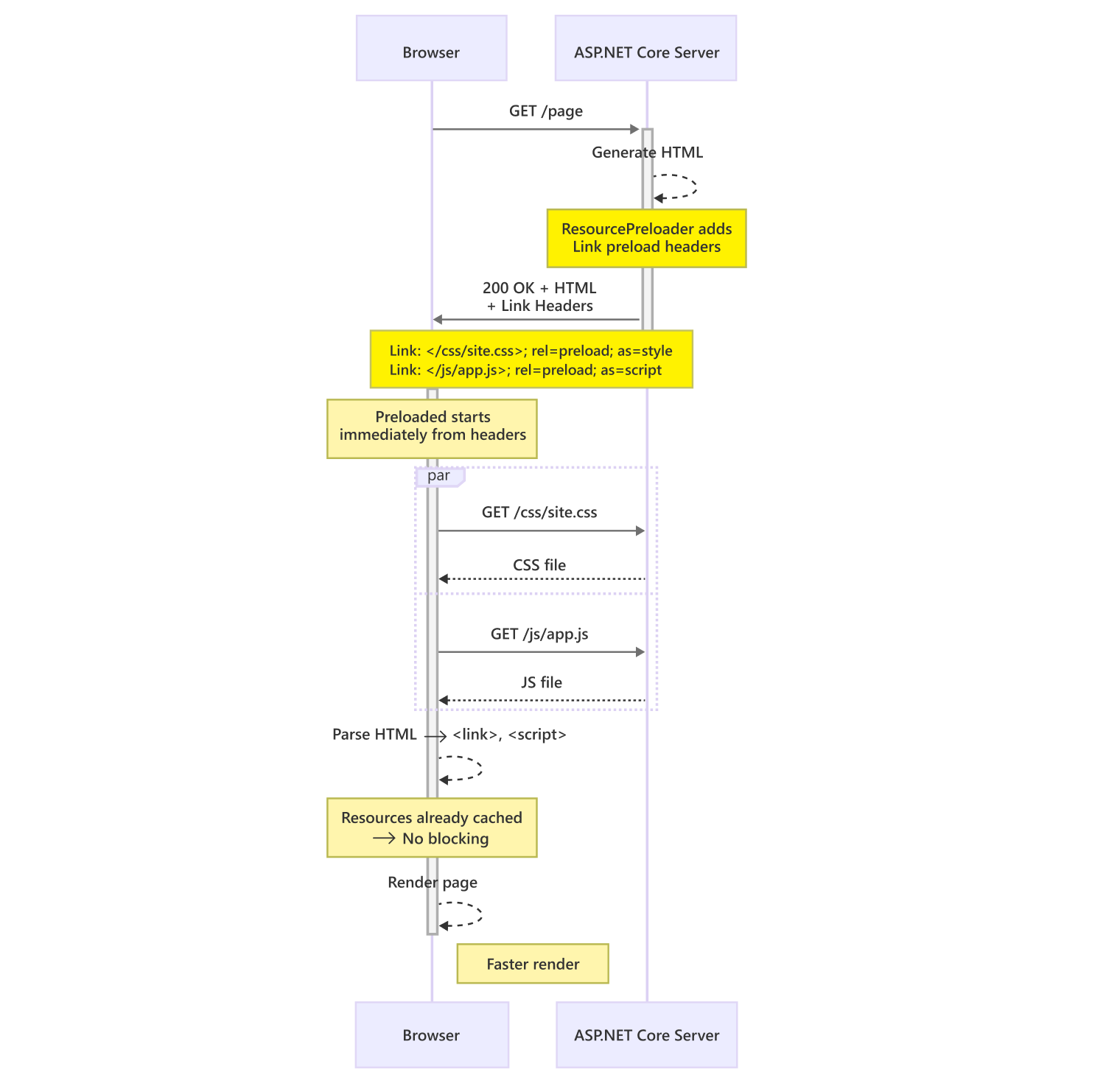
In .NET 10, Blazor web apps use the [ResourcePreloader](https://learn.microsoft.com/en-us/dotnet/api/microsoft.aspnetcore.components.resourcepreloader?view=aspnetcore-10.0)
component to preload framework static assets, replacing the **** headers.
We can add it to the App. Razor file as shown below.
```
```
This ensures assets are loaded efficiently with correct app base path resolution.
Refer to the following image. Here, the Blazor asset preload fetches critical resources during connection setup, enabling faster rendering.
## 2. Leverage the HybridCache for efficient caching
The [HybridCache library](https://learn.microsoft.com/en-us/aspnet/core/release-notes/aspnetcore-9.0?view=aspnetcore-9.0#new-hybridcache-library)
, introduced as a preview in .NET 9 and fully supported after release as **Microsoft.Extensions.Caching.Hybrid** integrates in-memory and distributed caching with stampede protection to avoid redundant fetches on cache misses. This prevents performance issues in high-concurrency APIs and microservices. It also enables the graceful handling of cancellation tokens to prevent unwanted executions.
- **Implementation**: Use the [GetOrCreateAsync](https://learn.microsoft.com/en-us/dotnet/api/microsoft.extensions.caching.hybrid.hybridcache.getorcreateasync?view=net-10.0-pp) method for seamless caching as shown below.``` var data = await cache.GetOrCreateAsync("key", async entry => await ExpensiveOperationAsync()); ```
- **Benefits:** Reduces **database/API** calls, supports custom serializers (default: ** System.Text.Json**), and optimizes immutable types with object reuse, zero garbage collection pressure via the ** ValueTask** method, and pooled buffers.
- **When to avoid**: The ** HybridCache** may not be the best fit for simple, low-traffic apps or real-time systems with strict fresh data requirements. Older projects, before .NET 8, may use the ** IMemoryCache** or ** IDistributedCache** interfaces directly.
- **Benchmarks**: Significant reduction in operation duplication under load.
### Best practices
**HybridCache** is most effective when used for frequently accessed data such as API responses, computed results, or expensive queries. This minimizes backend strain and improves overall responsiveness. The ASP.NET Core 9 and later releases include features such as monitoring cache hit rates with metrics, static asset optimization, and Blazor enhancements that complement ** HybridCache**.
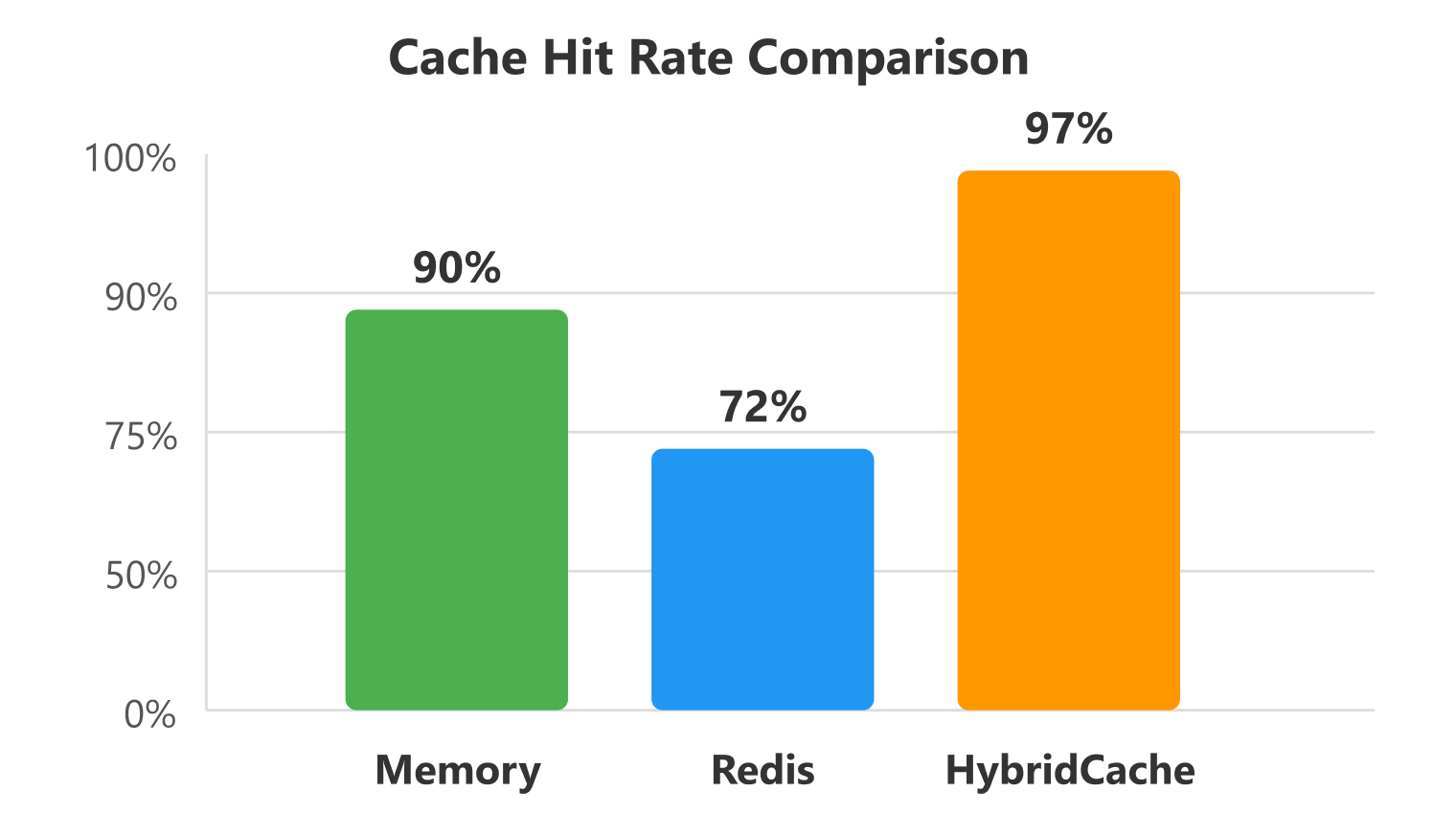
The diagram below illustrates how HybridCache achieves higher effective hit rates by falling back to Redis from the in-memory cache when needed. (**Note: Numbers shown are representative, not actual benchmarks.**)
### Comparing different types of caching solutions
| Feature/Aspect | HybridCache | IMemoryCache | IDistributedCache |
| --- | --- | --- | --- |
| Package | Microsoft.Extensions.Caching.Hybrid (.NET 8+) | Microsoft.Extensions.Caching.Memory (.NET Core 1.0+) | Microsoft.Extensions.Caching.Abstractions (.NET Core 1.0+) |
| Caching scope | In-memory by default(L1), with seamless support for distributed caches (L2)(e.g., Redis, SQL Server). | In-memory only; no built-in support for distributed caching. | Distributed caching only (e.g., Redis, SQL Server, NCache); requires external cache store. |
| API implicity | Simplified API with GetOrCreateAsync for automatic cache population and factory execution. | More manual API; requires explicit Get, Set, and CreateEntry operations. | Low-level API; requires manual GetAsync, SetAsync, and RemoveAsync operations. |
| Cache stampede protection | Built-in protection to prevent multiple threads from populating the same cache key simultaneously. | No built-in protection; requires manual synchronization (e.g., locks). | No built-in protection; requires manual synchronization or external coordination. |
| Serialization | Automatic serialization/deserialization of complex objects for both in-memory and distributed caches. | No automatic serialization; objects stored directly in memory, manual handling needed for serialization. | Requires manual serialization/deserialization (e.g., to/from byte arrays). |
| Cancellation support | Supports CancellationToken in GetOrCreateAsync for canceling expensive operations. | No direct cancellation support; must be handled manually in factory logic. | No direct cancellation support; must be handled manually in factory logic. |
| Distributed cache integration | Native integration with IDistributedCache providers, seamless fallback to in-memory if no distributed cache is configured. | No direct integration; requires separate use of IDistributedCache with manual coordination. | Core interface for distributed caching; requires specific provider implementation (e.g., Redis, SQL Server). |
| Performance | Optimized for high-concurrency with stampede protection and efficient distributed cache integration. | Lightweight for simple in-memory scenarios, but less efficient in high-concurrency without manual synchronization. | Depends on the provider (e.g., Redis is fast but adds network latency); no concurrency protections. |
| Expiration policies | Supports expiration via HybridCacheEntryOptions. | Supports flexible expiration (absolute, sliding, size limits, post-eviction callbacks). | Supports expiration via DistributedCacheEntryOptions, but implementation varies by provider. |
| Metrics integration | Benefits from ASP.NET Core 10’s metrics (e.g., Microsoft.AspNetCore.MemoryPool) for monitoring cache performance. | Limited metrics integration; requires custom instrumentation. | Limited metrics; depends on provider-specific monitoring (e.g., Redis metrics). |
| Use cases | Ideal for high-traffic monolithic apps, microservices, or Blazor apps needing robust caching with minimal code. | Best for simple, low-traffic monolithic apps with in-memory caching needs. | Suitable for distributed environments or multi-instance apps requiring shared caching. |
| Complexity | Higher-level abstraction, reducing boilerplate but requiring configuration for distributed caches. | Lower-level abstraction, offering more control but requiring more code for complex scenarios. | Lowest-level abstraction; requires manual serialization, provider setup, and error handling. |
| Scalability | Scales seamlessly from single instance to multi-instance with distributed cache support. | Limited to single-instance apps; not scalable to distributed environments without manual integration. | Designed for distributed environments, scalable across multiple instances. |
## 3. Secure rate limiting and timeouts
Securing your apps through rate limiting and timeouts is a cornerstone of performance tuning. They prevent resource exhaustion from malicious traffic or slow operations while maintaining high throughput for legitimate requests.
- **Rate limiting**: It is powered by the built-in [Microsoft.AspNetCore.RateLimiting](https://learn.microsoft.com/en-us/aspnet/core/performance/rate-limit?view=aspnetcore-10.0) middleware. It enforces policies such as fixed-window limits, e.g., 100 requests per minute or concurrency limits to throttle excessive calls, thereby directly reducing CPU and memory spikes during Distributed [Denial of Service](https://en.wikipedia.org/wiki/Denial-of-service_attack) (** DDoS**) scenarios. Hence, it improves performance and reduces service costs.
- **Request timeouts**: It is a middleware from [Microsoft.AspNetCore.Http.Timeouts](https://learn.microsoft.com/en-us/aspnet/core/performance/timeouts?view=aspnetcore-10.0) that cap endpoint execution time, such as 30 seconds globally or per-route, to avoid long-running tasks hogging threads, ensuring the Kestrel server remains responsive.
A combination of these two features optimizes overall performance by freeing up server resources for concurrent workloads, thereby enhancing overall efficiency. They also align with .NET 10’s enhanced [JIT compilation](https://en.wikipedia.org/wiki/Just-in-time_compilation)
and runtime efficiencies for faster cold starts and lower latency.
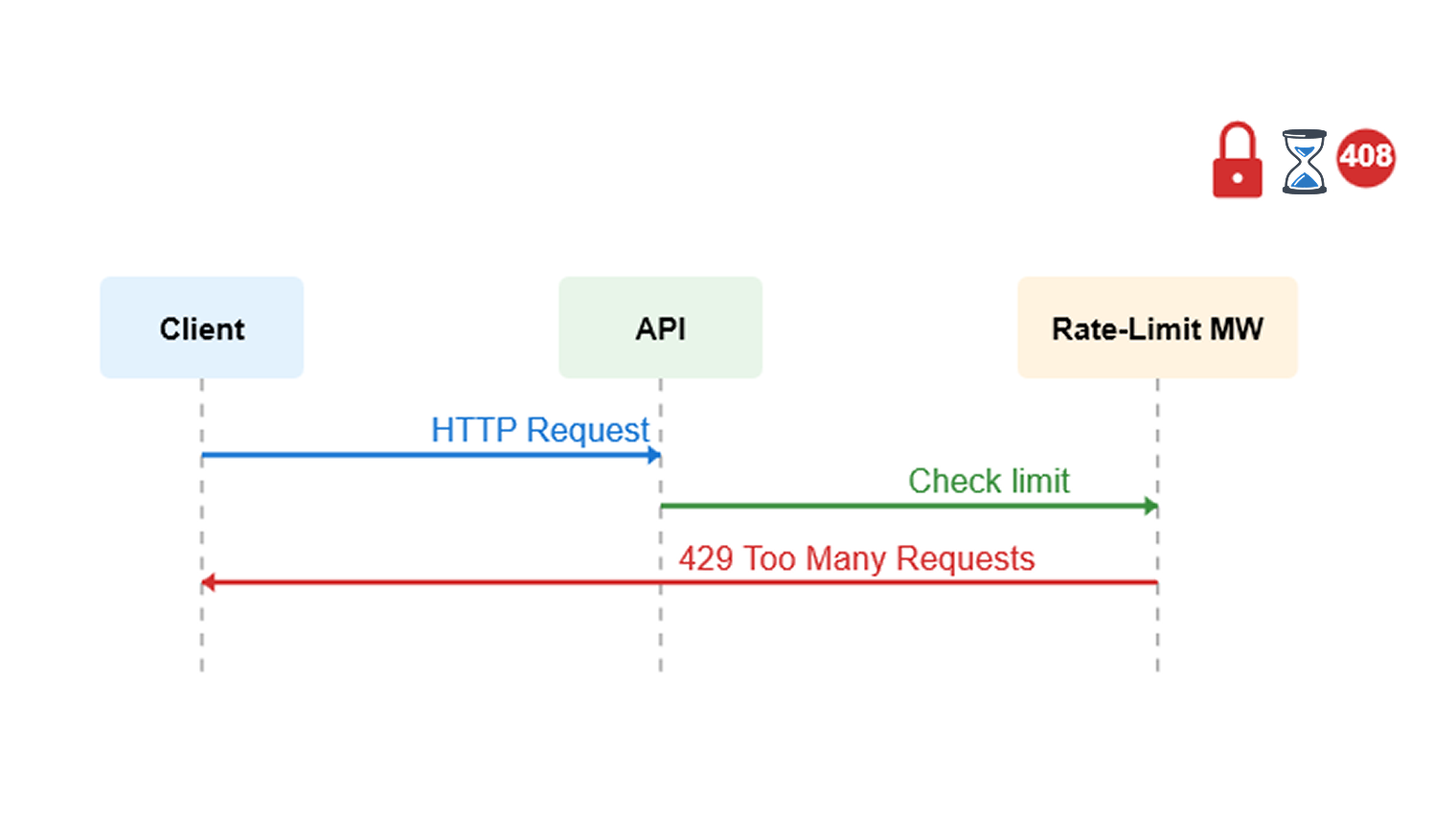
Refer to the following image, which illustrates ASP.NET Core rate-limiting and timeout protection.
Here’s an example implementation in a minimal API setup for **Program.cs** file.
```
using Microsoft.AspNetCore.RateLimiting;
using System.Threading.RateLimiting;
using Microsoft.AspNetCore.Http.Timeouts;
var builder = WebApplication.CreateBuilder(args);
// Configure rate limiting
builder.Services.AddRateLimiter(options =>
{
options.AddFixedWindowLimiter("fixed", opt =>
{
opt.PermitLimit = 100;
opt.Window = TimeSpan.FromMinutes(1);
opt.QueueProcessingOrder = QueueProcessingOrder.OldestFirst;
opt.QueueLimit = 10;
});
options.OnRejected = (context, token) =>
{
context.HttpContext.Response.StatusCode = 429;
context.HttpContext.Response.WriteAsync("Too many requests. Try again later.");
return ValueTask.CompletedTask;
};
});
// Configure timeouts
builder.Services.AddRequestTimeouts();
var app = builder.Build();
// Apply rate limiting globally
app.UseRateLimiter();
// Apply global timeout
app.UseRequestTimeouts();
// Example endpoint with specific timeout and rate limit
app.MapGet("/api/data", async (HttpContext ctx) =>
{
await Task.Delay(5000); // Simulate work
return "Data retrieved";
})
.WithName("DataEndpoint")
.WithRequestTimeout(TimeSpan.FromSeconds(10))
.RequireRateLimiting ("fixed"); // Apply policy, I have set this in options
app.Run();
```
### Pros and cons
| Aspect | Pros | Cons |
| --- | --- | --- |
| Rate limiting | Enhances security against brute-force attacks and abuse.Improves scalability by distributing load evenly.Low overhead with in-memory partitioning (supports Redis for distributed setups in .NET 10). | Potential for false positives during traffic spikes. Requires load testing to tune limits.In-memory storage isn’t ideal for stateless scaling without extensions. |
| Timeouts | Prevents thread pool exhaustion from hung requests.Customizable per endpoint for fine-grained control.Integrates seamlessly with async patterns for better responsiveness. | Abrupt cutoffs can frustrate users on slow networks.No built-in retry logic; needs custom handling.Debug mode disables enforcement, risking overlooked issues. |
### Dos
1. Load test in a production-like environment with tools like Apache JMeter or Bombardier to benchmark limits. For example, ensure the 99th percentile response time stays under 200ms under burst traffic.
2. Use partitioners, such as IP addresses or client IDs, for targeted limiting and combine them with authentication for API keys.
3. Set global timeouts conservatively (e.g., 120 seconds) and override them for long-running endpoints, such as file uploads.
### Don’ts
1. Don’t ignore rejection handling; always return informative 429 responses with Retry-After headers.
2. Don’t apply overly aggressive limits without monitoring; start with permissive limits and tighten them based on analytics in production or check with a similar system.
3. Don’t forget to exclude health check endpoints from limits to avoid false alerts in monitoring tools like Application Insights.
## 4. Trim IL after AOT: Reduce bundle size in WASM
Although the WebAssembly Native **AOT** (Ahead-of-Time compilation) was introduced in **.NET 6**, it was experimental. Although it matured from **.NET 7** to **.NET 9**, it was not production-ready. With .NET 10, [WebAssembly Native AOT compilation](https://learn.microsoft.com/en-us/aspnet/core/blazor/webassembly-build-tools-and-aot?view=aspnetcore-10.0#ahead-of-time-aot-compilation)
is now production-ready for Blazor apps using Interactive WebAssembly or Auto render modes.
### New optimization
To further optimize download size after Native **AOT**, Microsoft recommends enabling ** WasmStripILAfterAOT**. This MSBuild property removes the .NET Intermediate Language (IL) from compiled methods after AOT compilation.
The result?
Significantly reducing the size of the _framework folder in the WebAssembly app. While most methods can be safely trimmed, some are retained for runtime reflection or interpreter use.
### How to enable
Add the following code to your **.Client** project file.
```
truetrue
```
### When to use AOT?
- Interactive Auto apps
- Data-heavy UIs (grids, charts)
- Long user sessions
- Offline/PWA support
### Skip AOT (use JIT)
- Simple marketing sites
- Frequent deployments
- Small bundles critical
- Dev/test environments
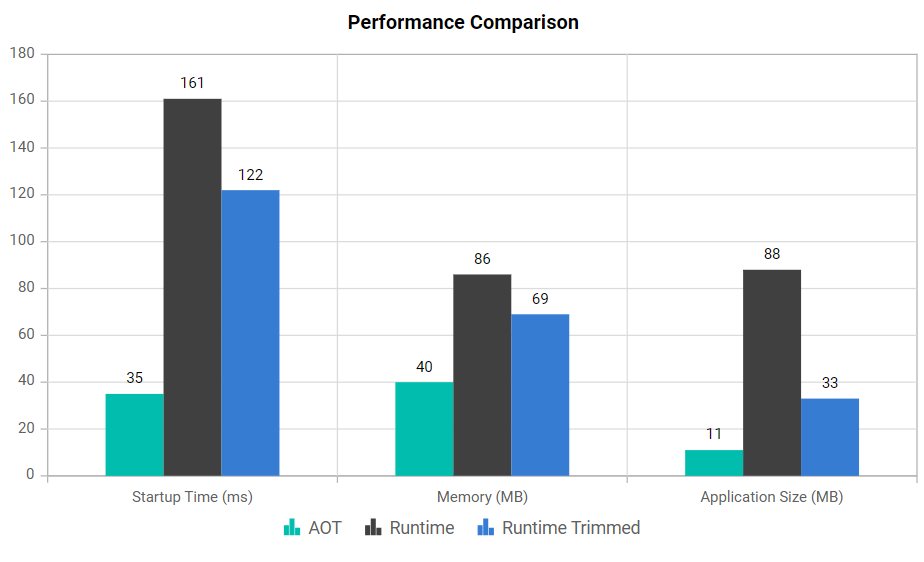
Refer to the following image. From this, we can conclude that Native AOT has a lower app size, memory usage, and startup time; trimming IL will give more optimization.
**Data source:** [Microsoft](https://learn.microsoft.com/en-us/aspnet/core/fundamentals/native-aot?view=aspnetcore-10.0#why-use-native-aot-with-aspnet-core)
**Note:** The same flag <**PublishAot>true** is also used for Server-side apps. The ** WasmStripILAfterAOT** property is only applicable for WebAssembly in the browser. For compatibility summary, refer to the [official documentation](https://learn.microsoft.com/en-us/aspnet/core/fundamentals/native-aot?view=aspnetcore-10.0#aspnet-core-and-native-aot-compatibility)
.
## 5**.** Monitor and profile with enhanced metrics
Observability is the foundation of performance tuning in 2026. ASP.NET Core has evolved from basic logging to a rich, hierarchical metrics ecosystem that lets you measure exactly where time and resources are spent. From the moment your server starts to fine-grained Blazor component rendering, built-in metrics empower you to detect regressions before users do.
Let’s explore the key metrics and tools to master this!
### ASP.NET Core 10 identity metrics: Tune authentication at scale
Observability in .NET 10 goes beyond basic logging; it now includes **rich metrics for Identity operations**, helping you optimize authentication flows and security without sacrificing performance.
#### What’s new?
ASP.NET Core 10 introduces the **Microsoft.AspNetCore.Identity meter**, which provides counters, histograms, and gauges to track critical user and session behaviors in real time:
- User creation
- Password updates
- Role assignments
- Login attempts
- Two-factor authentication usage
- Token validation
#### Key metrics
- **aspnetcore.identity.sign_in.authenticate.duration:** Measures sign-in time
- **aspnetcore.identity.user.create.duration:** Tracks user creation latency
- **aspnetcore.identity.sign_in.two_factor_clients_remembered:** Monitors 2FA usage trends
These metrics enable **proactive performance tuning** and ** security monitoring**.
#### Integration
Integrate these metrics with **OpenTelemetry** or ** Prometheus** to visualize trends, detect anomalies (e.g., spikes in failed logins), and optimize authentication flows, ensuring both speed and safety at scale. For complete setup, refer to the [ASP.NET Core metrics documentation](https://learn.microsoft.com/en-us/aspnet/core/log-mon/metrics/metrics?view=aspnetcore-10.0)
.
Here is the table that explains the metrics and what they measure.
| Key metrics | What it measures | Why it matters |
| --- | --- | --- |
| ServerReady event. | Time from process start to Kestrel listening. | Critical for cold start in containers, serverless. |
| Kestrel errors, SignalR, Blazor tracing. | Connection drops, hub invocations, circuit lifecycle. | Pinpoint real-time app bottlenecks. |
| Auth metrics, profiling counters. | Sign-in duration, challenge count, CPU/memory per request. | Secure identity-heavy apps without perf tax. |
### Tools to profile
Profiling is the compass for performance tuning; it turns guesswork into data-driven wins. ASP.NET Core provides a robust toolchain to help you identify bottlenecks and optimize effectively.
#### Essential profiling tools
- [dotnet-counters](https://learn.microsoft.com/en-us/dotnet/core/diagnostics/dotnet-counters) : Real-time snapshots of GC pauses, CPU spikes, and memory trends during load tests.
- [dotnet-trace](https://learn.microsoft.com/en-us/dotnet/core/diagnostics/dotnet-trace) : Captures EventPipe data in production with near-zero overhead. Ideal for diagnosing latency jitter and intermittent issues.
- **Visual Studio Profiler:** Visualizes per-method allocations and hot paths via interactive graphs.
- [dotnet-dump](https://learn.microsoft.com/en-us/dotnet/core/diagnostics/dotnet-dump) : Enables post-mortem forensics on crashes without restarting.
#### Why these tools matter
Together, these tools form a complete observability loop, helping you:
- Cut latency by **30%+**
- Reduce memory usage by **20%**
- Ship resilient apps at scale
**Pro Tip:** Profile early, profile often, and let metrics guide every optimization.
#### Tooling stack for ASP.NET Core
| Tool | Use cases |
| --- | --- |
| dotnet-counters | Live GC, thread pool, JIT |
| dotnet-trace | CPU sampling, GC events |
| Prometheus + Grafana | Long-term dashboards |
| Aspire Dashboard | .NET 10 native (auth, Blazor, Kestrel) |
**Note:** For more details, refer to the [diagnostic tools documentation](https://learn.microsoft.com/en-us/dotnet/core/diagnostics/tools-overview)
.
## Frequently Asked Questions
What are the prerequisites for implementing these performance tuning techniques? Do they require .NET 10 specifically?Most techniques highlighted in this post, like `MapStaticAssets`, `HybridCache`, enhanced rate limiting, IL trimming after AOT, and new Identity metrics, are introduced or significantly improved in ASP.NET Core 10 (.NET 10). You should upgrade your project to .NET 10 to use them natively. For older versions (e.g., .NET 8 or 9), you can achieve similar results with workarounds: use **`UseStaticFiles`** with manual compression for assets, combine `IMemoryCache` and `IDistributedCache` for hybrid-like caching, or rely on third-party libraries. Always test upgrades in a staging environment to avoid breaking changes in middleware or Blazor rendering.
How much performance improvement can I realistically expect from these optimizations, and how do I measure it?Benchmarks in the post show dramatic reductions, such as 80-92% smaller static asset bundles for Blazor apps, but real-world gains depend on your app’s traffic, architecture, and bottlenecks. For example, HybridCache can reduce database hits by 50-90% in high-read scenarios, while rate limiting prevents up to 100% resource exhaustion during spikes. To measure: Use tools like [dotnet-counters](https://learn.microsoft.com/en-us/dotnet/core/diagnostics/dotnet-counters)
for live metrics, Apache JMeter for load testing (aim for <200ms 99th-percentile latency), or integrate [OpenTelemetry](https://learn.microsoft.com/en-us/dotnet/core/diagnostics/observability-with-otel#what-is-opentelemetry)
with Grafana for before/after dashboards. Start with a baseline profile using dotnet-trace, apply one technique at a time, and re-test, expect 20-50% overall throughput improvements in tuned apps.
Are these techniques applicable only to Blazor apps, or do they work for general ASP.NET Core APIs and MVC projects?While features like client-side fingerprinting, resource preloading, and IL trimming after AOT are Blazor-specific (especially for WebAssembly), most of these apply broadly to ASP.NET Core. MapStaticAssets optimizes static files in APIs or MVC apps. HybridCache suits API caching needs. Rate limiting/timeouts protect all endpoints, and enhanced metrics/profiling work across the board. For non-Blazor projects, focus on asset delivery and caching first; they yield quick wins without Blazor dependencies. If your app mixes Blazor with APIs, these integrate seamlessly via shared middleware.
The post doesn’t cover database optimizations, how do these techniques tie into EF Core or other data access layers?While the focus is on runtime and middleware tuning, these integrate well with database layers. HybridCache can front-load EF Core queries to reduce DB hits (e.g., cache query results with a short TTL). Rate limiting prevents query floods, and timeouts avoid long-running transactions. For deeper database tuning in 2026, consider EF Core 10’s improvements, such as compiled queries or batching. Profile with [dotnet-trace](https://learn.microsoft.com/en-us/dotnet/core/diagnostics/dotnet-trace)
to identify if database calls are your bottleneck, and then layer caching on top. If your app is Database-Heavy, consider extending these with connection pooling and asynchronous LINQ to boost overall performance.
Is Native AOT with IL trimming suitable for all Blazor apps, and what about server-side rendering (SSR)?Native AOT shines for interactive WebAssembly apps with data-heavy UIs (e.g., grids/charts), cutting startup time and bundle size via WasmStripILAfterAOT. However, skip it for simple SSR Blazor (use JIT for faster deploys) or if you rely heavily on reflection/dynamic code, as trimming could break those. In hybrid Auto modes, AOT applies only to the client-side. Test bundle sizes post-trim and expect 20-50% reductions. Monitor for interpreter fallbacks. For PWA/offline scenarios, it’s a must for efficiency.
How future-proof are these best practices for ASP.NET Core beyond 2026, and what should I watch for in upcoming releases?These align with Microsoft’s push toward cloud-native, observable apps in .NET 11 and beyond, so they’re solid foundations. Watch for evolutions in observability (e.g., more AI-driven profiling) and caching (potentially smarter eviction policies). Stay updated via the ASP.NET Core roadmap on [GitHub](https://github.com/dotnet/aspnetcore/issues/64787)
. To future-proof your system, adopt OpenTelemetry early for vendor-agnostic metrics and design it modularly so you can easily swap caches or limiters. Revisit profiling annually as traffic grows, and consider [.NET’s LTS cycles](https://learn.microsoft.com/en-us/lifecycle/products/microsoft-net-and-net-core)
for stable upgrades.
## Wrapping up
Thanks for reading! ASP.NET Core performance tuning in 2026 is no longer about isolated tweaks; it’s a holistic discipline. From build-time asset optimization and hybrid caching to runtime rate limiting, AOT trimming, and granular observability, .NET 10 gives you the tools to build apps that are:
- 80–92% lighter in payload size.
- Highly resilient against cache stampedes and traffic spikes.
- Blazing fast, with sub-200ms latencies under load.
Whether you’re powering real-time Blazor experiences, high-throughput APIs, or globally scaled microservices, these best practices will help you define modern performance standards.
**Next steps:**
- Apply these optimizations incrementally.
- Measure relentlessly with dotnet-counters and OpenTelemetry.
- Keep profiling and monitoring at the heart of your workflow.
Your apps won’t just meet expectations; they’ll **set the benchmark for speed and scalability**.
## Start your next-gen ASP.NET Core project today with Syncfusion
Syncfusion offers **Day 1 support for .NET 10**, ensuring full compatibility and optimized performance from the start. Build and deploy [ASP.NET Core](https://www.syncfusion.com/aspnet-core-ui-controls)
apps confidently with Syncfusion’s powerful component suite, and create next-generation applications that are**faster, smarter, and more efficient.**
Existing Syncfusion users can download the newest version of Essential Studio from the [license and download](https://www.syncfusion.com/account)
page, while new users can start a 30-day [free trial](https://www.syncfusion.com/downloads)
to experience its full potential.
If you have any questions, contact us through our [support forum](https://www.syncfusion.com/forums)
, [support portal](https://support.syncfusion.com/)
, or [feedback portal](https://www.syncfusion.com/feedback/)
. We are always happy to assist you
## Related Blogs
[Modern .NET or .NET Framework: Which Should Developers Choose?](https://www.syncfusion.com/blogs/post/modern-dotnet-or-dotnet-framework)
[Syncfusion Announces Day-1 Support for .NET 10 in Blazor Components](https://www.syncfusion.com/blogs/post/dot-net-10-support-syncfusion-blazor)
[How to Export Pivot Table Data to Excel in ASP.NET Core Without UI Rendering](https://www.syncfusion.com/blogs/post/export-pivot-table-data-to-excel)
[How to Deploy Syncfusion Spreadsheet Docker Image with ASP.NET Core 8.0](https://www.syncfusion.com/blogs/post/spreadsheet-docker-image-deployment)