---
title: "Introducing Syncfusion Toolkit for Blazor: Free Open-Source Blazor Components"
published_at: "2026-05-22T17:02:22+00:00"
modified_at: "2026-06-18T11:24:57+00:00"
url: "https://www.syncfusion.com/blogs/post/open-source-syncfusion-toolkit-for-blazor"
excerpt: "We’re thrilled to launch the Syncfusion Toolkit for Blazor, a free, open-source, MIT-licensed collection of reusable Blazor UI components."
taxonomy_category:
- "Blazor"
- "Development"
- "Open source"
- "Productivity"
- "UI"
- "Web"
taxonomy_post_tag:
- ".NET"
- "Blazor"
- "C#"
- "Front-End Development"
- "open source"
- "productivity"
- "UI Components"
- "Web Application UI Design"
- "Web Development"
---
# Introducing Syncfusion Toolkit for Blazor: Free Open-Source Blazor Components
[Saravanan G](https://www.syncfusion.com/blogs/author/saravanang)
**TL;DR:** We’re excited to introduce the Syncfusion Toolkit for Blazor, a free, MIT-licensed collection of open-source Blazor UI components designed to help developers build modern web applications faster.
With the Syncfusion Toolkit for Blazor, you get:
- Free and MIT-licensed Blazor UI components,
- Open-source access on GitHub,
- NuGet package distribution,
- Support for Blazor Server and WebAssembly,
- Essential components such as Charts, Buttons, Dialogs, File Upload, Calendar, DatePicker, TextBox, Forms, Spinner, and more.
Whether you are building dashboards, admin panels, forms, internal business tools, SaaS apps, or enterprise web apps, the Toolkit for Blazor helps reduce repetitive UI development so you can focus on delivering better application experiences faster.
## What is Syncfusion Toolkit for Blazor?
The [Syncfusion® Toolkit for Blazor](https://www.syncfusion.com/blazor-toolkit)
is a free, MIT-licensed collection of open-source Blazor UI components designed to help developers build modern Blazor applications faster.
Hosted on [GitHub](https://github.com/syncfusion/blazor-toolkit)
and distributed through [NuGet](https://www.nuget.org/packages/Syncfusion.Blazor.Toolkit)
, the toolkit provides reusable, customizable, and production-friendly UI components that developers can easily integrate into their applications.
Instead of building common UI infrastructure from scratch, developers can use ready-to-integrate components for charts, forms, dialogs, uploads, date selection, input handling, and other common application scenarios.
The Toolkit for Blazor focuses on providing essential UI building blocks that help developers quickly create modern business applications with cleaner and more maintainable code.
## Why we built Syncfusion Toolkit for Blazor
Syncfusion has long provided a comprehensive commercial suite of Blazor UI components for enterprise application development. With the **Syncfusion Toolkit for Blazor**, we are extending our support for the Blazor developer community by offering a free and open-source set of essential UI components.
Open source helps developers by providing:
- Greater transparency,
- More flexibility,
- Easier customization,
- Community-driven collaboration, and
- Long-term control over application UI infrastructure.
Our goal is simple:
Help developers build modern Blazor applications faster using reusable, community-friendly UI components under the MIT license.
This release reflects our continued commitment to supporting the .NET and Blazor ecosystem through open-source contributions and developer-focused tooling.
## What’s included in the first release?
The first release of the **Syncfusion Toolkit for Blazor** includes commonly used UI components for modern web and business applications.
### [Charts](https://www.syncfusion.com/blazor-components/blazor-charts)
Create interactive visualizations such as line, bar, column, area, scatter, bubble, and other chart types for dashboards, analytics, and reporting experiences.
Blazor Charts
### [Button](https://www.syncfusion.com/blazor-components/blazor-button) and [Button Group](https://www.syncfusion.com/blazor-components/blazor-button-group)
Add customizable buttons and grouped actions for forms, toolbars, dialogs, and modern application interfaces.
### Date and time components
#### [Calendar](https://www.syncfusion.com/blazor-components/blazor-calendar)
Provide interactive calendar-based date selection experiences.
#### [DatePicker](https://www.syncfusion.com/blazor-components/blazor-datepicker)
Simplify date selection with user-friendly calendar input.
#### [DateTime Picker](https://www.syncfusion.com/blazor-components/blazor-datetime-picker)
Combine date and time selection in a single control.
#### [TimePicker](https://www.syncfusion.com/blazor-components/blazor-timepicker)
Enable precise and flexible time-selection workflows.
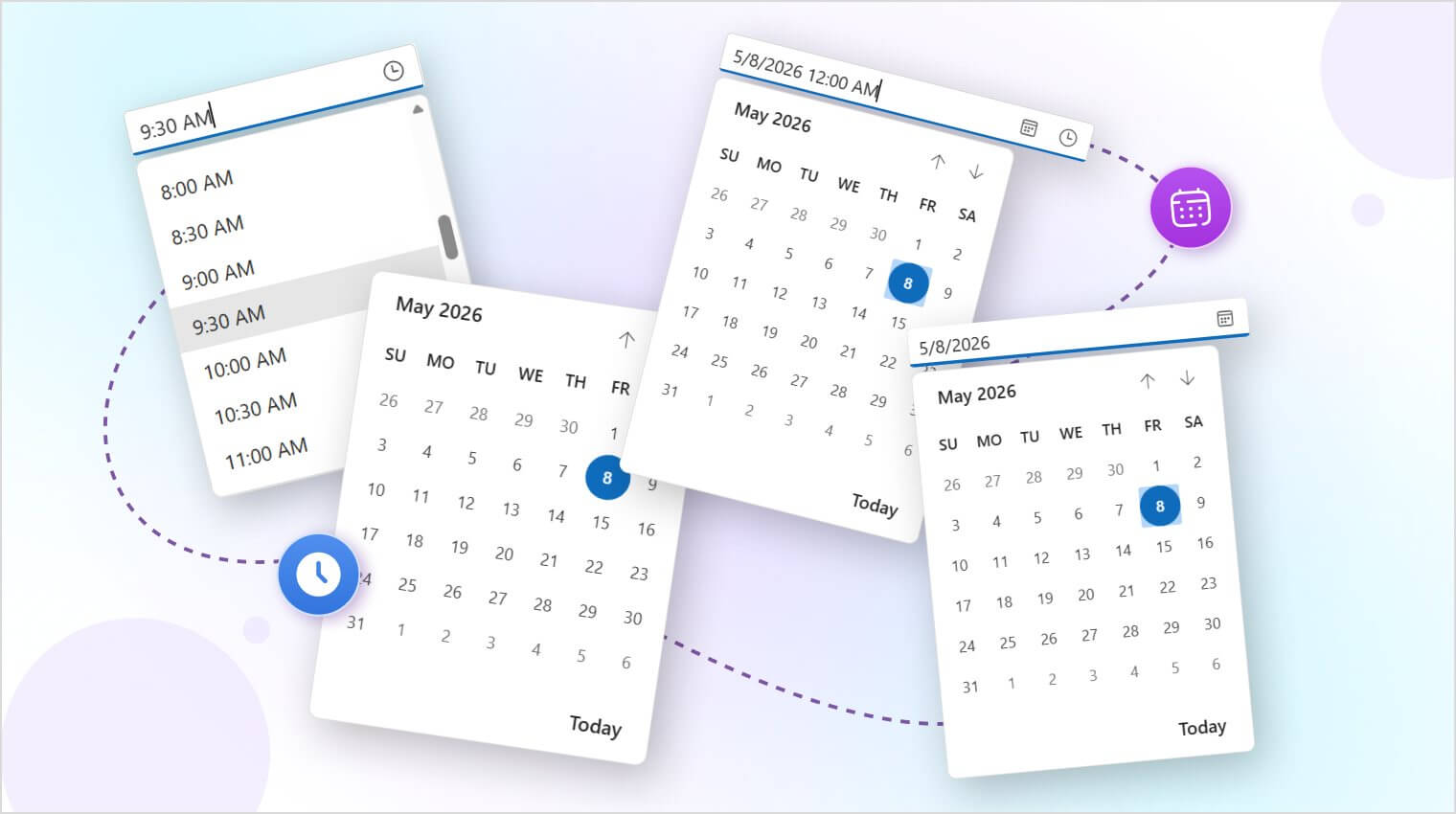
Blazor Date and Time components
### [TextBox](https://www.syncfusion.com/blazor-components/blazor-textbox) and [TextArea](https://www.syncfusion.com/blazor-components/blazor-textarea)
Capture single-line and multi-line user input for forms, comments, notes, search fields, and data-entry screens.
### Input and toggle Components
#### [Checkbox](https://www.syncfusion.com/blazor-components/blazor-checkbox)
Enable simple and intuitive selection-based interactions.
#### [Radio Button](https://www.syncfusion.com/blazor-components/blazor-radio-button)
Allow users to choose a single option from grouped selections.
#### [Numeric Textbox](https://www.syncfusion.com/blazor-components/blazor-numeric-textbox)
Accept formatted numeric input with validation-friendly behavior.
#### [Toggle Switch Button](https://www.syncfusion.com/blazor-components/blazor-toggle-switch-button)
Create modern on/off interactions for settings and state management.
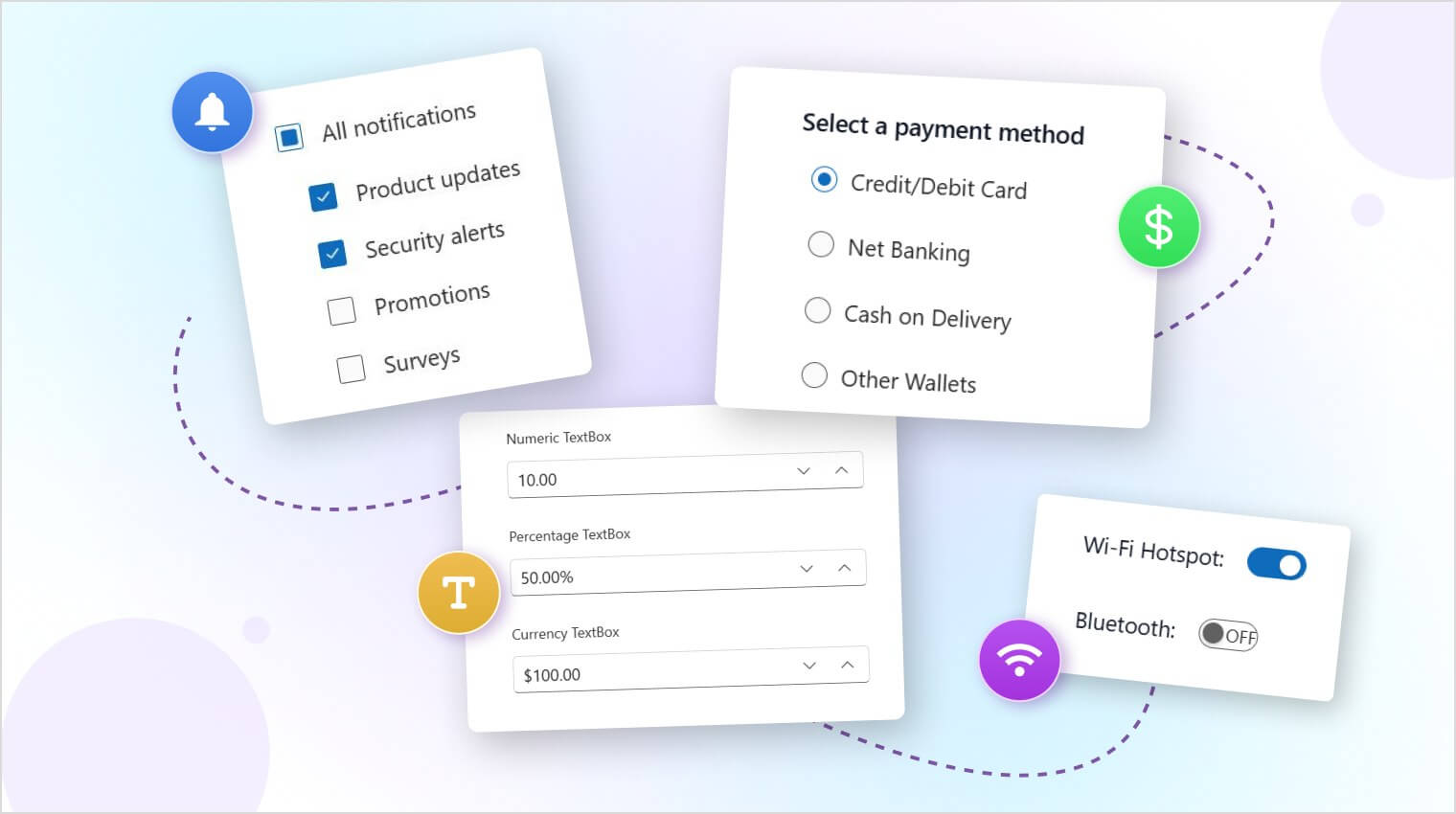
Blazor Input and Toggle components
### [File Upload](https://www.syncfusion.com/blazor-components/blazor-file-upload)
Add file-upload capabilities with drag-and-drop support, progress tracking, and flexible upload experiences.
Blazor File Upload component
### [Dialog](https://www.syncfusion.com/blazor-components/blazor-modal-dialog)
Create alerts, confirmations, modal popups, and interactive dialogs for modern application workflows.
Blazor Dialog component
### [Spinner](https://www.syncfusion.com/blazor-components/blazor-spinner)
Display loading and processing states clearly during asynchronous operations.
Together, these free Blazor UI components help developers build:
- Dashboards
- Admin panels
- Reporting systems
- Data-entry forms
- Internal business tools
- SaaS applications
- Enterprise web applications
with significantly less UI setup effort.
## Getting started with Syncfusion Toolkit for Blazor
Let’s create a simple Blazor app and add your first component from the Toolkit for Blazor.
### Step 1: Create a new Blazor Web app
Start by [creating a new Blazor Web app project](https://blazor.syncfusion.com/documentation/getting-started/blazor-web-app)
using the following command.
```
dotnet new blazor -n MyBlazorApp
cd MyBlazorApp
```
### Step 2: Install the NuGet package
Install the [Syncfusion Toolkit for Blazor](https://www.nuget.org/packages/Syncfusion.Blazor.Toolkit)
package using the following command:
```
dotnet add package Syncfusion.Blazor.Toolkit
```
### Step 3: Register Syncfusion services
In your **Program.cs** file, register the Syncfusion Blazor service.
Program.cs
```
using Syncfusion.Blazor;
var builder = WebApplication.CreateBuilder(args);
builder.Services
.AddRazorComponents()
.AddInteractiveWebAssemblyComponents();
// Register Syncfusion Blazor Toolkit services
builder.Services.AddSyncfusionBlazorToolkit();
var app = builder.Build();
// Remaining app configuration
```
### Step 4: Import the required namespaces
Add the following namespaces to the **_Imports.razor** file.
Import.razor
```
@using Syncfusion.Blazor.Toolkit
```
### Step 5: Add the stylesheet reference
Add the required CSS reference to your layout file.
Layout.razor
```
```
### Step 6: Add your first component
Now, you can use the Toolkit for Blazor components on your Blazor page.
C#
```
@page "/"
@using Syncfusion.Blazor.Toolkit.Buttons
Welcome to Syncfusion Toolkit for Blazor!
Click Me!
Button clicked: @clickCount times
@code
{
private int clickCount = 0;
private void HandleButtonClick()
{
clickCount++;
}
}
```
### Step 7: Run the application
Launch your application using the following command:
```
dotnet run
```
And, open the application in your browser and see the Syncfusion Toolkit for Blazor components in action.
Refer to the following image.
Web application built using the Toolkit for Blazor
## Built for modern Blazor applications
The **Syncfusion Toolkit for Blazor** is designed for modern Blazor development scenarios, including:
- Blazor Web Apps,
- Interactive Server rendering,
- Interactive WebAssembly rendering,
- Interactive Auto mode,
- Standalone Blazor WebAssembly apps,
- Modern .NET versions, including .NET 8, .NET 9, and future-ready .NET releases.
This gives developers the flexibility to use the toolkit across different Blazor hosting and rendering models.
## Why open source matters for Blazor developers
Open-source UI components provide more than free access. They give developers flexibility, visibility, and long-term control over their application UI infrastructure.
With the **Syncfusion Toolkit for Blazor**, developers can:
- Review the source code,
- Understand component implementation details,
- Customize behavior based on project needs,
- Contribute improvements,
- Use the components in personal, startup, commercial, and enterprise applications.
Because the toolkit is released under the MIT license, developers can confidently adopt it across a wide range of application scenarios without complex licensing restrictions.
## Start building with Syncfusion Toolkit for Blazor
Thanks for reading! Open source continues to accelerate innovation and developer collaboration, and we’re bringing that same philosophy to Blazor development with the [Syncfusion Toolkit for Blazor](https://www.syncfusion.com/blazor-toolkit)
.
With a growing collection of free, MIT-licensed Blazor UI components, developers can build dashboards, forms, dialogs, admin interfaces, and modern business apps faster while maintaining full flexibility and visibility into the source code.
The toolkit is hosted on [GitHub](https://github.com/syncfusion/blazor-toolkit)
and supported with documentation, [API references](https://help.syncfusion.com/cr/blazor-toolkit/Syncfusion.Blazor.Toolkit.html)
, and practical [examples](https://blazor.syncfusion.com/demos/toolkit)
to help teams get started quickly.
Explore the [Syncfusion Toolkit for Blazor](https://blazortoolkit.syncfusion.com/support/tickets/)
, try the components in your projects, and start building modern Blazor apps faster today.
## Related Blogs
[Introducing Syncfusion Document SDK AI Agent Tools for Autonomous Document Workflows](https://www.syncfusion.com/blogs/post/syncfusion-ai-agent-tools-document-workflows)
[Build an AI Content Creation App in Blazor with AI AssistView](https://www.syncfusion.com/blogs/post/blazor-ai-content-creation-app-structured-prompting)
[Syncfusion Document SDKs 2026 Volume 1: Smarter PDF, Word, and Excel Automation](https://www.syncfusion.com/blogs/post/whats-new-in-document-sdks-2026-vol1)
[Syncfusion Essential Studio 2026 Volume 1: AI-Powered Components, Smart Data Extraction, and 100+ Enhancements](https://www.syncfusion.com/blogs/post/essential-studio-2026-volume-1)