---
title: "Introducing the New Angular SpeechToText Component"
published_at: "2025-04-14T10:38:57+00:00"
modified_at: "2026-02-10T08:29:22+00:00"
url: "https://www.syncfusion.com/blogs/post/new-angular-speech-to-text-component"
excerpt: "This blog explains the features of the new Angular SpeechToText component added in our 2025 Volume 1 release."
taxonomy_category:
- "Angular"
- "Development"
- "Web"
- "What's new"
taxonomy_post_tag:
- "Angular"
- "development"
- "productivity"
- "Web"
- "What's New"
---
# Introducing the New Angular SpeechToText Component
[Kirupa karan Raj Kumar](https://www.syncfusion.com/blogs/author/kirupa-karan-raj-kumar)
**TL;DR:** Let’s explore the new Angular SpeechToText component. It converts spoken words into text using the Web Speech API, supporting real-time transcription, multi-language input, and customizable UI. Key features include interim result handling, tooltip guidance, and listening state indicators. It is ideal for voice-command apps, language-learning tools, and transcription services**.**
We are delighted to unveil the new Syncfusion [Angular SpeechToText](https://www.syncfusion.com/angular-components/angular-speech-to-text)
component in our [2025 Volume 1](https://www.syncfusion.com/forums/196488/essential-studio-2025-volume-1-main-release-v29-1-33-is-available-for-download)
release. This breakthrough component utilizes the Web Speech API to instantaneously convert spoken language into written text. With capabilities such as multi-language adaptability, pre-defined themes, guidance prompts, and a customizable interface, this tool effectively enhances the user experience.
Whether your project involves creating an accessibility feature, a voice-command app, or an interactive user interface, the Angular SpeechToText component is designed to accommodate various scenarios. With support for multiple languages and advanced functionalities, it guarantees precise and effective voice recognition.
Let’s explore this user-friendly component in detail!
## Use cases
The Angular SpeechToText component is a great fit for the following apps:
- **Language learning apps**: Help users practice pronunciation and improve language skills by providing real-time feedback on spoken words and phrases.
- **Voice-activated assistants:** Enable voice commands in apps, facilitating hands-free interaction and operation.
- **Real-time transcription services:** Implement live transcription for events, lectures, or note-taking apps, catering to diverse audiences.
- **Interactive customer service:** Enhance customer interaction platforms by transcribing audio inquiries into text for accurate service delivery.
## Key features
The key features of the Angular SpeechToText component are as follows:
- [Real-time text conversion](#Real-Time)
- [Speech recognition with interim results](#Speech)
- [Listening state management](#Listening)
- [Multi-language support](#Multi-Language)
- [Tooltips for improved guidance](#Tooltips)
- [Flexible button customization](#Flexible)
- [Pre-defined button styles](#Predefined)
### Real-time text conversion
The Angular SpeechToText component continuously translates spoken language into text, returning both interim and final results for smooth transcription.
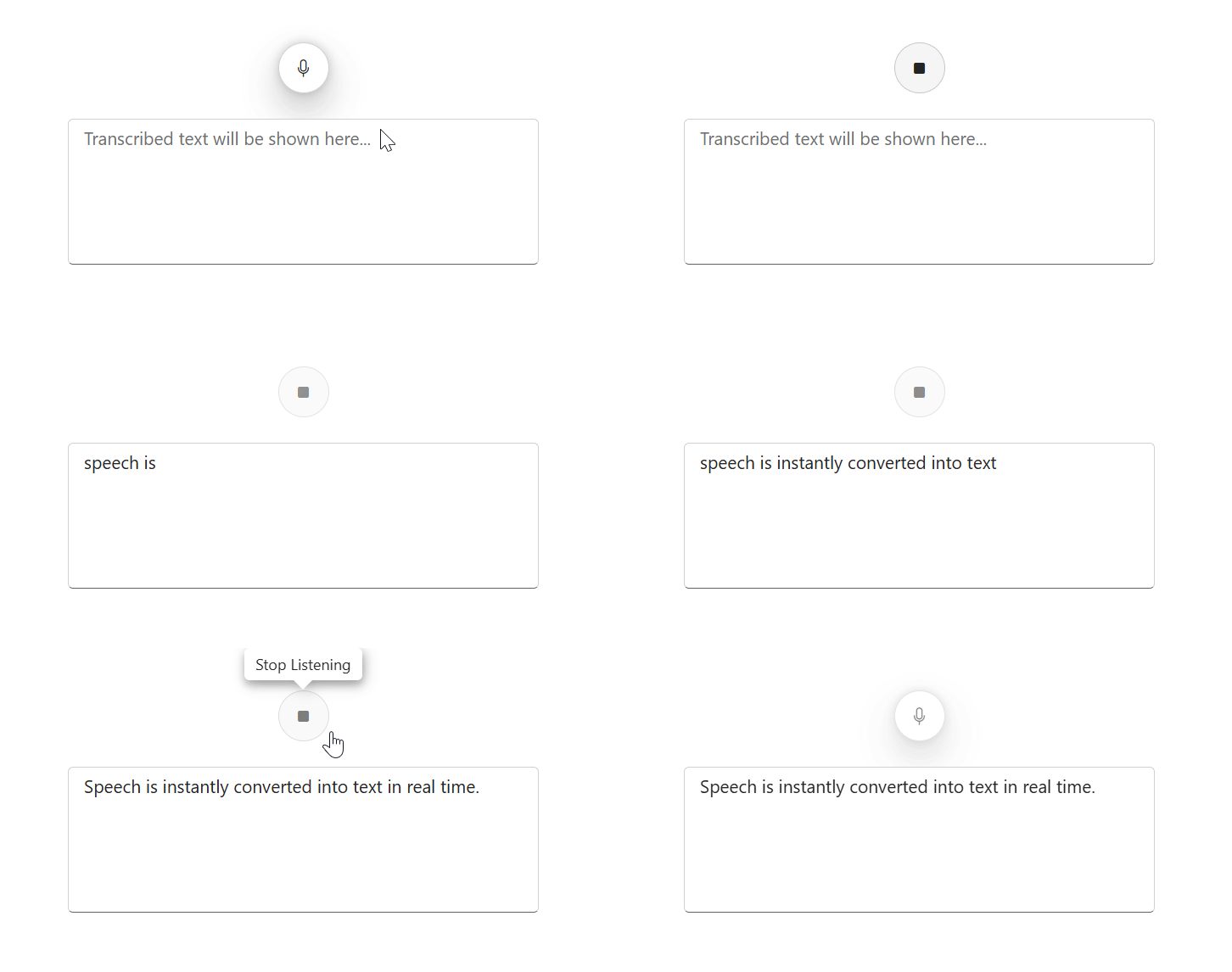
Real-time text conversion in Angular SpeechToText component
### Speech recognition with interim results
Interim results provide immediate feedback as the user speaks, showing temporary transcriptions in real time before finalizing the text. You can alter this functionality by setting the following values in the [allowInterimResults](https://ej2.syncfusion.com/angular/documentation/api/speech-to-text/#allowinterimresults)
property:
- **true**(default): Dynamically shows speech recognition as words are spoken.
- **false**: Displays only the final transcribed text after completing the recognition process.
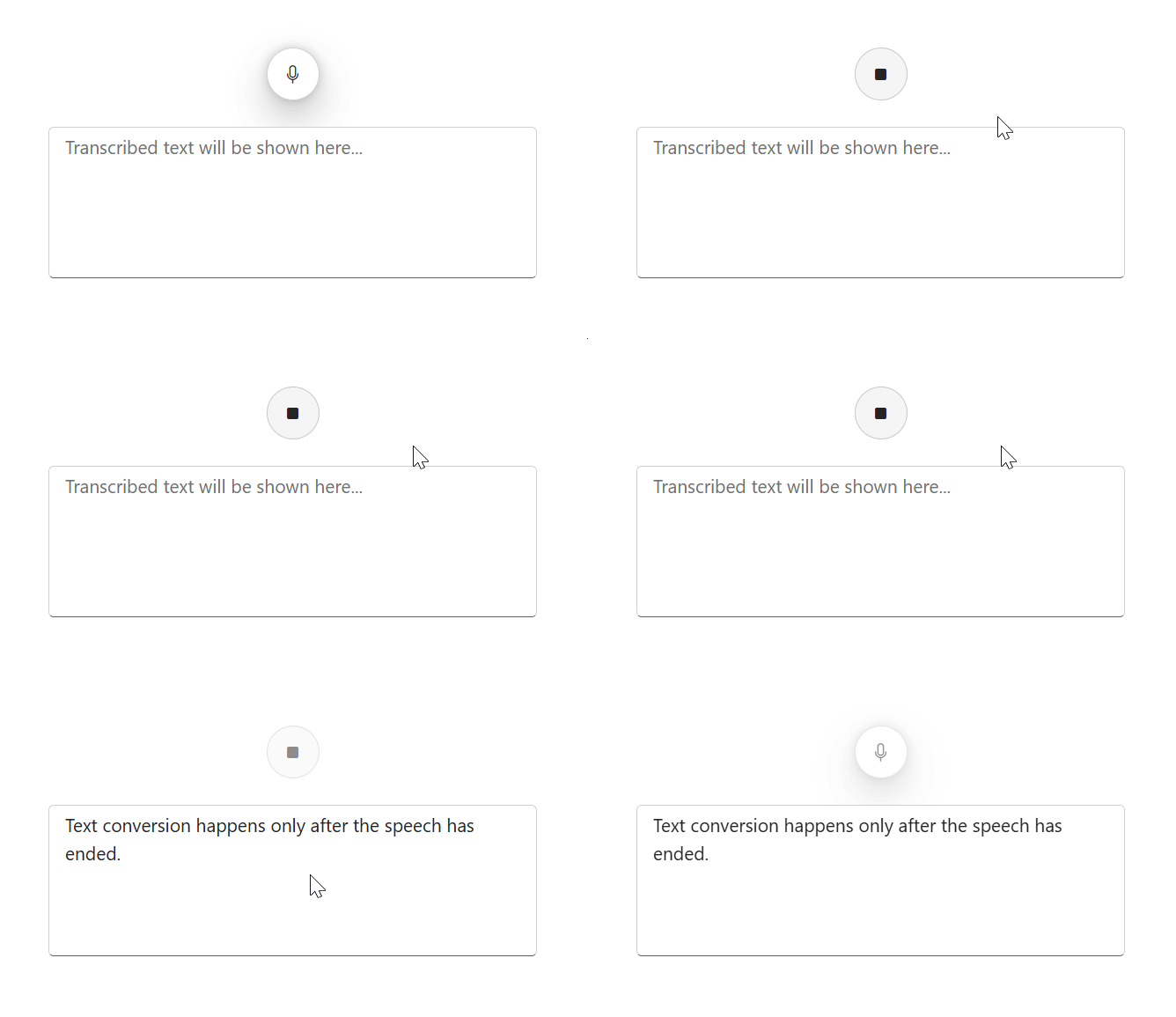
Speech recognition with interim results in Angular SpeechToText component
### Listening state management
The SpeechToText component manages various listening stages to provide visual indicators of the current speech recognition status.
- **Inactive**: No active speech recognition.
- **Listening**: Captures and transcribes speech, highlighted by an icon and animation.
- **Stopped**: Marks the end of recognition, displaying the final text.
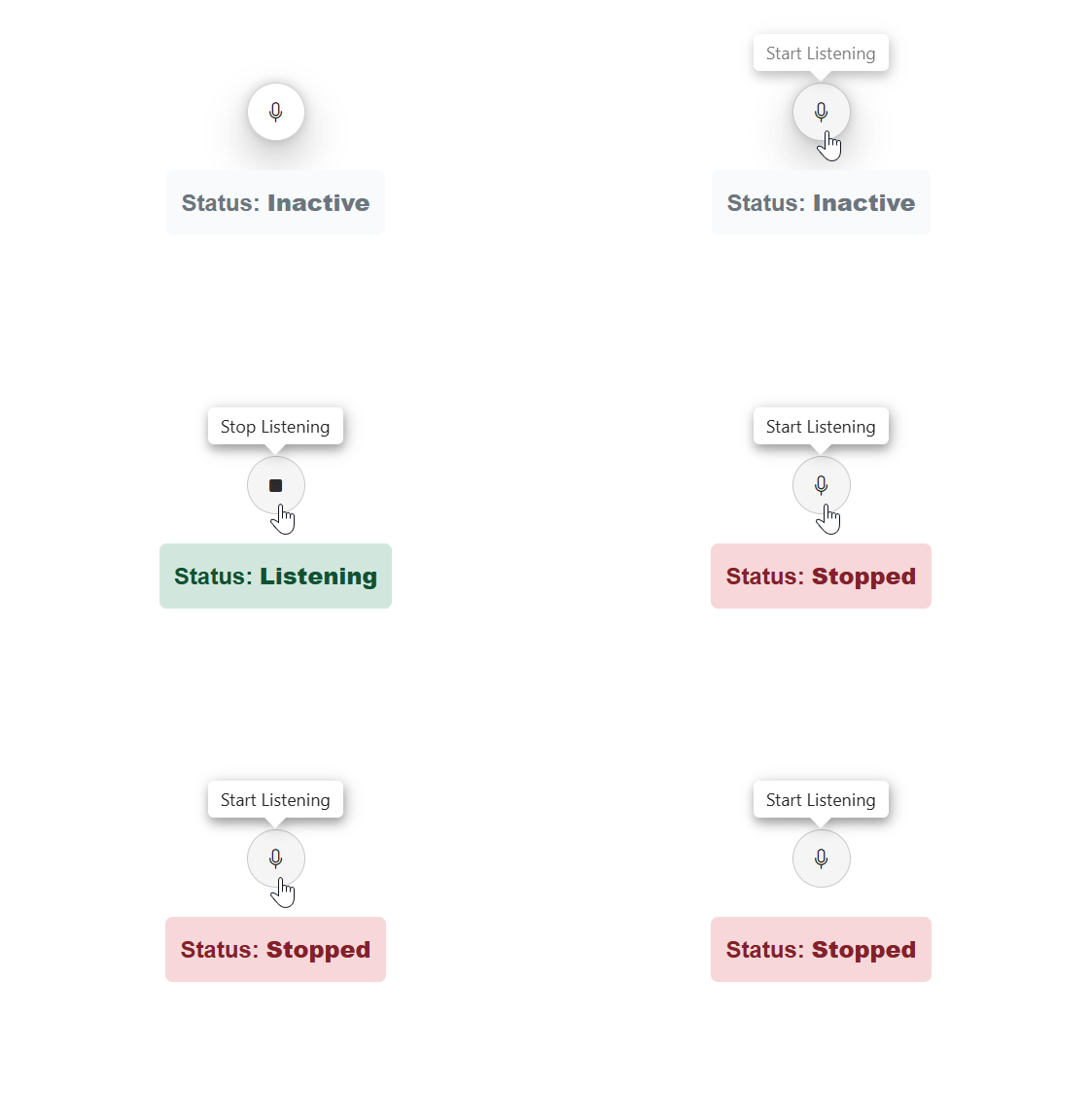
Listening state management feature in Angular SpeechToText component
### Multi-language support
This component supports multiple languages, enabling users to transcribe voice inputs in their preferred language. This enhances the component’s utility across different regions and cultures.
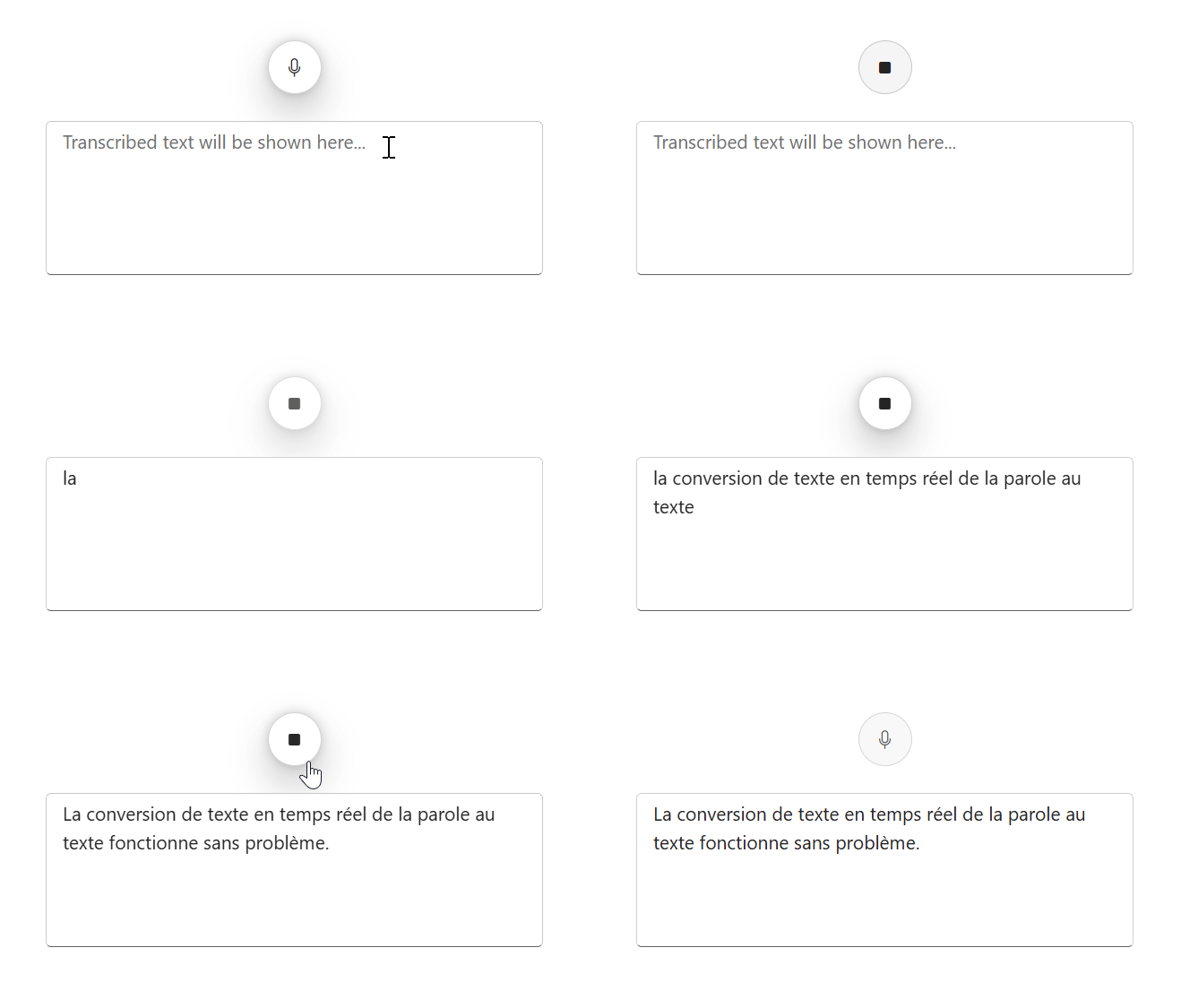
Multi-language support in Angular SpeechToText component
### Tooltips for improved guidance
The tooltips provide useful information when hovering over the speech-to-text button, offering guidance. Users can configure tooltips to display custom messages for the start and stop listening states.

Tooltips in the Angular SpeechToText component
### Flexible button customization
The SpeechToText component supports icon-only buttons as well as buttons with icons positioned to the text, allowing for a customizable interface based on the app’s needs.
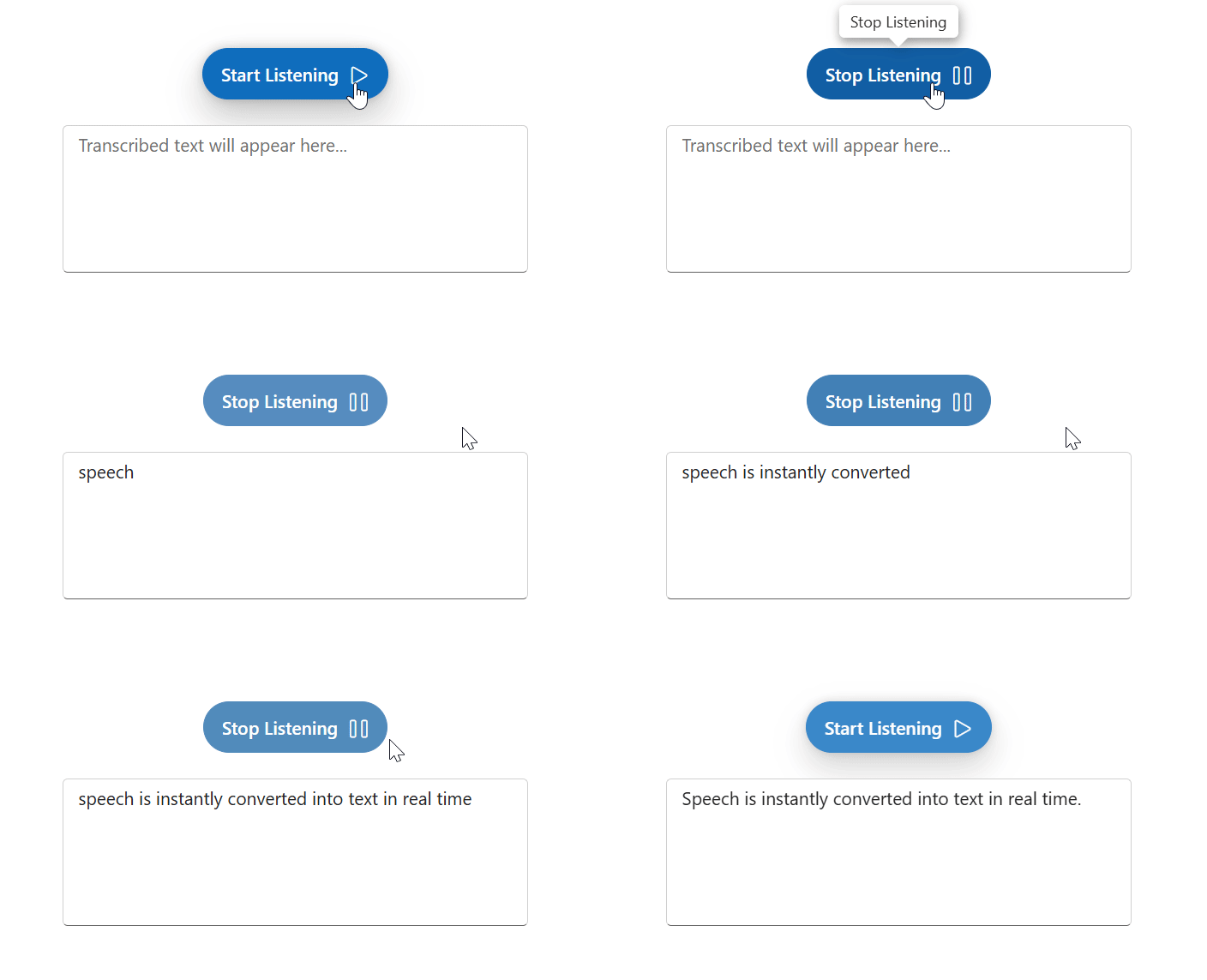
Customizing buttons in the Angular SpeechToText component
### Pre-defined button styles
The Angular SpeechToText component offers various pre-defined button styles, such as **Primary, Secondary, Outline, Flat, etc.,** to match a variety of app themes and scenarios.
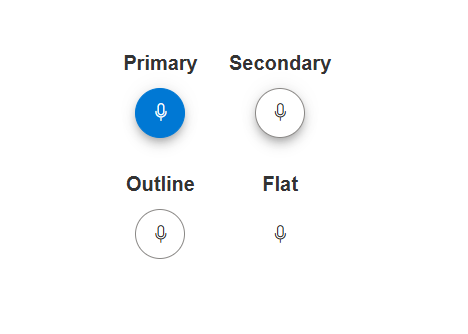
Pre-defined button styles in Angular SpeechToText component
## Supported platforms
The SpeechToText component is also available on the following platforms:
| Platform | Live demo | Documentation |
| --- | --- | --- |
| JavaScript | JavaScript SpeechToText demos | Getting started with JavaScript SpeechToText |
| Blazor | Blazor SpeechToText demos | Getting started with Blazor SpeechToText |
| React | React SpeechToText demos | Getting started with React SpeechToText |
| Vue | Vue SpeechToText demos | Getting started with Vue SpeechToText |
| ASP.NET Core | ASP.NET Core SpeechToText demos | Getting started with ASP.NET Core SpeechToText |
| ASP.NET MVC | ASP.NET MVC SpeechToText demos | Getting started with ASP.NET MVC SpeechToText |
## Getting started with the Angular SpeechToText component
Let’s see the steps to get started with our Angular SpeechToText component:
### Step 1: Setup the Angular environment
First, install the [Angular CLI](https://github.com/angular/angular-cli)
using the following command to set up your Angular apps:
```
npm install -g @angular/cli
```
### Step 2: Create an Angular app
Now, start a new Angular app using the Angular CLI command.
```
ng new my-app
cd my-app
```
### Step 3: Install the Angular SpeechToText package
All Syncfusion packages are published in the [NPM](https://www.npmjs.com/~syncfusionorg)
registry. You can easily install the SpeechToText dependencies using the following command:
```
npm install @syncfusion/ej2-angular-inputs --save
```
### Step 4: Add the SpeechToText module
Then, import the SpeechToText module into the Angular app (**app.module.ts**) from the package **@syncfusion/ej2-angular-inputs.**
```
import { NgModule } from '@angular/core';
import { BrowserModule } from '@angular/platform-browser';
import { SpeechToTextModule } from '@syncfusion/ej2-angular-inputs';
import { AppComponent } from './app.component';
@NgModule({
// declaration of ej2-angular-inputs module into NgModule
imports: [ BrowserModule, SpeechToTextModule ],
declarations: [ AppComponent ],
bootstrap: [ AppComponent ]
})
export class AppModule { }
```
### Step 5: Add CSS reference
Add the required CSS references as shown in the following code example.
```
@import '../node_modules/@syncfusion/ej2-base/styles/fluent2.css';
@import '../node_modules/@syncfusion/ej2-buttons/styles/fluent2.css';
@import '../node_modules/@syncfusion/ej2-popups/styles/fluent2.css';
@import '../node_modules/@syncfusion/ej2-inputs/styles/fluent2.css';
.speechText-container {
display: flex;
flex-direction: column;
align-items: center;
justify-content: center;
gap: 10px;
}
```
### Step 6: Add the Angular SpeechToText component
Modify the template in the **app.component.ts** file with **ejs-speechtotext** to render the SpeechToText component.
```
import { Component } from "@angular/core";
@Component({
selector: "app-root",
template: `
`,
})
export class AppComponent {
}
```
### Step 7: Add the button content
We can use the **content** and ** stopContent** properties to display the ** start/stop** listening text by using the ** buttonSettings** property.
```
import { Component, ViewChild } from '@angular/core';
import { SpeechToTextModule, TextAreaComponent, TextAreaModule, TranscriptChangedEventArgs, ButtonSettingsModel } from '@syncfusion/ej2-angular-inputs';
@Component({
selector: 'app-root',
template: `
`,
})
export class AppComponent {
@ViewChild('outputTextarea') outputTextarea!: TextAreaComponent;
public buttonSettings: ButtonSettingsModel = {
content: 'Start Listening',
stopContent: 'Stop Listening'
};
onTranscriptChange(args: TranscriptChangedEventArgs): void {
this.outputTextarea.value = args.transcript;
}
}
```
### Step 8: Run the app
Finally, run the app in the browser using the following command:
```
ng serve
```
Refer to the following output image.
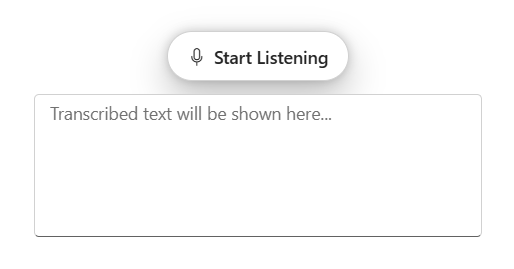
Integrating SpeechToText component in Angular app
## Conclusion
Thank you for exploring this content! Here, we’ve discussed the standout features of the new Syncfusion [Angular SpeechToText](https://www.syncfusion.com/angular-components/angular-speech-to-text)
component, designed to enrich voice-responsive apps. With functionalities like instantaneous text conversion, multi-language support, and adaptable UI options, this component aims to enhance user interaction and accessibility across various apps.
You can also share your feedback or feature requests through our [support forum](https://www.syncfusion.com/forums)
, [support portal](https://support.syncfusion.com/)
, or [feedback portal](https://www.syncfusion.com/feedback)
. We’re always here to assist you!
## Related Blogs
[Mastering SOLID Principles in Angular: Build Scalable Apps with Clean Code](https://www.syncfusion.com/blogs/post/angular-solid-principles)
[Syncfusion Angular UI Kit Updated with 39 Powerful New UI Blocks](https://www.syncfusion.com/blogs/post/introducing-39-new-angular-ui-blocks)
[AI-Powered Text-to-Flowchart Converter Using OpenAI and Angular Diagram Library](https://www.syncfusion.com/blogs/post/ai-powered-angular-text-to-flowchart)
[The Top 5 Most Loved Angular Chart Libraries of 2026](https://www.syncfusion.com/blogs/post/best-angular-chart-libraries)