---
title: "Boost .NET MAUI DataGrid Performance with Efficient Pagination Techniques"
published_at: "2025-06-02T13:47:00+00:00"
modified_at: "2025-06-02T13:47:04+00:00"
url: "https://www.syncfusion.com/blogs/post/maui-datagrid-performance-pagination"
excerpt: "Learn how to enhance the performance of .NET MAUI DataGrids by implementing efficient pagination with the Syncfusion DataPager. Improve app responsiveness, reduce memory usage, and optimize large dataset handling with this step-by-step guide."
taxonomy_category:
- ".NET MAUI"
- "DataGrid"
- "Mobile"
- "Paging"
- "Performance Optimization"
- "UI"
taxonomy_post_tag:
- ".NET MAUI"
- "Data Table"
- "DataGrid"
- "DataGrid Performance"
- "Mobile"
- "Pagination"
---
# Boost .NET MAUI DataGrid Performance with Efficient Pagination Techniques
[Farjana Parveen](https://www.syncfusion.com/blogs/author/farjanaparveena)
**TL;DR:** Loading large datasets simultaneously in a .NET MAUI DataGrid can lead to slow performance and high memory usage. This guide demonstrates how to implement efficient pagination using the Syncfusion® DataPager to load data in manageable chunks, enhancing app responsiveness and user experience. Follow the step-by-step instructions to integrate Syncfusion’s DataGrid and DataPager controls, bind your data source, and optimize UI rendering.
Displaying large datasets efficiently is a common challenge in .NET MAUI applications, especially when using [DataGrid](https://www.syncfusion.com/maui-controls/maui-datagrid)
. Loading all data at once often leads to sluggish UI performance and increased memory consumption, harming user experience. Implementing efficient **[pagination](https://help.syncfusion.com/maui/datagrid/paging)** is key to resolving these issues by retrieving and showing data in manageable portions. This guide walks you through using the [Syncfusion® DataPager](https://help.syncfusion.com/maui/datagrid/paging)
control with [.NET MAUI DataGrid](https://www.syncfusion.com/maui-controls/maui-datagrid)
to boost responsiveness and optimize data loading in your .NET MAUI apps.
## **Why does Efficient Pagination matter?**
Loading an entire dataset into a [DataGrid](https://www.syncfusion.com/maui-controls/maui-datagrid)
simultaneously can cause slow load times, excessive memory usage, and degraded responsiveness. Efficient pagination reduces server and client load by fetching only a subset of data at a time, making the UI more responsive and scalable for large datasets.
## Prerequisites
Before starting, ensure you have the following tools installed
- [.NET 8 SDK](https://dotnet.microsoft.com/en-us/download/dotnet/8.0) or later
- [Visual Studio 2022](https://visualstudio.microsoft.com/vs/) with the .NET MAUI workload installed
- [Syncfusion MAUI controls](https://www.syncfusion.com/maui-controls)
## Step-by-Step guide
### Step 1: Set up your MAUI project
Open **Visual Studio** and select ** Create a new project**. Next, choose .** NET MAUI App** and click ** Next.** Configure your project by specifying the project name and location, then click ** Create**.
### Step 2: Install Syncfusion® .NET MAUI DataGrid
To add the [Syncfusion® .NET MAUI DataGrid](https://www.syncfusion.com/maui-controls/maui-datagrid)
to your project, open the NuGet Package Manager, search for **[DataGrid](https://www.syncfusion.com/maui-controls/maui-datagrid)**, and install the package.
### Step 3: Create the user interface
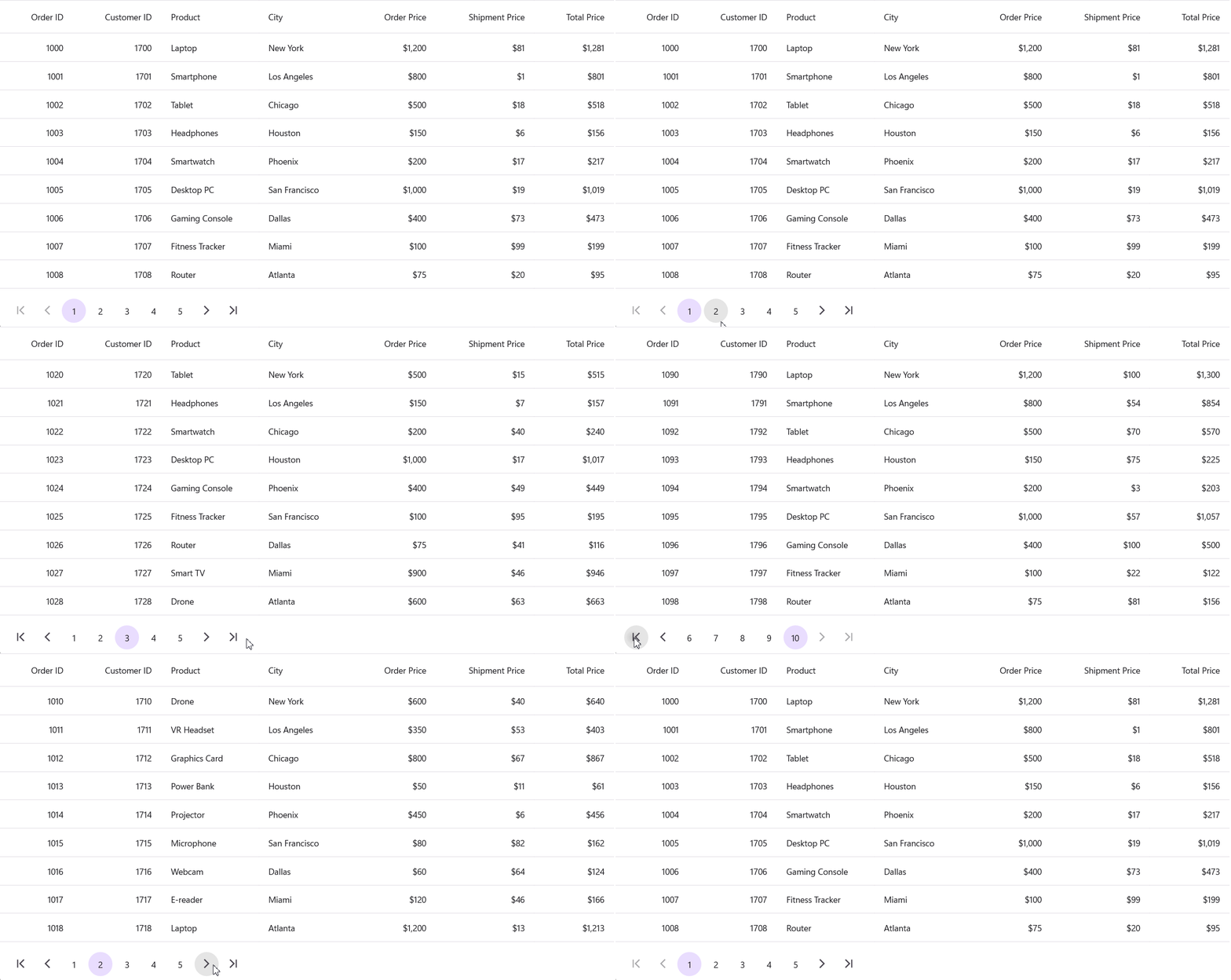
The **[SfDataPager](https://help.syncfusion.com/cr/maui/Syncfusion.Maui.DataGrid.DataPager.SfDataPager.html)** is bound to the full dataset ***(OrderInfoCollection).*** The **[SfDataGrid](https://www.syncfusion.com/maui-controls/maui-datagrid)** obtains its data from **[SfDataPager.PagedSource](https://help.syncfusion.com/cr/maui/Syncfusion.Maui.DataGrid.DataPager.SfDataPager.html#Syncfusion_Maui_DataGrid_DataPager_SfDataPager_PagedSource)**, ensuring that only the records for the current page are displayed. The ** Pager control** enables users to navigate between pages, and the ** SfDataGrid** updates dynamically when a different page is selected.
The **SfDataGrid** displays data from the paginated source (the **[PagedSource](https://help.syncfusion.com/cr/maui/Syncfusion.Maui.DataGrid.DataPager.SfDataPager.html#Syncfusion_Maui_DataGrid_DataPager_SfDataPager_PagedSource)** from **[SfDataPager](https://help.syncfusion.com/cr/maui/Syncfusion.Maui.DataGrid.DataPager.SfDataPager.html)**) and is configured for manual column definition **([AutoGenerateColumnsMode](https://help.syncfusion.com/cr/maui/Syncfusion.Maui.DataGrid.SfDataGrid.html#Syncfusion_Maui_DataGrid_SfDataGrid_AutoGenerateColumnsMode)
=None).** It uses various column types, such as **[DataGridNumericColumn](https://help.syncfusion.com/maui/datagrid/column-types#datagridnumericcolumn)** and **[DataGridTextColumn](https://help.syncfusion.com/maui/datagrid/column-types#datagridnumericcolumn)
,** to display order details, including ** Order ID**, ** Customer ID**, ** Product**, ** City**, ** Order Price**, ** Shipment Price**, and ** Total Price.**
```
```
### Step 4: Bind the data source
The **OrderInfo class** defines a structured data model for handling order details in a .NET MAUI application, specifically for displaying data in the **[DataGrid](https://www.syncfusion.com/maui-controls/maui-datagrid)**. It includes key attributes such as ** Order ID**, ** Customer ID**, ** Product Name**, ** City**, ** Order Price**, ** Shipment Price**, and ** Total Price**.
The constructor initializes these properties and automatically calculates the **TotalPrice** by summing the ** OrderPrice** and ** ShipmentPrice**. This approach reduces manual calculations, improves data consistency, and ensures efficient data binding in UI components like **[DataGrid](https://www.syncfusion.com/maui-controls/maui-datagrid)**.
This model is essential for managing and displaying structured order data, playing a crucial role in pagination and data visualization for large datasets in .NET MAUI applications.
**OrderInfo.cs (Model)**
```
public class OrderInfo
{
public int OrderID { get; set; }
public int CustomerID { get; set; }
public string Product { get; set; }
public string City { get; set; }
public double OrderPrice { get; set; }
public double ShipmentPrice { get; set; }
public double TotalPrice { get; set; }
public OrderInfo(int orderId, int customerId, string product, string city, double orderPrice, double shipmentPrice)
{
OrderID = orderId;
CustomerID = customerId;
Product = product;
City = city;
OrderPrice = orderPrice;
ShipmentPrice = shipmentPrice;
TotalPrice = orderPrice + shipmentPrice;
}
}
```
**ViewModel (StockViewModel)**
```
public class OrderInfoRepository
{
public ObservableCollection OrderInfoCollection { get; set; }
public OrderInfoRepository()
{
OrderInfoCollection = new ObservableCollection();
GenerateOrders();
}
private void GenerateOrders()
{
Random random = new Random();
string[] cities =
{
"New York", "Los Angeles", "Chicago", "Houston", "Phoenix",
"San Francisco", "Dallas", "Miami", "Atlanta", "Seattle"
};
Dictionary productPrices = new Dictionary
{
{ "Laptop", 1200.0 },
{ "Smartphone", 800.0 },
{ "Tablet", 500.0 },
{ "Headphones", 150.0 },
{ "Smartwatch", 200.0 },
{ "Desktop PC", 1000.0 },
{ "Gaming Console", 400.0 },
{ "Fitness Tracker", 100.0 },
{ "Router", 75.0 },
{ "Smart TV", 900.0 },
{ "Drone", 600.0 },
{ "VR Headset", 350.0 },
{ "Graphics Card", 800.0 },
{ "Power Bank", 50.0 },
{ "Projector", 450.0 },
{ "Microphone", 80.0 },
{ "Webcam", 60.0 },
{ "E-reader", 120.0 }
};
var products = new List(productPrices.Keys);
for (int i = 0; i < 100; i++)
{
string product = products[i % products.Count];
double price = productPrices[product];
double shipmentPrice = random.Next(1, 100) + random.NextDouble();
string city = cities[i % cities.Length];
OrderInfoCollection.Add(new OrderInfo(1000 + i, 1700 + i, product, city, price, shipmentPrice));
}
}
}
```
## GitHub reference
For more details, refer to the [GitHub demo.](https://github.com/SyncfusionExamples/Enhancing-DataGrid-Performance-with-Efficient-Pagination)
## Conclusion
Thank you for reading this blog! Efficient pagination is essential for managing large datasets in [.NET MAUI DataGrid](https://www.syncfusion.com/maui-controls/maui-datagrid)
, dramatically improving performance and user experience. Using [Syncfusion® DataPager](https://help.syncfusion.com/maui/datagrid/paging)
with [.NET MAUI DataGrid](https://www.syncfusion.com/maui-controls/maui-datagrid)
allows your app to load data incrementally, reducing memory load and keeping UI interactions smooth. Adopt this approach to build scalable, responsive MAUI applications that handle big data effortlessly.
Explore Syncfusion MAUI controls today and check out the whole sample on GitHub to get started with efficient pagination!
Existing customers can download the new version of Essential Studio® on the [license and downloads](https://www.syncfusion.com/account/downloads)
page. If you are not a Syncfusion® customer, try our 30-day [free trial](https://www.syncfusion.com/downloads)
to check our incredible features.
If you require assistance, please don’t hesitate to contact us via our [support forum](https://www.syncfusion.com/forums)
, [support portal](https://support.syncfusion.com/)
, or [feedback portal](https://www.syncfusion.com/feedback)
. We are always eager to help you!
## Related Blogs
[Build a Real-Time Trading App Using .NET MAUI DataGrid](https://www.syncfusion.com/blogs/post/real-time-trading-app-using-maui-grid)
[Easily Bind SQLite Database and Perform CRUD Actions in .NET MAUI DataGrid](https://www.syncfusion.com/blogs/post/bind-sqlite-perform-crud-in-maui-grid)
[AI-Powered Smart .NET MAUI DataGrid for Predictive Data Integration](https://www.syncfusion.com/blogs/post/ai-powered-smart-maui-datagrid)
[Easily Bind DataTable and Perform CRUD Actions with .NET MAUI DataGrid](https://www.syncfusion.com/blogs/post/bind-datatable-crud-maui-datagrid)