---
title: "Integrating JavaScript Scheduler with PHP and MySQL for Dynamic CRUD Operations"
published_at: "2023-03-16T11:34:42+00:00"
modified_at: "2026-06-29T03:43:44+00:00"
url: "https://www.syncfusion.com/blogs/post/javascript-scheduler-with-php-and-mysql-for-dynamic-crud-operations"
excerpt: "This blog guides readers through integrating the JS Scheduler with a PHP-based CRUD application that utilizes a MySQL database for creating, reading, updating, and deleting data."
taxonomy_category:
- "Development"
- "JavaScript"
- "PHP"
- "Scheduler"
- "SQL"
- "Web"
taxonomy_post_tag:
- "CRUD"
- "JavaScript"
- "PHP"
- "Scheduler"
- "SQL"
- "Web Development"
---
# Integrating JavaScript Scheduler with PHP and MySQL for Dynamic CRUD Operations
[Ram Raju Elaiyaperumal](https://www.syncfusion.com/blogs/author/ram-raju-elaiyaperumal)

## Introduction
This blog post will provide a step-by-step guide on integrating Syncfusion’s [JavaScript Scheduler](https://www.syncfusion.com/javascript-ui-controls/js-scheduler)
control with a CRUD (create, read, update, and delete) application using PHP and a MySQL database.
Build Smarter JavaScript Scheduling Experiences Faster
Add interactive calendars to your JavaScript apps with Syncfusion JavaScript Scheduler. Manage events, appointments, recurring schedules, multiple calendar views, and drag-and-drop rescheduling with a polished, customizable UI.
[Explore JavaScript Scheduler](https://www.syncfusion.com/javascript-ui-controls/js-scheduler)
## Prerequisites
Make sure the following have global installations of your environment:
- [XAMPP server](https://www.apachefriends.org/)
- [MySQL](https://www.mysql.com/)
## Getting started with XAMPP server
XAMPP, which stands for cross-platform Apache, MySQL, PHP, and Perl, is a software bundle that allows developers to create and test dynamic web applications on their local machines, whether they have Windows, Linux, or Mac. By installing XAMPP, developers can easily set up a local web server and work on their projects offline without needing a live internet connection.
Installation:
1. Install the XAMPP server on your system.
2. Once the installation is complete, navigate to the designated path: **C:\xampp\htdocs**.
3. Within this directory, create a new folder with a desired name (e.g., “ej2-php-crud-service”).
- This newly created folder will serve as the repository for the database configuration and CRUD action PHP files required for the project.
- Proper creation and configuration of these files within this directory are crucial for the smooth functioning of the project.
## Creating a MySQL database and table
In this example, I have created a database named **SchedulerDB.** I created a table in the database named ** Appointments** with the following fields: ** Id, Subject, StartTime, EndTime, StartTimezone, EndTimezone, Location, Description, IsAllDay, RecurrenceID, FollowingID, RecurrenceRule, RecurrenceException, IsReadonly, IsBlock, RoomID.**
The query to create the table is provided in the following code.
```
">CREATE TABLE `appointments` (
`Id` int(11) NOT NULL,
`Subject` varchar(200) DEFAULT NULL,
`StartTime` datetime NOT NULL,
`EndTime` datetime NOT NULL,
`StartTimezone` varchar(200) DEFAULT NULL,
`EndTimezone` varchar(200) DEFAULT NULL,
`Location` varchar(200) DEFAULT NULL,
`Description` varchar(200) DEFAULT NULL,
`IsAllDay` bit(1) NOT NULL,
`RecurrenceID` int(11) DEFAULT NULL,
`FollowingID` int(11) DEFAULT NULL,
`RecurrenceRule` varchar(200) DEFAULT NULL,
`RecurrenceException` varchar(200) DEFAULT NULL,
`IsReadonly` bit(1) DEFAULT NULL,
`IsBlock` bit(1) DEFAULT NULL,
`RoomID` int(11) DEFAULT NULL
) ENGINE=InnoDB DEFAULT CHARSET=utf8mb4;
```
## Set up database configuration
Navigate to **C:\xampp\htdocs\ej2-php-crud-service**, create a PHP file named ** server.php**, and add the following code.
```
connect_error) {
die("Connection failed" . $conn->connect_error);
}
?>
```
The previous PHP code snippet demonstrates the process of creating a connection to a MySQL database using the **MySQLi** library. The first step is to set the connection parameters, such as the server’s name, username, password, and database name. These values are stored in variables, **$servername, $username, $password,** and **$dbname,** respectively.
The **$servername** variable is set to ** localhost,** which means the database is on the same server as the PHP script. The **$username** variable is set to ** root,** the default username for a MySQL server. The **$password** variable for this example is set to ** Sync@1997.** The **$dbname** variable is set to ** SchedulerDB.**
Once the connection parameters are set, the script creates a new connection object by calling the **MySQLi** constructor and passing the connection parameters as arguments, which are then assigned to the variable **$conn.** The script then uses the ** connect_error** method to check if the connection is successful. If the connection is unsuccessful, the script displays the error message ** Connection failed** and exits.
## Set up CRUD configuration
In the same file, **server.php**, add the code to perform the CRUD actions. This will be the primary location for handling these actions.
The following code sets headers and handles a JSON request on the server side using PHP. It sets the content type and character encoding to JSON and UTF-8. This allows any origin, method, and headers in the requests using CORS headers; exits the script if the request method is **OPTIONS**; sends an HTTP status 200 OK; reads the raw post data from the client; converts the JSON string to a PHP array; and assigns that array to a variable. This code is a good practice for handling JSON requests and ensures proper communication between the client and server.
```
header("Content-type:application/json; charset=UTF-8");
header("Access-Control-Allow-Methods: *");
header("Access-Control-Allow-Headers: *");
header('Access-Control-Allow-Origin: *', false);
if($_SERVER['REQUEST_METHOD'] == 'OPTIONS') {
header( "HTTP/1.1 200 OK" );
exit;
}
$json_param = file_get_contents('php://input');
$param = json_decode($json_param,true);
```
Now, let’s write the code for CRUD actions.
```
if(isset($param['action'])) {
if ($param['action'] == "insert" || ($param['action'] == "batch" && !empty($param['added']))) {
error_log("This is an error message");
if ($param['action'] == "insert") {
$id = isset($param['value']['Id']) ? $param['value']['Id'] : null;
$subject = isset($param['value']['Subject']) ? $param['value']['Subject'] : null;
$startTime = isset($param['value']['StartTime']) ? $param['value']['StartTime'] : null;
$endTime = isset($param['value']['EndTime']) ? $param['value']['EndTime'] : null;
$location = isset($param['value']['Location']) ? $param['value']['Location'] : null;
$description = isset($param['value']['Description']) ? $param['value']['Description'] : null;
$isAllDay = isset($param['value']['IsAllDay']) ? $param['value']['IsAllDay'] : null;
$recurrenceId = isset($param['value']['RecurrenceID']) && $param['value']['RecurrenceID'] > 0 ? $param['value']['RecurrenceID'] : null;
$recurrenceRule = isset($param['value']['RecurrenceRule']) ? $param['value']['RecurrenceRule'] : null;
$recurrenceException = isset($param['value']['RecurrenceException']) && !empty($param['value']['RecurrenceException']) ? $param['value']['RecurrenceException'] : null;
$roomId = isset($param['value']['RoomID']) && !empty($param['value']['RoomID']) ? $param['value']['RoomID'] : null;
$startTime = clone new DateTime($startTime);
$timezone = new DateTimeZone('Asia/Calcutta');
$startTime->setTimezone($timezone);
$startTime = $startTime->format('Y-m-d H:i:s');
$endTime = clone new DateTime($endTime);
$timezone = new DateTimeZone('Asia/Calcutta');
$endTime->setTimezone($timezone);
$endTime = $endTime->format('Y-m-d H:i:s');
if($recurrenceRule == null) {
$sql = "INSERT INTO `appointments` (`Id`, `Subject`, `StartTime`, `EndTime`, `Location`, `Description`, `IsAllDay`, `RoomID`) VALUES ($id, '$subject', '$startTime', '$endTime', '$location','$description', $isAllDay, $roomId)";
} else {
if($recurrenceId == null) {
$sql = "INSERT INTO `appointments` (`Id`, `Subject`, `StartTime`, `EndTime`, `Location`, `Description`, `IsAllDay`, `RecurrenceRule`, `RoomID`) VALUES ($id, '$subject', '$startTime', '$endTime', '$location','$description', $isAllDay, '$recurrenceRule', $roomId)";
} else {
$sql = "INSERT INTO `appointments` (`Id`, `Subject`, `StartTime`, `EndTime`, `Location`, `Description`, `IsAllDay`, `RecurrenceID`, `RecurrenceRule`, `RecurrenceException`, `RoomID`) VALUES ($id, '$subject', '$startTime', '$endTime', '$location','$description', $isAllDay, '$recurrenceId', '$recurrenceRule', '$recurrenceException', $roomId)";
}
}
$result = $conn->query($sql);
}
else if ($param['action'] == "batch" && !empty($param['added'])) {
foreach($param['added'] as $add) {
$id =isset($add['Id']) ? $add['Id'] : null;
$subject = isset($add['Subject']) ? $add['Subject'] : null;
$startTime = isset($add['StartTime']) ? $add['StartTime'] : null;
$endTime = isset($add['EndTime']) ? $add['EndTime'] : null;
$location = isset($add['Location']) ? $add['Location'] : null;
$description = isset($add['Description']) ? $add['Description'] : null;
$isAllDay = !empty($add['IsAllDay']) ? 1 : 0;
$recurrenceId = isset($add['RecurrenceID']) && $add['RecurrenceID'] > 0 ? $add['RecurrenceID'] : null;
$recurrenceRule = isset($add['RecurrenceRule']) ? $add['RecurrenceRule'] : null;
$recurrenceException = isset($add['RecurrenceException']) && !empty($add['RecurrenceException']) ? $add['RecurrenceException'] : null;
$roomId = isset($add['RoomID']) && !empty($add['RoomID']) ? $add['RoomID'] : null;
$startTime = clone new DateTime($startTime);
$timezone = new DateTimeZone('Asia/Calcutta');
$startTime->setTimezone($timezone);
$startTime = $startTime->format('Y-m-d H:i:s');
$endTime = clone new DateTime($endTime);
$timezone = new DateTimeZone('Asia/Calcutta');
$endTime->setTimezone($timezone);
$endTime = $endTime->format('Y-m-d H:i:s');
if($recurrenceRule == null) {
$sql = "INSERT INTO `appointments` (`Id`, `Subject`, `StartTime`, `EndTime`, `Location`, `Description`, `IsAllDay`, `RoomID`) VALUES ($id, '$subject', '$startTime', '$endTime', '$location','$description', $isAllDay, $roomId)";
} else {
if($recurrenceId == null) {
$sql = "INSERT INTO `appointments` (`Id`, `Subject`, `StartTime`, `EndTime`, `Location`, `Description`, `IsAllDay`, `RecurrenceRule`, `RoomID`) VALUES ($id, '$subject', '$startTime', '$endTime', '$location','$description', $isAllDay, '$recurrenceRule', $roomId)";
} else {
$sql = "INSERT INTO `appointments` (`Id`, `Subject`, `StartTime`, `EndTime`, `Location`, `Description`, `IsAllDay`, `RecurrenceID`, `RecurrenceRule`, `RecurrenceException`, `RoomID`) VALUES ($id, '$subject', '$startTime', '$endTime', '$location','$description', $isAllDay, '$recurrenceId', '$recurrenceRule', '$recurrenceException', $roomId)";
}
}
$result = $conn->query($sql);
}
}
}
}
```
This PHP code block is used to insert appointment details into a database. We first check whether the **action** parameter is set, whether it is ** insert** or ** batch**, and whether there are added values. If these conditions are met, the code block sets several variables by checking whether specific values exist in the ** value** array of the ** param** variable, such as the subject, start time, end time, and so on. It then converts the start and end times to a specific time zone and formats them as a string in the ** Y-m-d H:i:s** format. Finally, it creates an SQL query to insert the data into the appointments table, with different columns included depending on whether the ** recurrenceRule** or ** recurrenceId** variables are null. The SQL query is then executed using the MySQLi query function.
```
if ($param['action'] == "update" || ($param['action'] == "batch" && !empty($param['changed']))) {
if ($param['action'] == "update") {
$id = isset($param['value']['Id']) ? $param['value']['Id'] : null;
$subject = isset($param['value']['Subject']) ? $param['value']['Subject'] : null;
$startTime = isset($param['value']['StartTime']) ? $param['value']['StartTime'] : null;
$endTime = isset($param['value']['EndTime']) ? $param['value']['EndTime'] : null;
$location = isset($param['value']['Location']) ? $param['value']['Location'] : null;
$description = isset($param['value']['Description']) ? $param['value']['Description'] : null;
$isAllDay = isset($param['value']['IsAllDay']) ? $param['value']['IsAllDay'] : false;
$recurrenceId = isset($param['value']['RecurrenceID']) && $param['value']['RecurrenceID'] > 0 ? $param['value']['RecurrenceID'] : null;
$recurrenceRule = isset($param['value']['RecurrenceRule']) ? $param['value']['RecurrenceRule'] : null;
$recurrenceException = isset($param['value']['RecurrenceException']) && !empty($param['RecurrenceException']) ? $param['value']['RecurrenceException'] : null;
$roomId = isset($param['value']['RoomID']) && !empty($param['RoomID']) ? $param['value']['RoomID'] : null;
$startTime = clone new DateTime($startTime);
$timezone = new DateTimeZone('Asia/Calcutta');
$startTime->setTimezone($timezone);
$startTime = $startTime->format('Y-m-d H:i:s');
$endTime = clone new DateTime($endTime);
$timezone = new DateTimeZone('Asia/Calcutta');
$endTime->setTimezone($timezone);
$endTime = $endTime->format('Y-m-d H:i:s');
if($recurrenceRule == null){
$sql = "UPDATE `appointments` SET `Subject` = '$subject', `StartTime` = '$startTime', `EndTime` = '$endTime', `Location` = '$location', `Description` = '$description', `IsAllDay` = $isAllDay, `RoomID` = $roomId WHERE `appointments`.`Id` = $id";
}
else {
$sql = "UPDATE `appointments` SET `Subject` = '$subject', `StartTime` = '$startTime', `EndTime` = '$endTime', `Location` = '$location', `Description` = '$description', `IsAllDay` = $isAllDay, `RecurrenceID` = $recurrenceId,`RecurrenceRule` = $recurrenceRule,`RecurrenceException` = $recurrenceException, `RoomID` =$roomId WHERE `appointments`.`Id` = $id";
}
$result = $conn->query($sql);
}
else if ($param['action'] == "batch" && !empty($param['changed'])) {
foreach($param['changed'] as $update) {
$id = isset($update['Id']) ? $update['Id'] : null;
$subject = isset($update['Subject']) ? $update['Subject'] : null;
$startTime = isset($update['StartTime']) ? $update['StartTime'] : null;
$endTime = isset($update['EndTime']) ? $update['EndTime'] : null;
$location = isset($update['Location']) ? $update['Location'] : null;
$isAllDay = !empty($update['IsAllDay']) ? 1 : 0;
$isAllDay = isset($update['IsAllDay']) ? $update['IsAllDay'] : false;
$recurrenceId = isset($update['RecurrenceID']) && $update['RecurrenceID'] > 0 ? $update['RecurrenceID'] : null;
$recurrenceRule = isset($update['RecurrenceRule']) ? $update['RecurrenceRule'] : null;
$recurrenceException = isset($update['RecurrenceException']) && !empty($update['RecurrenceException']) ? $update['RecurrenceException'] : null;
$roomId = isset($update['RoomID']) && !empty($update['RoomID']) ? $update['RoomID'] : null;
$startTime = clone new DateTime($startTime);
$timezone = new DateTimeZone('Asia/Calcutta');
$startTime->setTimezone($timezone);
$startTime = $startTime->format('Y-m-d H:i:s');
$endTime = clone new DateTime($endTime);
$timezone = new DateTimeZone('Asia/Calcutta');
$endTime->setTimezone($timezone);
$endTime = $endTime->format('Y-m-d H:i:s');
if($recurrenceRule == null){
$sql = "UPDATE `appointments` SET `Subject` = '$subject', `StartTime` = '$startTime', `EndTime` = '$endTime', `Location` = '$location', `Description` = '$description', `IsAllDay` = $isAllDay, `RoomID` = $roomId WHERE `appointments`.`Id` = $id";
}
else {
if($recurrenceId == null) {
if($recurrenceException == null) {
$sql = "UPDATE `appointments` SET `Subject` = '$subject', `StartTime` = '$startTime', `EndTime` = '$endTime', `Location` = '$location', `Description` = '$description', `IsAllDay` = $isAllDay, `RecurrenceRule` = '$recurrenceRule', `RoomID` = $roomId WHERE `appointments`.`Id` = $id";
} else {
$sql = "UPDATE `appointments` SET `Subject` = '$subject', `StartTime` = '$startTime', `EndTime` = '$endTime', `Location` = '$location', `Description` = '$description', `IsAllDay` = $isAllDay, `RecurrenceRule` = '$recurrenceRule', `RecurrenceException` = '$recurrenceException', `RoomID` = $roomId WHERE `appointments`.`Id` = $id";
}
} else {
$sql = "UPDATE `appointments` SET `Subject` = '$subject', `StartTime` = '$startTime', `EndTime` = '$endTime', `Location` = '$location', `Description` = '$description', `IsAllDay` = $isAllDay, `RecurrenceID` = '$recurrenceId', `RecurrenceRule` = '$recurrenceRule', `RecurrenceException` = '$recurrenceException', `RoomID` = $roomId WHERE `appointments`.`Id` = $id";
}
}
$result = $conn->query($sql);
}
}
}
```
The previous code block is used to update appointment details in the database. It first checks whether the **action** parameter is set to ** update** or ** batch**, and whether there are changed values. If these conditions are met, it sets several variables by checking whether specific values exist in the ** value** array of the ** param** variable, such as the subject, start time, end time, and so on. It then converts the start and end times to a specific time zone and formats them as a string in the format of ** Y-m-d H:i:s**. Finally, it creates an SQL query to update the data in the appointments table with the new values, with different columns included depending on whether the ** recurrenceRule** is null. The SQL query is then executed using the MySQLi query function. If the action is ** batch**, it will iterate through all the changed appointments and update them one by one.
```
if ($param['action'] == "remove" || ($param['action'] == "batch" && !empty($param['deleted']))) {
if ($param['action'] == "remove") {
$id = $param['key'];
$sql = "DELETE FROM `appointments` WHERE `Id`=$id";
$result = $conn->query($sql);
}
else if ($param['action'] == "batch" && !empty($param['deleted'])) {
foreach($param['deleted'] as $delete) {
if($delete['Id'] != null)
{
$id = $delete['Id'];
$sql = "DELETE FROM `appointments` WHERE `Id`=$id";
$result = $conn->query($sql);
}
}
}
}
```
This previous code block is used to delete appointment details from a database. It first checks whether the **action** parameter is set to ** remove** or ** batch** and whether there are deleted values. If the action is ** remove**, it sets the variable **$id** to the value of the ** key** parameter and creates an SQL query to delete the appointment with that specific ID from the appointments table. If the action is ** batch**, it will iterate through all the deleted appointments and delete them by their specific ID. The SQL query is then executed using the MySQLi query function.
```
$json = array();
if (isset($param["StartDate"]) && isset($param["EndDate"])) {
$sql = "SELECT * FROM `appointments`";
$appointmentList = $conn->query($sql);
$json = $appointmentList->fetch_all(MYSQLI_ASSOC);
}
echo json_encode($json, JSON_NUMERIC_CHECK);
```
Finally, this code block retrieves appointment details from a database and returns them as a JSON-encoded string. It first checks whether the **StartDate** and ** EndDate** parameters are set. If they are, it creates an SQL query to select all the data from the appointments table. The query is executed using the MySQLi query function, and the result is saved in the **$appointmentList** variable. The result is then fetched and saved in the **$json** variable and encoded as a JSON string using the ** json_encode()** function. The ** JSON_NUMERIC_CHECK** flag is passed to ensure that numeric values are encoded as numbers, not strings. Finally, the encoded JSON string is printed.
## Set up Scheduler UI
We will now design a user-friendly, front-end interface utilizing the [Syncfusion JavaScript Scheduler](https://www.syncfusion.com/javascript-ui-controls/js-scheduler)
component and integrate it with the previously established server.
First, we create an **index.php** file within our application located at ** C:\xampp\htdocs \ej2-php-crud-service**. This file will serve as the primary front-end interface for our application.
To utilize Syncfusion’s Scheduler component within our application, we include the necessary CDN links within the head tag of our code. This allows us to access and implement the component within our application.
```
Essential Studio® for JavaScript : Detail Template
```
We will now begin crafting the code for the HTML body. The body content is straightforward and simple, adding a div element with an ID of **Schedule**. This div will serve as the container for our Scheduler component, which will be appended via script.
```
';
?>
```
We will now shift our focus to the script side of the application. As this is a basic schedule application, the necessary script can be included within the script tag at the end of the body tag.
```
//Initialize Scheduler in JavaScript.
var scheduleObj = new ej.schedule.Schedule({
height: "550px",
selectedDate: new Date(2026, 1, 16),
views: ["TimelineDay", "TimelineWeek"],
allowDragAndDrop: true,
eventSettings: { dataSource: dataManager },
group: {
resources: ["MeetingRoom"]
},
resources: [{
field: "RoomID", title: "Room Type",
name: "MeetingRoom", allowMultiple: true,
dataSource: [
{ text: "Jammy", id: 1, color: "#ea7a57", capacity: 20, type: "Conference" },
{ text: "Tweety", id: 2, color: "#7fa900", capacity: 7, type: "Cabin" },
{ text: "Nestle", id: 3, color: "#5978ee", capacity: 5, type: "Cabin" },
{ text: "Phoenix", id: 4, color: "#fec200", capacity: 15, type: "Conference" },
{ text: "Mission", id: 5, color: "#df5286", capacity: 25, type: "Conference" },
{ text: "Hangout", id: 6, color: "#00bdae", capacity: 10, type: "Cabin" },
{ text: "Rick Roll", id: 7, color: "#865fcf", capacity: 20, type: "Conference" },
{ text: "Rainbow", id: 8, color: "#1aaa55", capacity: 8, type: "Cabin" },
{ text: "Swarm", id: 9, color: "#df5286", capacity: 30, type: "Conference" },
{ text: "Photogenic", id: 10, color: "#710193", capacity: 25, type: "Conference" }
],
textField: "text", idField: "id", colorField: "color"
}],
});
scheduleObj.appendTo("#Schedule");
```
This code block is used to create a new instance of a schedule component in JavaScript using the Syncfusion Scheduler library:
- The Scheduler component is given a specific height, selected date, and a specific view.
- The component allows you to drag and drop events, and the data source for the events is set to the dataManager variable.
- The Scheduler component can group resources; the resources are defined as Meeting Rooms. The data source for the Meeting Rooms is an array of objects with specific properties such as text, ID, color, capacity, and type.
- The Scheduler component is then appended to the HTML element with an ID of **Schedule**.
This will provide an empty scheduler, enabling the creation, updating, and deletion of appointments and the ability to perform drag-and-drop and resize actions on appointments.
Next, let’s connect our scheduler application with the server using the data manager. Place the following code just above the creation of the Scheduler instance.
```
// data manager initialization.
var dataManager = new ej.data.DataManager({
url: "http://localhost/ej2-php-crud-service/server.php",
crudUrl: "http://localhost/ej2-php-crud-service/server.php",
adaptor: new ej.data.UrlAdaptor(),
crossDomain: true
});
```
This code block creates a new instance of the **DataManager** class, which handles data operations such as inserting, retrieving, updating, and deleting appointments in the scheduler application. The data manager has been set up to connect to a specific server via the ** url** and ** crudUrl** properties, both of which have been set to ** http://localhost/ej2-php-crud-service/server.php**. A ** UrlAdaptor** handles the communication between the application and the server. The ** crossDomain** property is set to ** true**, indicating that the application will be making requests to a server on a different domain. This code block sets up the connection between the scheduler application and the server and configures how data will be exchanged.
## Launch the application
After creating the necessary **index.php** and ** server.php** files within the application directory, launch the application. Start the XAMPP server by locating the icon on the ** Show Hidden Icons** panel and selecting ** Show/Hide**. This will open the XAMPP control panel dialog box. To initiate the Apache module, please select the ** Start** button within the dialog box. If the icon is not visible, search for the XAMPP control panel and initiate the start process. This will initiate the server and make it ready for use.
With the XAMPP server running, open a web browser and navigate to the URL **localhost/ej2-php-crud-service**. This will display our scheduler application. We can then perform CRUD operations on the scheduler, which will be reflected in the MySQL database. Updates made to the appointments, including dragging and resizing, will immediately reflect in the database in real-time.
The following GIF images illustrate performing CRUD operations using the Scheduler component.
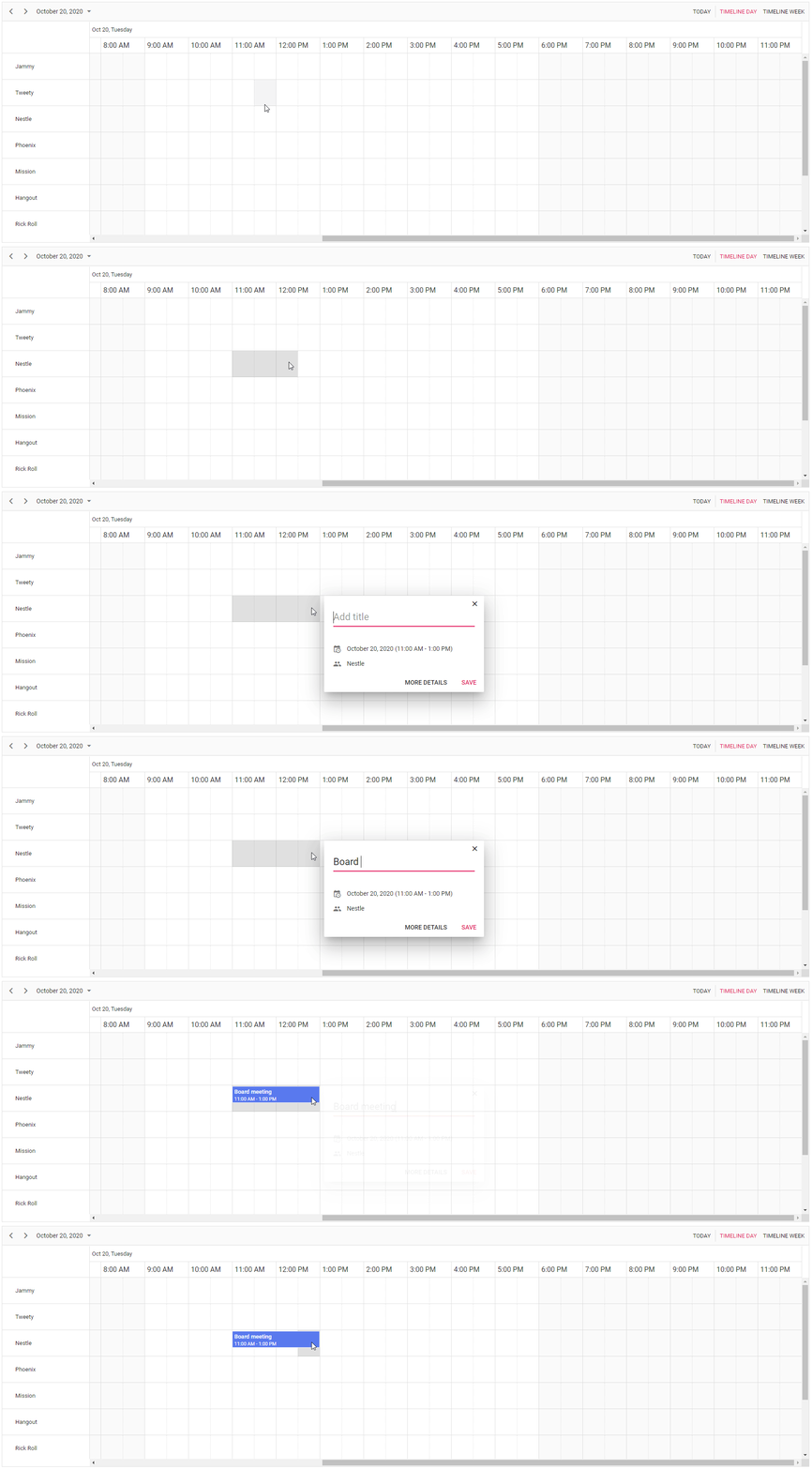
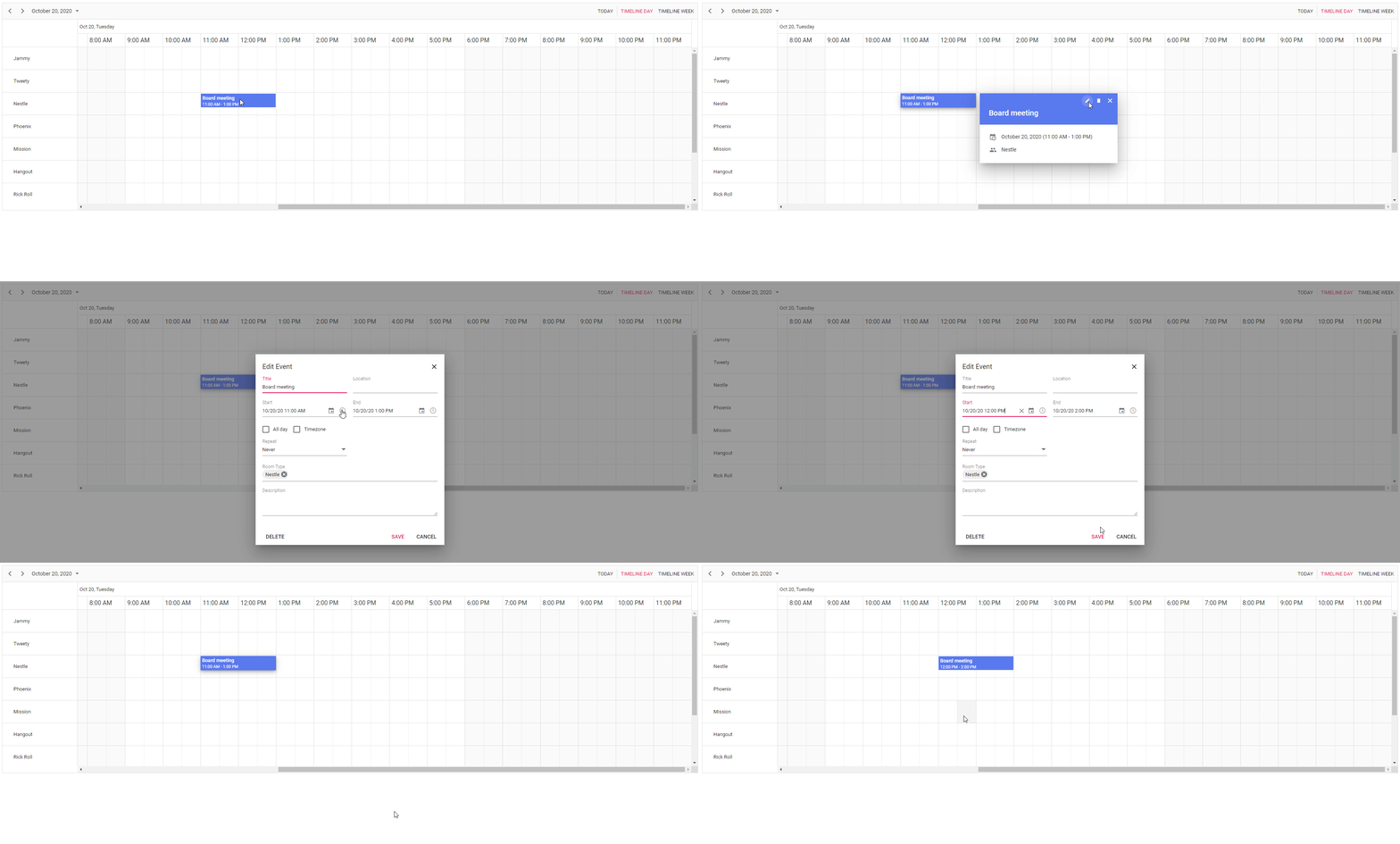
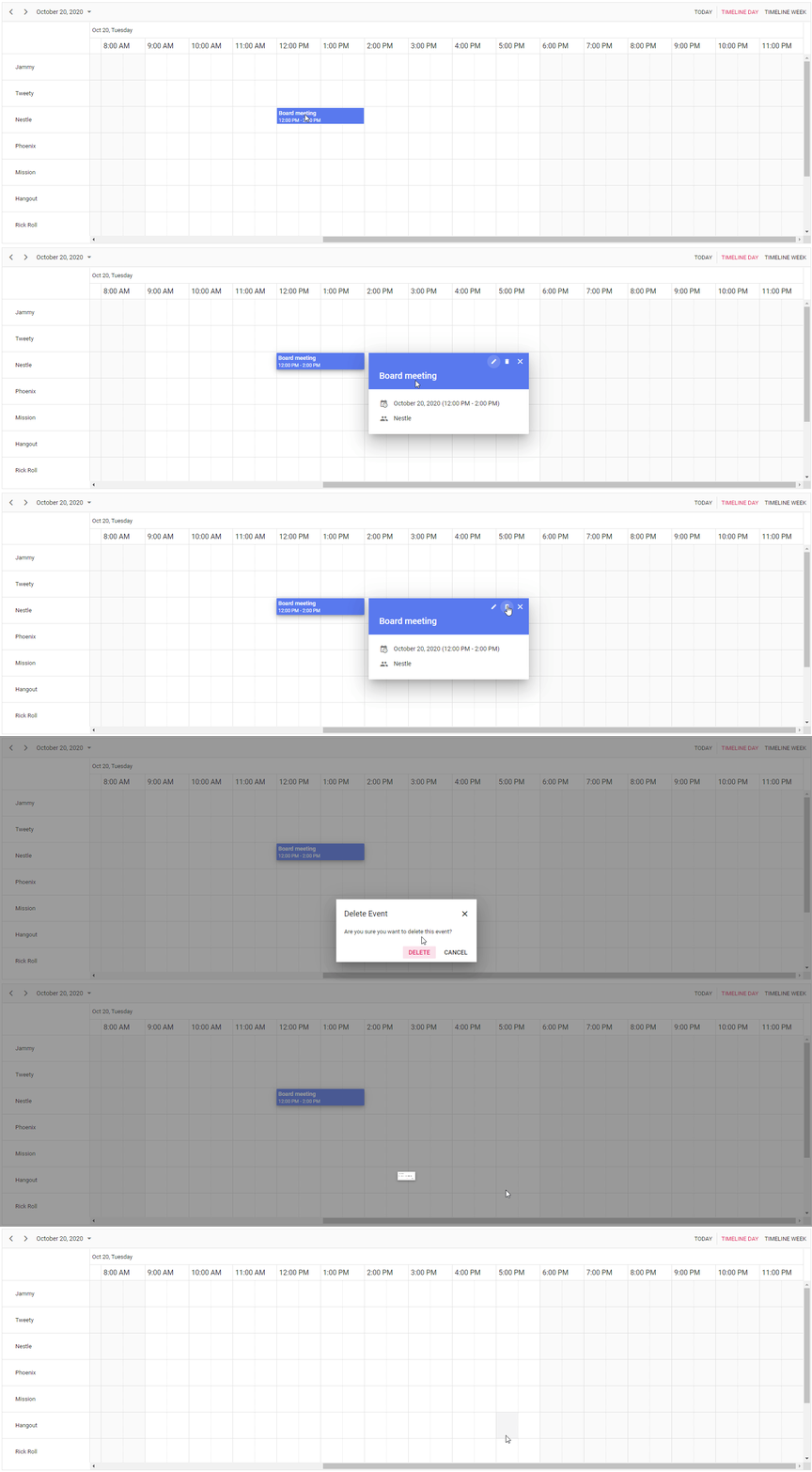
Performing CRUD Operations in JavaScript Scheduler
## GitHub reference
You can check out this GitHub repository [React Scheduler CRUD application](https://github.com/SyncfusionExamples/Javascript-Scheduler-CRUD-PHP-MySQL)
for more demos.
## Summary
This article aimed to provide a clearer understanding of building a scheduler application with CRUD functionality using PHP and a MySQL database. Give it a shot and let us know your thoughts in the comments section.
For our clients, the latest version of Essential Studio can be downloaded from the [license and downloads](https://www.syncfusion.com/account/downloads)
page. If you are yet to become a Syncfusion customer, take advantage of our 30-day [free tria](https://www.syncfusion.com/downloads)
[l](https://www.syncfusion.com/downloads/)
to experience all the features we offer.
If you have questions, don’t hesitate to contact us through our [support forum](https://www.syncfusion.com/forums/maui)
, [support portal](https://support.syncfusion.com/kb/cross-platforms/category/76)
, or [feedback portal](https://www.syncfusion.com/feedback/maui)
. We are always here to help!
## Related Blogs
[Using JavaScript Gantt Chart in SharePoint Web Parts for Effective Project Management: Part 1](https://www.syncfusion.com/blogs/post/using-javascript-gantt-chart-in-sharepoint-web-parts-for-effective-project-management-part-1)
[Using JavaScript Gantt Chart in SharePoint Web Parts for Effective Project Management: Part 2](https://www.syncfusion.com/blogs/post/using-javascript-gantt-chart-in-sharepoint-web-part-for-effective-project-management-part-2)
[10 Tips and Tricks to Handle JavaScript Objects](https://www.syncfusion.com/blogs/post/10-tips-and-tricks-to-handle-javascript-objects)
[Easily Group Data into Ranges in Web Applications Using Pivot Table](https://www.syncfusion.com/blogs/post/easily-group-data-into-ranges-in-web-applications-using-pivot-table)