---
title: "Introducing Slot Template Support for Syncfusion Vue Components"
published_at: "2022-05-19T10:00:57+00:00"
modified_at: "2026-01-12T06:33:14+00:00"
url: "https://www.syncfusion.com/blogs/post/introducing-slot-template-support-for-syncfusion-vue-components"
excerpt: "At Syncfusion, we previously rendered templates for the Vue components using their properties and a separate Vue component. This led to less code readability and more code usage. Unfortunately for that approach, code optimization and code readability play a significant..."
taxonomy_category:
- "Development"
- "Syncfusion"
- "Vue"
- "Web"
- "What's new"
taxonomy_post_tag:
- "productivity"
- "Vue"
- "Web Development"
- "What's New"
---
# Introducing Slot Template Support for Syncfusion Vue Components
[Piramanayagam Ramakrishnan](https://www.syncfusion.com/blogs/author/piramanayagamr)
At Syncfusion, we previously rendered templates for the [Vue components](https://www.syncfusion.com/vue-ui-components)
using their properties and a separate Vue component. This led to less code readability and more code usage. Unfortunately for that approach, code optimization and code readability play a significant role in enhancing the efficiency of an application. We can resolve this issue using slot support, which improves code readability in template rendering.
Syncfusion always keeps up with the latest features in the frameworks we support, and we are happy to announce that the Syncfusion Vue components now support slots as of the [2022 Volume 1 (version 20.1.47)](https://www.syncfusion.com/forums/174125/essential-studio-2022-volume-1-main-release-v20-1-0-47-is-available-for-download)
release.
In this article, we’ll see what a slot is and how it makes template rendering as easy as possible in the Syncfusion Vue components.
## What is a slot?
A [slot](https://vuejs.org/guide/components/slots.html)
is a reserved space provided by Vue to display content from one component to another. It loads outlet content into the [DOM (Document Object Model)](https://en.wikipedia.org/wiki/Document_Object_Model)
. There are two types of slots: [named slots and unnamed or default slot](https://vuejs.org/guide/components/slots.html#named-slots)
.
In Syncfusion Vue components, we use named slots.
## Classic template rendering in Syncfusion Vue components
Previously, we used a separate Vue component and a property to render templates for Syncfusion Vue components.
For example, consider the [Tree View](https://www.syncfusion.com/vue-ui-components/vue-tree-view)
component with the template option. We would define the template using a separate Vue component and map this template name (treeTemplate) to the **nodeTemplate** property of the TreeView. This led to using more lines of code and affected the code readability.
Refer to the following code example.
```
```
Executing the above code will provide output like the following screenshot.
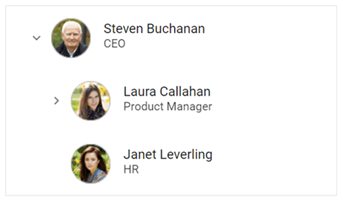
Classic Template Rendering in Syncfusion Vue Components
## **Template rendering in Syncfusion Vue components using slots**
Now, you can easily render templates using slots in our Vue components. Also, you can render multiple templates using slots. Each template is differentiated by its name. We should map each slot name with the corresponding property to render the slot content to the corresponding slot outlet.
The component’s data source ({data}) will be passed as the property to the **v-slot** directive, which can be accessed by expressions inside the slot. As said before, this approach enhances code readability.
Refer to the following code example. Here, we have used **treeTemplate** as the name of the slot template.
```
![employee]()
{{data.name}}
{{data.job}}
```
After executing the above code, the output we receive will look like the following screenshot.
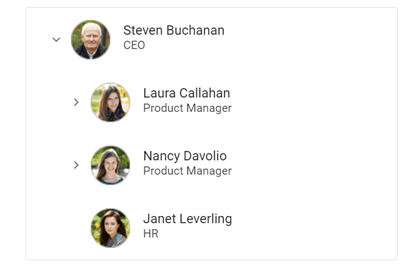
Template Rendering in Syncfusion Vue Components using Slots
**Note:** For more details, refer to the [Vue Tree View component support for slots in template rendering](https://ej2.syncfusion.com/vue/demos/#/bootstrap5/treeview/template.html)
demo.
## Conclusion
Thanks for reading! In this blog, we have seen the newly introduced slot template rendering support for [Syncfusion Vue components](https://www.syncfusion.com/vue-ui-components)
in the [2022 Volume 1](https://www.syncfusion.com/forums/174125/essential-studio-2022-volume-1-main-release-v20-1-0-47-is-available-for-download)
release. This new feature will enhance code readability and improve productivity while rendering templates in your Vue apps. Give it a try and leave your feedback in the comments section below!
For existing customers, the new version of Essential Studio® is available for download from the [License and Downloads](https://www.syncfusion.com/account/downloads)
page. If you are not yet a Syncfusion customer, you can try our 30-day [free trial](https://www.syncfusion.com/downloads)
to check out our available features.
You can also contact us through our [support forum](https://www.syncfusion.com/forums)
, [support portal](https://support.syncfusion.com/?_gl=1*1w77q2z*_ga*MTc3NTk2OTU1MC4xNjQ1MjA1MTE2*_ga_WC4JKKPHH0*MTY1MjY3MzA4OS4yODkuMS4xNjUyNjczMjA1LjA.)
, or [feedback portal](https://www.syncfusion.com/feedback)
. We are always happy to assist you!
## **Related blogs**
- [Can the Composition API Replace Vue Mixins?](https://www.syncfusion.com/blogs/post/can-the-composition-api-replace-vue-mixins.aspx)
- [A Step-By-Step Guide to Server-Side Rendering with VueJS](https://www.syncfusion.com/blogs/post/a-step-by-step-guide-to-server-side-rendering-with-vuejs.aspx)
- [Top 5 Features of Vue.js Devtools to Enhance Your Development Strategies](https://www.syncfusion.com/blogs/post/top-5-features-of-vue-js-devtools-to-enhance-your-development-strategies.aspx)
- [Micro-Frontend—Why and How?](https://www.syncfusion.com/blogs/post/micro-frontend-why-and-how.aspx)