---
title: "5 Tips to Improve the Load Time of an Angular Application"
published_at: "2023-03-02T12:17:58+00:00"
modified_at: "2025-11-06T09:11:45+00:00"
url: "https://www.syncfusion.com/blogs/post/improve-load-time-angular-app"
excerpt: "This article discusses five tips that will be useful to improve the load time of your Angular application."
taxonomy_category:
- "Angular"
- "Development"
- "Performance"
- "Tips and Tricks"
- "Web"
taxonomy_post_tag:
- "Angular"
- "development"
- "productivity"
- "Tips and Tricks"
- "Web"
---
# 5 Tips to Improve the Load Time of an Angular Application
[Sara Mahagamarachchi](https://www.syncfusion.com/blogs/author/sara-mahagamarachchi)
[Angular](https://en.wikipedia.org/wiki/Angular_(web_framework))
is popular among software developers to build architecturally complex and content-heavy applications. Even though Angular is a robust framework by nature, sometimes performance optimization could be a concern when it comes to providing an enhanced user experience. However, there are various techniques we can try out as developers to minimize these performance issues.
In this article, I will share five tips and tricks to improve the load time in an Angular application.
## 1. Lazy Loading Modules and Images
Lazy loading is a design approach that holds off on initializing an item until it is actually required. We can use it to improve the performance of a program by reducing the amount of time and resources that are devoted to loading and initializing objects that may not be used.
The primary purpose of lazy loading is to decrease the main bundle size of the Angular application by loading only what the user needs to see at first. It will reduce the initial load time of the Angular app.
### Lazy loading modules
We must modularize the application and plan the routes to achieve lazy loading. First, we will look at a simple example.
In the following example, there are three modules and routes.
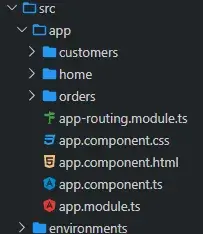
The **home** component should be eagerly loaded since it is shown to the users in the initial load. We can implement lazy loading for the ** customers** and ** orders** components. The following code snippet in the routing file shows how this is configured. The routing file can be within a submodule or in the ** app-routing.module.ts** file.
```
import { NgModule } from '@angular/core';
import { Routes, RouterModule } from '@angular/router';
import { HomeComponent } from './home/home.component';
import { CustomPreloadingService } from './shared/custom-preloading.service';
const routes: Routes = [
{
path: 'customers',
loadChildren: () =>
import('./customers/customers.module').then((m) => m.CustomersModule),
},
{
path: 'orders',
loadChildren: () =>
import('./orders/orders.module').then((m) => m.OrdersModule),
},
{
path: '',
component: HomeComponent,
},
];
@NgModule({
imports: [RouterModule.forRoot(routes)],
exports: [RouterModule],
providers: [],
})
export class AppRoutingModule {}
```
Once this code is used, Angular will load the module and related recourses only when the route is reached, not in the initial load, increasing the performance.
### Lazy loading images
Loading images only when they are in the viewport will help reduce the loading time of the application. It is straightforward to implement **Native** lazy loading.
```
 ```
The **loading** attribute supports ** auto**, ** eager**, and ** lazy**. When the loading attribute is set to ** lazy**, the browser will not load the resource until it is in the viewport. Unfortunately, even though this is super easy to implement, it is ** not**supported by the Safari browser.
We can handle this by using a placeholder image as the default image until the actual image is loaded. There are also other methods to implement the lazy load of images that are compatible with all browsers. The [ng-lazyload-image](https://www.npmjs.com/package/ng-lazyload-image)
is a lightweight library you can use for lazy loading images. It internally uses the [Intersection Observer API](https://developer.mozilla.org/en-US/docs/Web/API/Intersection_Observer_API)
for scrolling the listeners. Once you set up the library, you can use it as in the following.
```
```
The **loading** attribute supports ** auto**, ** eager**, and ** lazy**. When the loading attribute is set to ** lazy**, the browser will not load the resource until it is in the viewport. Unfortunately, even though this is super easy to implement, it is ** not**supported by the Safari browser.
We can handle this by using a placeholder image as the default image until the actual image is loaded. There are also other methods to implement the lazy load of images that are compatible with all browsers. The [ng-lazyload-image](https://www.npmjs.com/package/ng-lazyload-image)
is a lightweight library you can use for lazy loading images. It internally uses the [Intersection Observer API](https://developer.mozilla.org/en-US/docs/Web/API/Intersection_Observer_API)
for scrolling the listeners. Once you set up the library, you can use it as in the following.
```
![]() ```
When we use a placeholder image, we can avoid content shift by specifying the width and height for the outer container of the image, as content shifting gives a bad user experience.
## 2. Use OnPush change detection
In the Angular framework, there are two strategies for detecting a change:
- Default
- OnPush
**Default** will trigger change detection in all components whenever something is changed in our application, such as a click event or a promise. Through ** dirty checking**, Angular will compare the old and new values of an expression and decide whether the view should be updated. This default behavior does not matter to us until the project grows.
```
import { ChangeDetectionStrategy, Component, OnInit } from '@angular/core';
@Component({
selector: 'app-orders',
templateUrl: './orders.component.html',
styleUrls: ['./orders.component.css'],
changeDetection: ChangeDetectionStrategy.OnPush,
})
export class OrdersComponent implements OnInit {
constructor() {}
ngOnInit() {}
}
```
We can indicate to Angular when to check for changes after we set **OnPush**, as shown in ** orders.component.ts**. So, when does change detection happen now?
- **When a reference of an input changes.**
- It is essential to remember that we must use immutable objects whenever we pass data into a component as **@Inputs()** for the app to work as expected. All primitive data types are immutable. When using reference types such as objects and arrays, ** avoid**mutating existing instances and create a new instance.
- **When an event handler is triggered.**
- Irrespective of input variable changes, when an event handler is triggered inside a component, change detection will be triggered.
- **When a new value is emitted by an observable with an async pipe link in the template.**
- Following the *reactive approach*in Angular is an effective method for OnPush change detection.
- You can pass an observable as **@Inputs()** or directly inject a service (which exposes an observable) from the ** constructor** and subscribe to it in the template using an ** async pipe**. When a new value is emitted, it will trigger change detection.
## 3. Analyze your webpack’s bundle size
When you are concerned about the performance of your app, the size of your bundle definitely matters. You can use tools like [webpack-bundle-analyzer](https://github.com/webpack-contrib/webpack-bundle-analyzer)
to see how it will affect your Angular application’s load time.
When we need to use external libraries, we can avoid including them in the **index.html** file unless it is required and lazily load the libraries when needed. We can use a shared service to lazy load the external libraries.
```
import { Injectable, Inject } from '@angular/core';
import { ReplaySubject, Observable } from 'rxjs';
import { DOCUMENT } from '@angular/common';
@Injectable()
export class ScriptLoaderService {
loader: { [url: string]: ReplaySubject } = {};
constructor(@Inject(DOCUMENT) private readonly document: Document) {}
loadScript(url: string): Observable {
if (this.loader[url]) {
return this.loader[url].asObservable();
}
this.loader[url] = new ReplaySubject();
const script = this.document.createElement('script');
script.type = 'text/javascript';
script.src = url;
script.onload = () => {
this.loader[url].next();
this.loader[url].complete();
};
this.document.body.appendChild(script);
return this.loader[url].asObservable();
}
}
```
## 4. Preloading modules
We can take this to the next step once we have implemented lazy-loading modules. As discussed, lazy-loading modules help decrease the app’s initial load time, since they load the resources on demand. In contrast, preloading modules will help reduce the load time of lazy-loaded modules, since this will load modules that are to be lazy-loaded asynchronously in the background without blocking the UI.
**NoPreloading** is the default behavior for an Angular application. We can use ** PreloadAllModules** to preload all the modules to be lazy-loaded. However, this might not be very effective if there are a lot of modules in the application. The best method is:
- Eager load: For the modules with initially required resources such as login and home.
- Preload: For the modules frequently used in your application. There are different methods to implement this, such as preloading with a delay and preloading based on the network quality.
- Lazy load: All other modules.
To preload frequently used modules with a delay, we can write a service that implements **PreloadingStrategy**, as follows.
```
import { Injectable } from '@angular/core';
import { PreloadingStrategy, Route } from '@angular/router';
import { Observable, of, timer } from 'rxjs';
import { map } from 'rxjs/operators';
@Injectable({
providedIn: 'root',
})
export class CustomPreloadingService implements PreloadingStrategy {
preload(route: Route, load: () => Observable): Observable {
const loadRoute = (delay: number) =>
delay > 0 ? timer(delay * 1000).pipe(map(() => load())) : load();
if (route.data && route.data.preload) {
const delay = route.data.loadAfterSeconds
? route.data.loadAfterSeconds
: 0;
return loadRoute(delay);
}
return of(null);
}
}
```
## 5. Use pure pipes instead of methods
When we use a method in our template to do some calculations, the change detection will be triggered to re-render the component more frequently. This will affect the performance when there are many interactions in the template and when the processing is heavy.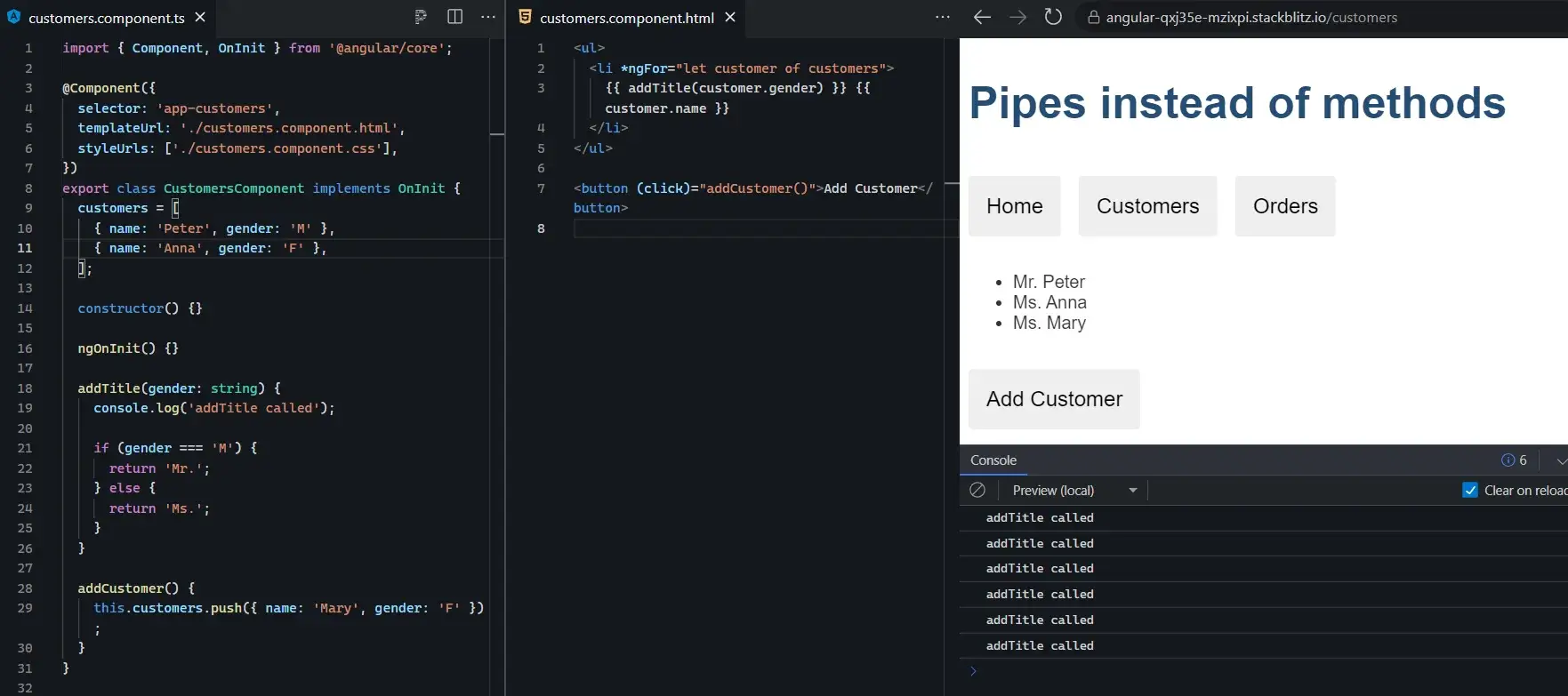
In this simple example, as you can see, the method is called six times just after the **Add Customer** button is clicked.
Pure pipes is a good solution for this issue since it is called **only** when function parameters change. In the following, you can see the difference. The pipe is called only once after the **Add Customer** button is clicked.
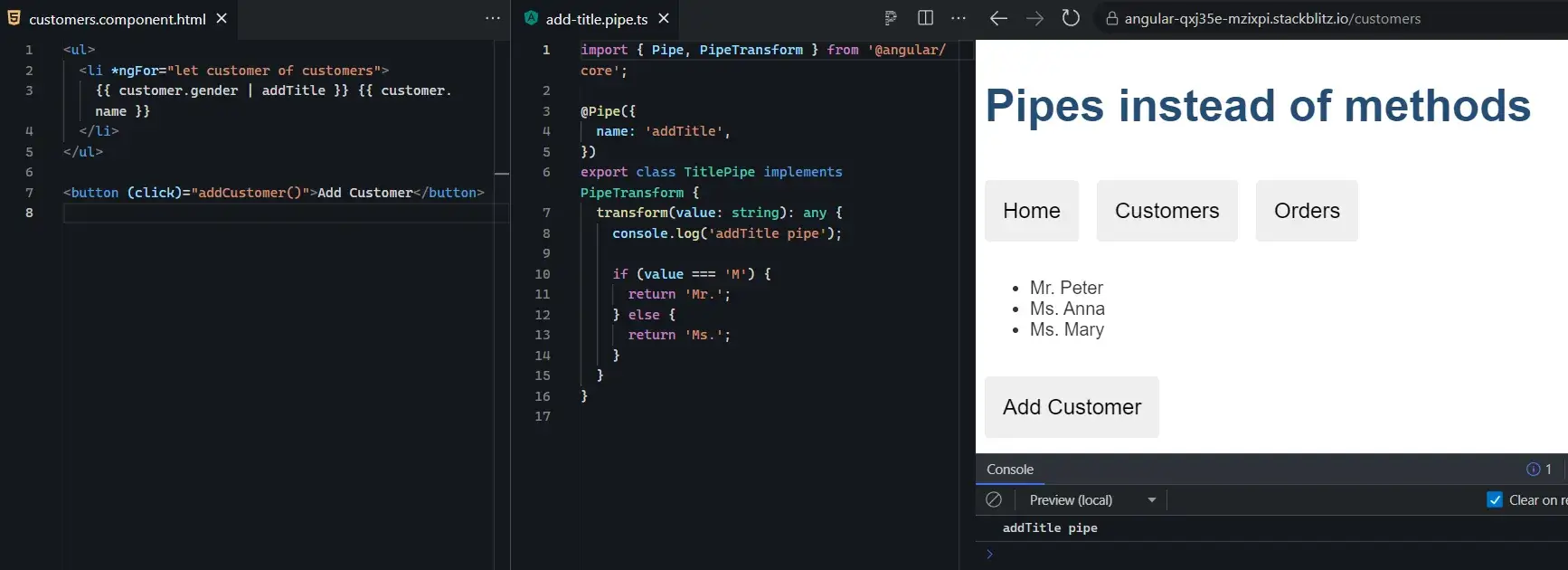Following is the sample code for **add-title.pipe.ts**.
```
import { Pipe, PipeTransform } from '@angular/core';
@Pipe({
name: 'addTitle',
})
export class TitlePipe implements PipeTransform {
transform(value: string): any {
console.log('addTitle pipe');
if (value === 'M') {
return 'Mr.';
} else {
return 'Ms.';
}
}
}
```
## Conclusion
I have shared five tips to improve the performance of your Angular application. Apart from these, you could use many more methods to improve performance. However, I hope these tips will help you in your quest.
Thank you for reading!
Syncfusion’s [Angular UI component](https://www.syncfusion.com/angular-ui-components)
library is the only suite you will ever need to build an app. It contains over 80 high-performance, lightweight, modular, and responsive UI components in a single package.
For existing customers, the newest Essential Studio® version is available for download from the [License and Downloads](https://www.syncfusion.com/account/downloads)
page. If you are not yet a Syncfusion customer, you can try our 30-day [free trial](https://www.syncfusion.com/downloads)
to check out the available features. Also, check out our demos on [GitHub](https://github.com/syncfusion)
.
If you have questions, you can contact us through our [support forums](https://www.syncfusion.com/forums)
, [support portal](https://support.syncfusion.com/)
, or [feedback portal](https://www.syncfusion.com/feedback/angular)
. We are always happy to assist you!
## Recommented resources
- [Angular Succinctly E-Books](https://www.syncfusion.com/succinctly-free-ebooks?searchkey=Angular&type=all)
- [A Complete Guide to Creating a Mind Map Using Angular Diagram Component](https://www.syncfusion.com/blogs/post/mind-map-using-angular-diagram.aspx)
- [Debug Angular Apps Easily Using Angular DevTools](https://www.syncfusion.com/blogs/post/debug-angular-apps-easily-using-angular-devtools.aspx)
- [Easily Generate Bulk Reports Using Mail Merge in Angular](https://www.syncfusion.com/blogs/post/easily-generate-bulk-reports-using-mail-merge-in-angular.aspx)
- [Easy Steps to Create a Read-Only Angular PDF Viewer](https://www.syncfusion.com/blogs/post/easy-steps-to-create-a-read-only-angular-pdf-viewer.aspx)
```
When we use a placeholder image, we can avoid content shift by specifying the width and height for the outer container of the image, as content shifting gives a bad user experience.
## 2. Use OnPush change detection
In the Angular framework, there are two strategies for detecting a change:
- Default
- OnPush
**Default** will trigger change detection in all components whenever something is changed in our application, such as a click event or a promise. Through ** dirty checking**, Angular will compare the old and new values of an expression and decide whether the view should be updated. This default behavior does not matter to us until the project grows.
```
import { ChangeDetectionStrategy, Component, OnInit } from '@angular/core';
@Component({
selector: 'app-orders',
templateUrl: './orders.component.html',
styleUrls: ['./orders.component.css'],
changeDetection: ChangeDetectionStrategy.OnPush,
})
export class OrdersComponent implements OnInit {
constructor() {}
ngOnInit() {}
}
```
We can indicate to Angular when to check for changes after we set **OnPush**, as shown in ** orders.component.ts**. So, when does change detection happen now?
- **When a reference of an input changes.**
- It is essential to remember that we must use immutable objects whenever we pass data into a component as **@Inputs()** for the app to work as expected. All primitive data types are immutable. When using reference types such as objects and arrays, ** avoid**mutating existing instances and create a new instance.
- **When an event handler is triggered.**
- Irrespective of input variable changes, when an event handler is triggered inside a component, change detection will be triggered.
- **When a new value is emitted by an observable with an async pipe link in the template.**
- Following the *reactive approach*in Angular is an effective method for OnPush change detection.
- You can pass an observable as **@Inputs()** or directly inject a service (which exposes an observable) from the ** constructor** and subscribe to it in the template using an ** async pipe**. When a new value is emitted, it will trigger change detection.
## 3. Analyze your webpack’s bundle size
When you are concerned about the performance of your app, the size of your bundle definitely matters. You can use tools like [webpack-bundle-analyzer](https://github.com/webpack-contrib/webpack-bundle-analyzer)
to see how it will affect your Angular application’s load time.
When we need to use external libraries, we can avoid including them in the **index.html** file unless it is required and lazily load the libraries when needed. We can use a shared service to lazy load the external libraries.
```
import { Injectable, Inject } from '@angular/core';
import { ReplaySubject, Observable } from 'rxjs';
import { DOCUMENT } from '@angular/common';
@Injectable()
export class ScriptLoaderService {
loader: { [url: string]: ReplaySubject } = {};
constructor(@Inject(DOCUMENT) private readonly document: Document) {}
loadScript(url: string): Observable {
if (this.loader[url]) {
return this.loader[url].asObservable();
}
this.loader[url] = new ReplaySubject();
const script = this.document.createElement('script');
script.type = 'text/javascript';
script.src = url;
script.onload = () => {
this.loader[url].next();
this.loader[url].complete();
};
this.document.body.appendChild(script);
return this.loader[url].asObservable();
}
}
```
## 4. Preloading modules
We can take this to the next step once we have implemented lazy-loading modules. As discussed, lazy-loading modules help decrease the app’s initial load time, since they load the resources on demand. In contrast, preloading modules will help reduce the load time of lazy-loaded modules, since this will load modules that are to be lazy-loaded asynchronously in the background without blocking the UI.
**NoPreloading** is the default behavior for an Angular application. We can use ** PreloadAllModules** to preload all the modules to be lazy-loaded. However, this might not be very effective if there are a lot of modules in the application. The best method is:
- Eager load: For the modules with initially required resources such as login and home.
- Preload: For the modules frequently used in your application. There are different methods to implement this, such as preloading with a delay and preloading based on the network quality.
- Lazy load: All other modules.
To preload frequently used modules with a delay, we can write a service that implements **PreloadingStrategy**, as follows.
```
import { Injectable } from '@angular/core';
import { PreloadingStrategy, Route } from '@angular/router';
import { Observable, of, timer } from 'rxjs';
import { map } from 'rxjs/operators';
@Injectable({
providedIn: 'root',
})
export class CustomPreloadingService implements PreloadingStrategy {
preload(route: Route, load: () => Observable): Observable {
const loadRoute = (delay: number) =>
delay > 0 ? timer(delay * 1000).pipe(map(() => load())) : load();
if (route.data && route.data.preload) {
const delay = route.data.loadAfterSeconds
? route.data.loadAfterSeconds
: 0;
return loadRoute(delay);
}
return of(null);
}
}
```
## 5. Use pure pipes instead of methods
When we use a method in our template to do some calculations, the change detection will be triggered to re-render the component more frequently. This will affect the performance when there are many interactions in the template and when the processing is heavy.
In this simple example, as you can see, the method is called six times just after the **Add Customer** button is clicked.
Pure pipes is a good solution for this issue since it is called **only** when function parameters change. In the following, you can see the difference. The pipe is called only once after the **Add Customer** button is clicked.
Following is the sample code for **add-title.pipe.ts**.
```
import { Pipe, PipeTransform } from '@angular/core';
@Pipe({
name: 'addTitle',
})
export class TitlePipe implements PipeTransform {
transform(value: string): any {
console.log('addTitle pipe');
if (value === 'M') {
return 'Mr.';
} else {
return 'Ms.';
}
}
}
```
## Conclusion
I have shared five tips to improve the performance of your Angular application. Apart from these, you could use many more methods to improve performance. However, I hope these tips will help you in your quest.
Thank you for reading!
Syncfusion’s [Angular UI component](https://www.syncfusion.com/angular-ui-components)
library is the only suite you will ever need to build an app. It contains over 80 high-performance, lightweight, modular, and responsive UI components in a single package.
For existing customers, the newest Essential Studio® version is available for download from the [License and Downloads](https://www.syncfusion.com/account/downloads)
page. If you are not yet a Syncfusion customer, you can try our 30-day [free trial](https://www.syncfusion.com/downloads)
to check out the available features. Also, check out our demos on [GitHub](https://github.com/syncfusion)
.
If you have questions, you can contact us through our [support forums](https://www.syncfusion.com/forums)
, [support portal](https://support.syncfusion.com/)
, or [feedback portal](https://www.syncfusion.com/feedback/angular)
. We are always happy to assist you!
## Recommented resources
- [Angular Succinctly E-Books](https://www.syncfusion.com/succinctly-free-ebooks?searchkey=Angular&type=all)
- [A Complete Guide to Creating a Mind Map Using Angular Diagram Component](https://www.syncfusion.com/blogs/post/mind-map-using-angular-diagram.aspx)
- [Debug Angular Apps Easily Using Angular DevTools](https://www.syncfusion.com/blogs/post/debug-angular-apps-easily-using-angular-devtools.aspx)
- [Easily Generate Bulk Reports Using Mail Merge in Angular](https://www.syncfusion.com/blogs/post/easily-generate-bulk-reports-using-mail-merge-in-angular.aspx)
- [Easy Steps to Create a Read-Only Angular PDF Viewer](https://www.syncfusion.com/blogs/post/easy-steps-to-create-a-read-only-angular-pdf-viewer.aspx)