---
title: "How to Dynamically Render a Component in a Blazor Application"
published_at: "2021-06-02T10:00:39+00:00"
modified_at: "2026-02-10T09:56:09+00:00"
url: "https://www.syncfusion.com/blogs/post/how-to-dynamically-render-a-component-in-a-blazor-application"
excerpt: "In Blazor, we typically use either RenderTreeBuilder or Razor syntax (RenderFragment) to create dynamic components. In the classic approach, we check for the data type or for a condition to dynamically render a component. This necessitates manually maintaining the component’s..."
taxonomy_category:
- "Blazor"
- "Tips and Tricks"
- "Web"
taxonomy_post_tag:
- "Blazor"
- "DynamicComponent"
- "productivity"
- "Web Development"
- "WebAssembly"
---
# How to Dynamically Render a Component in a Blazor Application
[Gopi Govindasamy](https://www.syncfusion.com/blogs/author/gopi-govindasamy)
In Blazor, we typically use either RenderTreeBuilder or Razor syntax ([RenderFragment](https://docs.microsoft.com/en-us/dotnet/api/microsoft.aspnetcore.components.renderfragment?view=aspnetcore-5.0)
) to create dynamic components. In the classic approach, we check for the data type or for a condition to dynamically render a component. This necessitates manually maintaining the component’s state of visibility based on whether the component should be displayed or hidden, which is more complicated for complex data.
Beginning with .NET 6 Preview 1, the ASP.NET Core team introduced [DynamicComponent](https://devblogs.microsoft.com/aspnet/asp-net-core-updates-in-net-6-preview-1/#dynamiccomponent)
. The use of DynamicComponent greatly reduces the complexity of dynamic component rendering when dealing with large amounts of complex data.
## What is DynamicComponent?
[DynamicComponent](https://devblogs.microsoft.com/aspnet/asp-net-core-updates-in-net-6-preview-1/#dynamiccomponent)
is a new built-in Blazor component that can be used to render dynamic components using its type and optional parameters. Let’s take a look at it with some code examples!
```
```
The optional **Parameters** property is used to define the component properties as ** dictionary**.
```
@code {
public Dictionary param { get; set; }
}
```
Let’s see DynamicComponent in action.
## Developing an expense tracker application
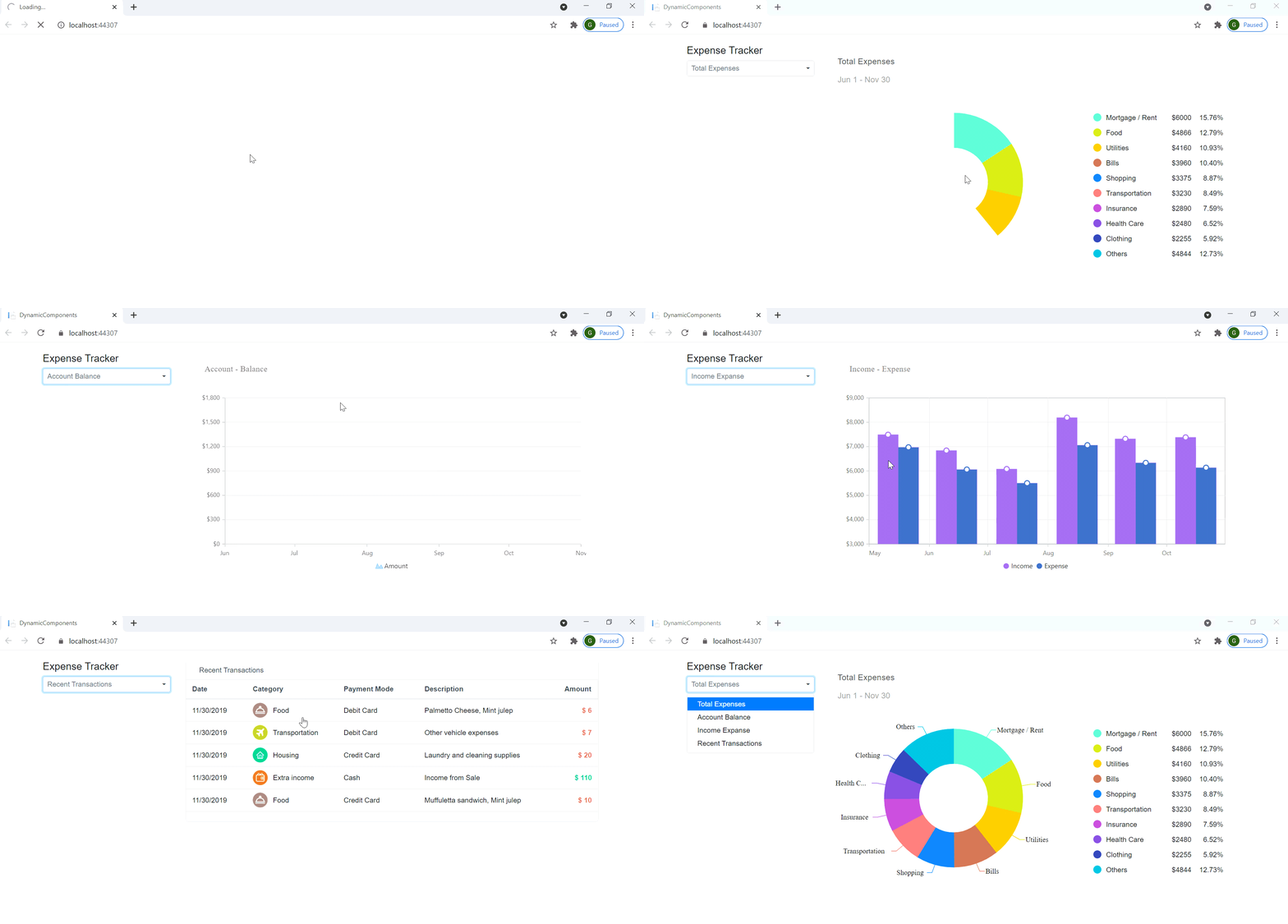
For this blog, we have developed an expense tracker application with dynamically created components by specifying their type.
A [DropDownList](https://www.syncfusion.com/blazor-components/blazor-dropdown-list)
contains four options for dynamically displaying the expense report. We render the expense tracker pages using several Syncfusion [Blazor UI components](https://www.syncfusion.com/blazor-components)
.
### Prerequisites
- [Visual Studio 2019](https://visualstudio.microsoft.com/vs/)
- [.NET 6 Preview 1](https://dotnet.microsoft.com/download/dotnet/6.0)
Refer to the [Getting Started with Syncfusion Blazor Components in Blazor Server-Side App in Visual Studio 2019](https://blazor.syncfusion.com/documentation/getting-started/blazor-server-side-visual-studio-2019/)
documentation. It will provide a step-by-step procedure to create a Blazor server application and configure it with Syncfusion Blazor components.
The Blazor DropDownList includes object value binding support, allowing us to bind the data source object to the **Value** property. We obtain the name of the component class using the ** nameof()** method and set it directly to the ** Type** property of ** DynamicComponent** by using the ** Type**.** GetType()** method. Since we bind the data in the DropDownList, any change in the DropDownList component values will automatically update the DynamicComponent.
Refer to the following code example:
```
@code {
private Components componentValue { get; set; }
public class Components
{
public string ComponentName { get; set; }
public string ComponentType { get; set; }
public Dictionary Param { get; set; }
}
protected override async Task OnInitializedAsync()
{
this.componentList = new List()
{
new Components() { ComponentName = "Total Expenses", ComponentType = typeof(ExpPieChart).AssemblyQualifiedName, Param = new Dictionary() { { "ExpenseData", ExpenseData } } }
. . .
. . .
};
this.componentValue = componentList[0];
await base.OnInitializedAsync();
}
}
```
Dynamically rendering a component in a Blazor application
## Resources
For more information, refer to the [How to render dynamic components in Blazor application project demo](https://github.com/SyncfusionExamples/Dynamically-Render-a-Component-in-Blazor-Application)
.
## Summary
Thank you for reading! In this article, we demonstrated how to use [DynamicComponent](https://devblogs.microsoft.com/aspnet/asp-net-core-updates-in-net-6-preview-1/#dynamiccomponent)
in a Blazor server application to dynamically render new components. We also explained some details about sending parameters to the DynamicComponent.
Essential Studio® for [Blazor](https://www.syncfusion.com/blazor-components)
offers the largest collection of components for the Blazor platform. It has popular components like [Charts](https://www.syncfusion.com/blazor-components/blazor-charts)
, [DataGrid](https://www.syncfusion.com/blazor-components/blazor-datagrid)
, [Scheduler](https://www.syncfusion.com/blazor-components/blazor-scheduler)
, [Diagram](https://www.syncfusion.com/blazor-components/blazor-diagram)
, [Word Processor](https://www.syncfusion.com/blazor-components/blazor-word-processor)
, and [Maps](https://www.syncfusion.com/blazor-components/blazor-maps)
. It also includes unique file-format libraries for manipulating [Excel](https://www.syncfusion.com/excel-framework/blazor)
, [Word](https://www.syncfusion.com/word-framework/blazor)
, [PDF](https://www.syncfusion.com/pdf-framework/blazor)
, and [PowerPoint](https://www.syncfusion.com/powerpoint-framework/blazor)
files. Use them to build world-class applications!
Also, try our Blazor components by downloading a [free 30-day trial](https://www.syncfusion.com/account/manage-trials/downloads)
, or check out our [NuGet package](https://www.nuget.org/packages/Syncfusion.Blazor)
. Feel free to peruse our [online examples](https://blazor.syncfusion.com/)
and [documentation](https://blazor.syncfusion.com/documentation/introduction/)
to explore other available features.
If you have questions, you can also contact us through our [feedback portal](https://www.syncfusion.com/feedback/blazor-components)
, [support forums](https://www.syncfusion.com/forums/blazor-components)
, or [Direct-Trac](https://www.syncfusion.com/support/directtrac/incidents/newincident)
. We are always happy to assist you!
If you enjoyed reading this blog, then we think you shouldn’t miss the following,- [ASP. NET Core Blazor Component Virtualization in .NET 5 – An Overview](https://www.syncfusion.com/blogs/post/asp-net-core-blazor-component-virtualization-in-net-5.aspx) [Blog]
- [Exploring Syncfusion Blazor Components on Cross-Platform Desktop Apps Using Electron](https://www.syncfusion.com/blogs/post/exploring-syncfusion-blazor-components-on-cross-platform-desktop-apps-using-electron.aspx) [Blog]
- [Easy Steps to Create a Blazor Server App with Authentication](https://www.syncfusion.com/blogs/post/easy-steps-create-a-blazor-server-app-with-authentication.aspx) [Blog]
- [3 Different Hosting Models in Blazor](https://www.syncfusion.com/blogs/post/3-blazor-hosting-models.aspx) [Blog]
- *[Blazor Succinctly](https://www.syncfusion.com/succinctly-free-ebooks/blazor-succinctly)*[Ebook]