---
title: "Mastering Globalization: Utilizing Calendar Types in .NET MAUI Calendar Control"
published_at: "2023-09-08T11:24:41+00:00"
modified_at: "2025-03-21T07:28:09+00:00"
url: "https://www.syncfusion.com/blogs/post/globalization-in-dotnet-maui-calendar"
excerpt: "This blog lists out the different calendar types and their basic functionalities available in the Syncfusion .NET MAUI Calendar control."
taxonomy_category:
- ".NET MAUI"
- "Desktop"
- "Development"
- "Mobile"
- "Syncfusion"
taxonomy_post_tag:
- ".NET MAUI"
- "Calendar"
- "desktop"
- "MAUI"
- "Mobile"
---
# Mastering Globalization: Utilizing Calendar Types in .NET MAUI Calendar Control
[Sasi Kumar Arumugam](https://www.syncfusion.com/blogs/author/sasi-kumar-arumugam)
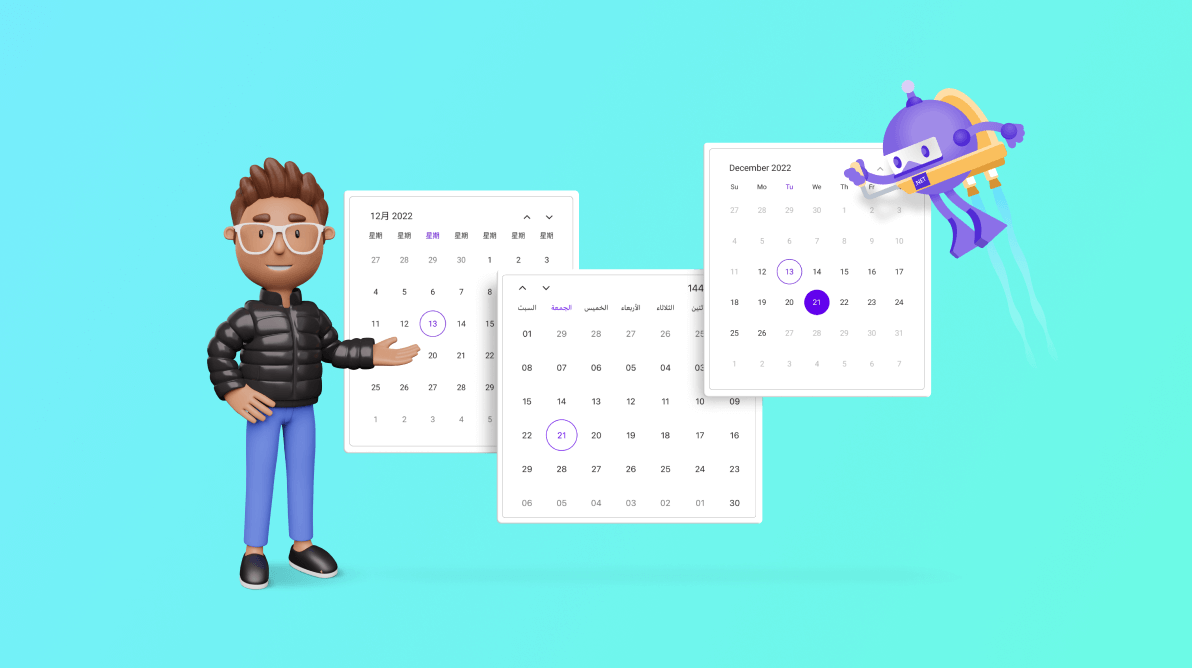
Different regions and cultures follow distinct calendar systems, reflecting their unique traditions and historical context. These calendar systems often vary in month lengths, year starts, and year ends. In today’s globalized world, developing applications that cater to users from diverse cultures and regions is essential.
The Syncfusion [.NET MAUI Calendar](https://www.syncfusion.com/maui-controls/maui-calendar)
control provides different calendar types, enabling developers to cater to a broader user base and users to interact with dates according to their cultural or regional preferences.
In this blog, we’ll explore the different calendar types and their basic functionalities in the .NET MAUI Calendar control.
**Note:** If you are new to this control, refer to the [.NET MAUI Calendar getting started](https://help.syncfusion.com/maui/calendar/getting-started)
documentation for background knowledge.
## Different calendar types
The .NET MAUI Calendar supports different calendar types and displays dates, months, and years based on the one specified. Gregorian is the default calendar type.
| Types | Description |
| --- | --- |
| Gregorian | This type of calendar is the most widely used civil calendar worldwide. The minimum supported date value is 01/01/01, and the maximum supported date value is 31/12/9999. The current year of the Gregorian calendar is 2023. |
| Hijri | This calendar type is mostly used in Saudi Arabia and the United Arab Emirates. The minimum supported date value is 01/01/01 (in Gregorian 18/07/622), and the maximum supported date value is 03/04/9666 (in Gregorian 31/12/9999). The current year of the Hijri calendar is 1444. |
| Korean | This type of calendar is very much like the Gregorian calendar and it only supports the current era. The minimum supported date value is 01/01/2334 (in Gregorian 01/01/01), and the maximum supported date value is 31/12/9999 (in Gregorian 31/12/12332). The current year of the Korean calendar is 4356. |
| Persian | This type of calendar is mostly used in Iran. The minimum supported date value is 01/01/01 (in Gregorian 21/03/622), and the maximum supported date value is 13/10/9378 (in Gregorian 31/12/9999). The current year of the Persian calendar is 1402. |
| Taiwan | This type of calendar, too, is like the Gregorian calendar and only supports the current era. The minimum supported date value is 01/01/01 (in Gregorian 01/01/1912), and the maximum supported date value is 31/12/8088 (in Gregorian 31/12/9999). The current year of the Taiwan calendar is 112. |
| Thai | This type of calendar is exactly like the Gregorian calendar and only supports the current era. The minimum supported date value is 01/01/544 (in Gregorian 01/01/01), and the maximum supported date value is 31/12/10542 (in Gregorian 31/12/9999). The current year of the Thai calendar is 2566. |
| UmAlQura | This type of calendar represents the Saudi Hijri calendar and is nearly identical to the Hijri calendar. The minimum supported date value is 01/01/1318 (in Gregorian 30/04/1900), and the maximum supported date value is 29/12/1450 (in Gregorian 13/05/2029). The current year of the UmAlQura calendar is 1444. |
You can easily change the calendar type using the [Identifier](https://help.syncfusion.com/cr/maui/Syncfusion.Maui.Calendar.SfCalendar.html#Syncfusion_Maui_Calendar_SfCalendar_Identifier)
property in the [SfCalendar](https://help.syncfusion.com/cr/maui/Syncfusion.Maui.Calendar.SfCalendar.html)
. Refer to the following code example.
```
```
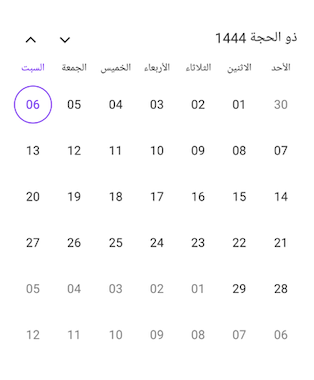
Hijri calendar type in .NET MAUI Calendar
## Different calendar views
The .NET MAUI Calendar control enriches the experience of using different calendar types by incorporating various calendar views, including month, year, decade, and century views. These distinct views offer versatile options for interacting with dates, months, and years based on the specified calendar type.
| | |
| --- | --- |
| | |
| --- | --- |
*Different calendar views in .NET MAUI Calendar control*
You can change the calendar view using the [View](https://help.syncfusion.com/cr/maui/Syncfusion.Maui.Calendar.SfCalendar.html#Syncfusion_Maui_Calendar_SfCalendar_View)
property in the [SfCalendar](https://help.syncfusion.com/cr/maui/Syncfusion.Maui.Calendar.SfCalendar.html)
. Refer to the following code example.
```
```
## Specifying the date value
When working with different calendar types in the .NET MAUI Calendar, you can assign a date value to its properties in two ways.
### Generating a date
You can create a date value by declaring the calendar type while creating the date instance.
Refer to the following code example. Here, we’ve declared the date by specifying the calendar type as Hijri.
```
SfCalendar calendar = new SfCalendar();
Calendar hijriCalendar = new HijriCalendar();
DateTime date = new DateTime(1444, 12, 6, hijriCalendar);
calendar.SelectedDate = date;
```
### Generating a date without calendar type
You can also create a date value without explicitly specifying the calendar type. In this case, the .NET MAUI Calendar will automatically convert and interpret the date value based on the specified local system’s calendar type.
Refer to the following code example. Here, we’ve used the Gregorian date, but the .NET MAUI Calendar control converts it to the corresponding Hijri calendar date.
```
SfCalendar calendar = new SfCalendar();
DateTime date = new DateTime(2023, 6, 24);
calendar.SelectedDate = date;
```
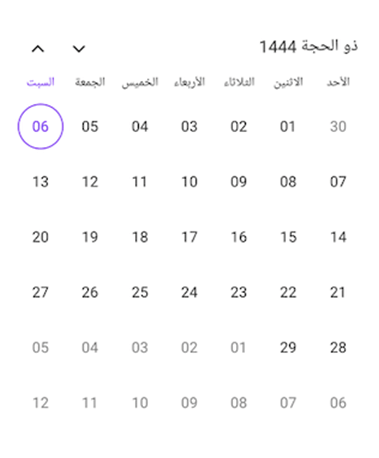
Specifying the date value in the .NET MAUI Calendar
## Specifying the flow direction
The .NET MAUI Calendar control automatically adjusts the flow direction based on the specified calendar type. This means that when you choose a calendar type with a right-to-left flow direction, such as in the Arabic calendar, the .NET MAUI Calendar control will automatically display the calendar elements in a right-to-left orientation.
The right-to-left supported calendar types in the .NET MAUI Calendar are:
- Hijri
- Persian
- UmAlQura
## Conclusion
Thanks for reading! In this blog, we have explored the various calendar types available in the Syncfusion [.NET MAUI Calendar](https://www.syncfusion.com/maui-controls/maui-calendar)
control and their versatile features. With this, you can enhance the experience of your global users.
Explore other features in the Calendar control in its [documentation](https://help.syncfusion.com/maui/calendar/overview)
. Try out the .NET MAUI demos available on [GitHub](https://github.com/syncfusion/maui-demos)
and share your feedback or ask questions in the comments section.
If you are not a Syncfusion customer, try our 30-day [free trial](https://www.syncfusion.com/downloads)
to see how our components can enhance your productivity.
You can also contact us through our [support forum](https://www.syncfusion.com/forums)
, [support portal](https://support.syncfusion.com/)
, or [feedback portal](https://www.syncfusion.com/feedback/home)
. We are always happy to assist you!
## Related Blogs
- [Chart of the Week: Creating a .NET MAUI Horizontal Bar Chart to Compare Grocery Prices Between Two Countries](https://www.syncfusion.com/blogs/post/dotnet-maui-horizontal-bar-chart-compare-grocery-prices.aspx)
- [Replicating a Storage UI in a .NET MAUI App](https://www.syncfusion.com/blogs/post/storage-ui-in-dotnet-maui.aspx)
- [Easily Build ChatGPT-like App in .NET MAUI using OpenAI APIs](https://www.syncfusion.com/blogs/post/dotnet-maui-chatgpt-like-app-using-openai.aspx)
- [Load Custom Badge UI in Your .NET MAUI App: An Overview](https://www.syncfusion.com/blogs/post/load-custom-badge-ui-dotnet-maui.aspx)