---
title: ".NET 11 Blazor: Key Features, Improvements, and Code Examples"
published_at: "2026-11-27T09:45:00+00:00"
modified_at: "2026-11-27T09:45:00+00:00"
url: "https://www.syncfusion.com/blogs/post/dotnet-11-blazor-features"
excerpt: "Discover how .NET 11 transforms Blazor development with smarter form validation, faster rendering, improved virtualization, and enhanced WebAssembly support. Explore practical examples and upgrade tips."
taxonomy_category:
  - ".NET 11"
  - "ASP.NET Core"
  - "Blazor"
  - "Release Updates"
  - "WASM"
taxonomy_post_tag:
  - ".NET 11"
  - "ASP.NET Core 11"
  - "Blazor"
  - "Blazor Server"
  - "Blazor SSR"
  - "Blazor WebAssembly"
---

# .NET 11 Blazor: Key Features, Improvements, and Code Examples

[Rajendran R](https://www.syncfusion.com/blogs/author/rajendranr)

![.NET 11 Blazor: Key Features, Improvements, and Code Examples](https://www.syncfusion.com/blogs/images/posts/dotnet-11-blazor-features/whats-new-in-dotnet-11-for-blazor.webp)

**TL;DR:** Upgrading to .NET 11? This article highlights the most important Blazor improvements, including updates to forms, rendering performance, virtualization, Interactive Server apps, and WebAssembly development. It also covers key breaking changes to review before migrating existing applications and .NET 11 support in Syncfusion Blazor components.

.NET 11 introduces several practical improvements for Blazor developers. Forms can now validate in the browser without custom JavaScript, static SSR pages can cache rendered content, Interactive Server apps can pause inactive sessions to save server resources, and standalone WebAssembly applications gain a simplified hosting model through the new Blazor Gateway.

This article walks through the .NET 11 Blazor features most likely to affect everyday development. You'll learn what each feature does, where it fits, and how to start using it through runnable examples for Blazor Web Apps and standalone WebAssembly applications.

## Get Started with Blazor in .NET 11

Install the [.NET 11 SDK](https://dotnet.microsoft.com/en-us/download/dotnet/11.0 "Download .NET 11.0") (version `11.0.100`). Visual Studio 2026 version `18.12` and VS Code with C# Dev Kit both support it. Then create the two apps used in this walkthrough with the [.NET CLI templates](https://learn.microsoft.com/en-us/aspnet/core/blazor/tooling?view=aspnetcore-11.0 "Tooling for ASP.NET Core Blazor"):

```bash
# Blazor Web App
dotnet new blazor -o BlazorWebApp

# Standalone Blazor WebAssembly app
dotnet new blazorwasm -o BlazorWasmApp
```

To upgrade an existing .NET 10 app, set the SDK to `11.0.100` in `global.json`, change the target framework to `net11.0`, and update `Microsoft.AspNetCore.*` and `Microsoft.Extensions.*` packages to `11.0.0`. The [migration guide](https://learn.microsoft.com/en-us/aspnet/core/migration/100-to-110 "Migrate from ASP.NET Core in .NET 10 to ASP.NET Core in .NET 11") covers the details.

## Enhanced Forms and Validation

Most apps define form rules twice: `DataAnnotations` on the server, and custom code for instant feedback. .NET 11 removes most of that second copy.

### Client-side validation in static SSR

Static SSR forms used to show errors only after a round trip. Now Blazor turns your `DataAnnotations` attributes into browser checks, so users see an error as soon as they leave a field, and an invalid form never posts. The server still validates the post, so the rules live in one place: your model.

```csharp
public class RegistrationModel
{
    [Required, EmailAddress]
    [Display(Name = "Work email")]
    public string? Email { get; set; }

    [Required, StringLength(100, MinimumLength = 8)]
    public string? Password { get; set; }

    [Required, Compare(nameof(Password))]
    [Display(Name = "Confirm password")]
    public string? ConfirmPassword { get; set; }
}
```

The form itself needs no changes. Any static SSR `EditForm` with `<DataAnnotationsValidator />` validates in the browser:

```razor
<EditForm Model="Model" FormName="registration" OnValidSubmit="HandleValidSubmit" Enhance>
    <DataAnnotationsValidator />

    <div class="mb-3">
        <Label For="() => Model!.Email" />
        <InputText @bind-Value="Model!.Email" class="form-control" />
        <ValidationMessage For="() => Model!.Email" />
    </div>
    @* Password and ConfirmPassword follow the same pattern. *@

    <button type="submit" class="btn btn-primary">Register</button>
</EditForm>
```

![Registration form with validation errors shown next to each invalid field](https://www.syncfusion.com/blogs/images/posts/dotnet-11-blazor-features/client-side-validation-errors.png "Registration form with validation errors shown next to each invalid field")

Built-in attributes such as `Required`, `StringLength`, `Range`, `EmailAddress`, and `Compare` work in the browser with no extra package. Custom attributes need `IClientValidationRuleProvider`. To opt out, set `DisableClientValidation` on the validator or in the `AddRazorComponents` options. See [Blazor client-side validation](https://learn.microsoft.com/en-us/aspnet/core/blazor/forms/validation-client-side?view=aspnetcore-11.0\&preserve-view=true "ASP.NET Core Blazor client-side form validation in static SSR").

### Asynchronous form validation

Some rules need a database or API call, such as "is this username taken?" or "is this coupon code valid?" In .NET 11, you register an async validator for a field, `EditForm` waits for it on submit, and `IsValidationPending` tells the UI a check is still running.

Put the check in a small validator component. The key call is `RegisterAsyncFieldValidator`:

```razor
@code {
    [CascadingParameter]
    private EditContext? CurrentEditContext { get; set; }

    [Parameter, EditorRequired]
    public string FieldName { get; set; } = default!;

    private ValidationMessageStore? messages;

    protected override void OnInitialized()
    {
        ArgumentNullException.ThrowIfNull(CurrentEditContext);
        messages = new ValidationMessageStore(CurrentEditContext);
        CurrentEditContext.OnFieldChanged += OnFieldChanged;
        CurrentEditContext.OnValidationRequested += OnValidationRequested;
    }

    // Per field, while the user edits. A new registration cancels the one in flight.
    private void OnFieldChanged(object? sender, FieldChangedEventArgs e)
    {
        if (e.FieldIdentifier.FieldName == FieldName)
        {
            CurrentEditContext!.RegisterAsyncFieldValidator(
                e.FieldIdentifier, token => CheckAsync(e.FieldIdentifier, token));
        }
    }

    // On submit. EditForm awaits this before it calls OnValidSubmit.
    private void OnValidationRequested(object? sender, ValidationRequestedEventArgs e) =>
        e.AddAsyncValidator(token => CheckAsync(CurrentEditContext!.Field(FieldName), token));

    // CheckAsync calls your service and adds an error to `messages` if the name is taken.
}
```

Then place it in the form, after `<DataAnnotationsValidator />`. Order matters: a new registration for a field cancels the one still running, so your check must register last.

```razor
<EditForm EditContext="editContext" OnValidSubmit="HandleSubmit">
    <DataAnnotationsValidator />
    <UsernameAvailabilityValidator FieldName="@nameof(UsernameModel.Username)" />

    <InputText @bind-Value="model.Username" class="form-control" />
    @if (editContext.IsValidationPending(() => model.Username))
    {
        <div class="form-text" aria-live="polite">Checking availability...</div>
    }
    <ValidationMessage For="() => model.Username" />
</EditForm>
```

![Username field showing "Checking availability" while the async validator runs](https://www.syncfusion.com/blogs/images/posts/dotnet-11-blazor-features/async-validation-checking-availability.png "Username field showing Checking availability while the async validator runs")

![Username field with the error That username is already taken](https://www.syncfusion.com/blogs/images/posts/dotnet-11-blazor-features/async-validation-username-taken.png "Username field with the error That username is already taken")

For rules that span the whole model, implement `IAsyncValidatableObject` instead. See [advanced form validation](https://learn.microsoft.com/en-us/aspnet/core/blazor/forms/validation-advanced?view=aspnetcore-11.0\&preserve-view=true "ASP.NET Core Blazor advanced form validation").

### Label and DisplayName components

`Label` renders a `<label>` whose text comes from the property's `[Display]` attribute, and inputs now generate matching `id` values, so you stop wiring `for` and `id` by hand. `DisplayName` renders the same text without a label, which is handy for table headers:

```razor
<Label For="() => Model!.Email">
    <InputText @bind-Value="Model!.Email" />
</Label>

<th><DisplayName For="() => sample.Name" /></th>
```

Rename a field in one `[Display]` attribute, and every label and header follows. See [Label and DisplayName](https://learn.microsoft.com/en-us/aspnet/core/blazor/forms/input-components?view=aspnetcore-11.0 "ASP.NET Core Blazor input components").

## Improved state management and rendering

Static SSR pages keep no state between requests, so they forget everything after a redirect and render everything again on each request. These features address both.

### CacheView for static SSR content

`CacheView` caches the rendered HTML of part of a page. On a cache hit, Blazor sends the stored markup without running the components inside it. Use it for fragments that are expensive to build but change slowly, such as a product catalog, a navigation menu, or a dashboard summary.

```razor
<CacheView VaryByQuery="category" ExpiresAfter="TimeSpan.FromSeconds(30)">
    <p>Rendered at @DateTime.Now.ToString("T")</p>
    <ul>
        @foreach (var item in Products.Where(p => Category is null || p.Category == Category))
        {
            <li>@item.Name</li>
        }
    </ul>
</CacheView>
```

Reload the page within 30 seconds, and the time outside the cache changes while "Rendered at" stays the same. Each `category` value gets its own entry.
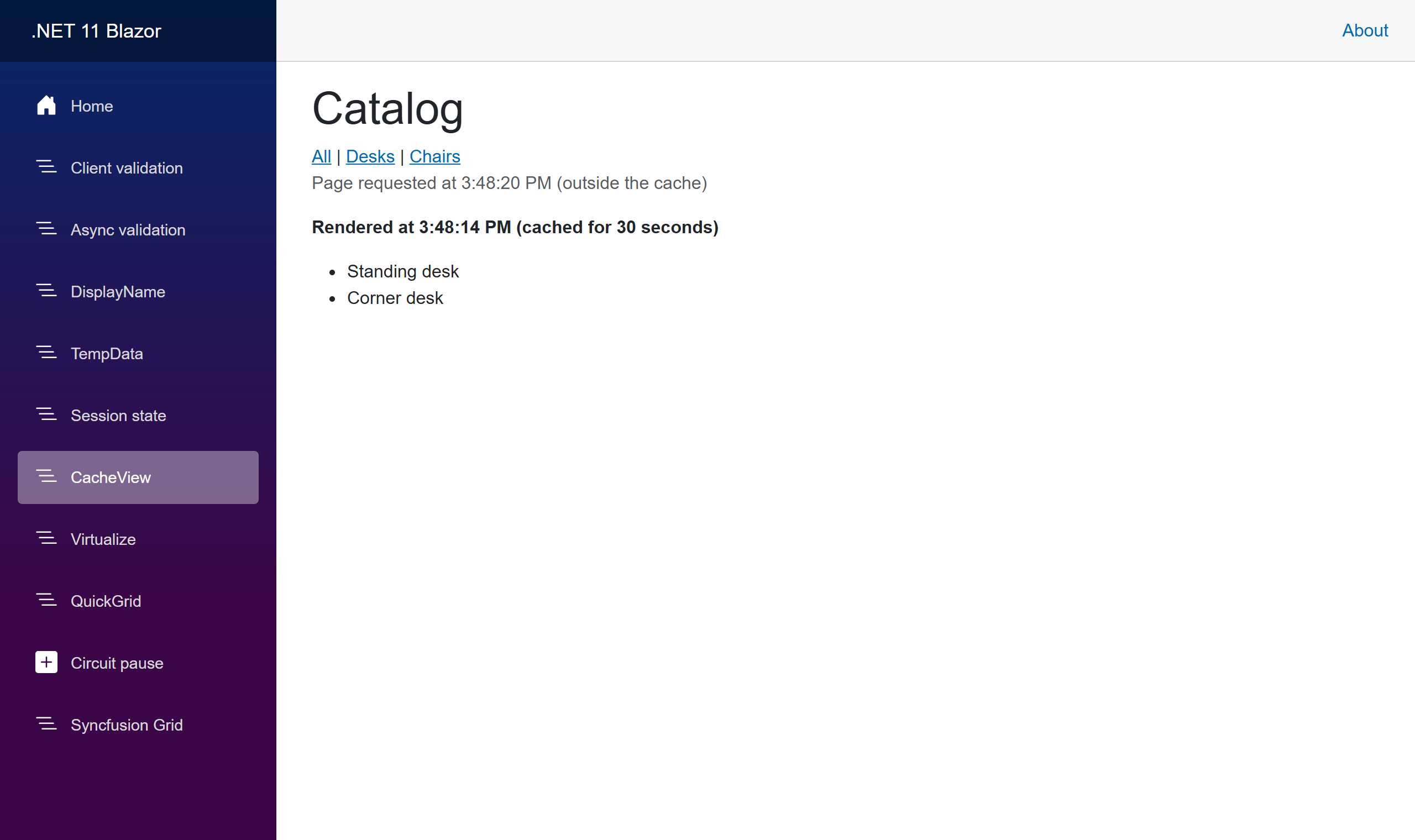
![Catalog page where the cached render time is older than the page request time](https://www.syncfusion.com/blogs/images/posts/dotnet-11-blazor-features/catalog-cacheview.png "Catalog page where the cached render time is older than the page request time")

You can also vary the cache by route, header, cookie, user, or culture. Use `VaryByUser` for anything personalized, including content inside `AuthorizeView`. `CacheView` works only in static SSR, and it uses `HybridCache` when you register one. See the [CacheView documentation](https://learn.microsoft.com/en-us/aspnet/core/blazor/state-management/cacheview-component?view=aspnetcore-11.0\&preserve-view=true "ASP.NET Core Blazor CacheView component").

### Virtualize anchor modes and scroll-to-item

Chats, feeds, and log viewers add items while the user watches. `Virtualize` now handles rows of different heights, and the new `AnchorMode` parameter decides what stays in view as items arrive. `End` keeps the list pinned to the newest item until the user scrolls away, and `Start` (the default) keeps the first visible item in place. `ScrollToItemAsync` jumps to any index.

```razor
<Virtualize Items="entries" Context="entry" AnchorMode="anchorMode" @ref="list">
    <div @key="entry.Id" style="padding: 0.5rem; border-bottom: 1px solid #ddd;">
        #@entry.Id: @entry.Message
    </div>
</Virtualize>

@code {
    private Virtualize<LogEntry>? list;
    private VirtualizeAnchorMode anchorMode = VirtualizeAnchorMode.End;

    private async Task ScrollToFirst()
    {
        if (list is null)
        {
            return;
        }

        // AnchorMode.End pulls a pinned list back to the newest item after a
        // programmatic scroll, so release the pin before jumping.
        anchorMode = VirtualizeAnchorMode.None;
        await Task.Yield(); // Lets Blazor render the new AnchorMode.
        await list.ScrollToItemAsync(0);
    }
}
```

![Virtualized log list that stays pinned to the newest entry](https://www.syncfusion.com/blogs/images/posts/dotnet-11-blazor-features/virtualize-anchor-mode-end.png "Virtualized log list that stays pinned to the newest entry")

See the [Virtualize documentation](https://learn.microsoft.com/en-us/aspnet/core/blazor/components/virtualization?view=aspnetcore-11.0 "ASP.NET Core Razor component virtualization").

## QuickGrid url-based sorting and paging

`QuickGrid` now stores the current page, sort column, and sort direction in the query string. Sorting and paging therefore work on static SSR pages without a circuit, and users can bookmark or share a sorted view such as `/employees?page=2&sort=Name&direction=asc`. Your markup doesn't change:

```razor
<QuickGrid Items="employees" Pagination="pagination">
    <PropertyColumn Property="@(e => e.Id)" Sortable="true" />
    <PropertyColumn Property="@(e => e.Name)" Sortable="true" />
    <PropertyColumn Property="@(e => e.Department)" Sortable="true" />
</QuickGrid>

<Paginator State="pagination" />
```

![QuickGrid sorted by name on page 2 with the sort state in the URL](https://www.syncfusion.com/blogs/images/posts/dotnet-11-blazor-features/quickgrid-url-sorting-paging.png "QuickGrid sorted by name on page 2 with the sort state in the URL")

Sort headers and pager buttons now render as `<a>` links, so update any CSS or tests that target `button`. If a page has more than one grid, give each a query parameter prefix with `QueryParameterNameOptions`. See the [QuickGrid documentation](https://learn.microsoft.com/en-us/aspnet/core/blazor/components/quickgrid?view=aspnetcore-11.0 "ASP.NET Core Blazor QuickGrid component").

## Interactive Server and WebAssembly improvements

The Web App's last stop is server memory. After that, the walkthrough moves to the standalone WebAssembly app.

### Pause and resume Interactive Server circuits

Every Interactive Server user holds a circuit in server memory, even with the tab in the background. In .NET 11, a circuit can pause, which frees that memory, and resume later where the user left off. Mark the state you want back with `[PersistentState]`:

```razor
@code {
    [PersistentState]
    public int CurrentCount { get; set; }

    private void IncrementCount() => CurrentCount++;
}
```

A circuit can pause in two ways:

- When the tab is hidden. Add the `Microsoft.AspNetCore.Components.Server.AutoPause` package and turn it on. Circuits pause after the tab has been hidden for the delay you set (2 minutes by default), and Blazor holds off while a download, upload, or media playback is in progress.
- When the server asks. Call `Circuit.RequestCircuitPauseAsync` before a planned restart or deployment, so users resume instead of losing their work.

```csharp
using Microsoft.AspNetCore.Components; // AddAutoPause lives in this namespace

app.MapRazorComponents<App>()
    .AddInteractiveServerRenderMode()
    .WithBrowserOptions(options =>
        options.AddAutoPause(p => p.HiddenDelay = TimeSpan.FromSeconds(30)));
```

For server-triggered pauses, track circuits with a `CircuitHandler`, then pause them all when the host starts to stop:

```csharp
appLifetime.ApplicationStopping.Register(
    () => PauseAllAsync().Wait(TimeSpan.FromSeconds(10)));

// ...

var results = await Task.WhenAll(circuits.Values.Select(async circuit =>
{
    try
    {
        return await circuit.RequestCircuitPauseAsync();
    }
    catch (Exception ex)
    {
        logger.LogWarning(ex, "Pause request failed for circuit {CircuitId}", circuit.Id);
        return false;
    }
}));
```

![Circuit pause dialog with a Resume button](https://www.syncfusion.com/blogs/images/posts/dotnet-11-blazor-features/circuit-paused-by-server.png "Circuit pause dialog with a Resume button")

Select Resume in the pause dialog, and the count comes back from `[PersistentState]`. See [circuit pause](https://learn.microsoft.com/en-us/aspnet/core/blazor/state-management/server?view=aspnetcore-11.0#server-triggered-circuit-pause "ASP.NET Core Blazor server-side state management") and [automatic pause on tab inactivity](https://learn.microsoft.com/en-us/aspnet/core/blazor/state-management/server?view=aspnetcore-11.0#automatic-circuit-pause-on-tab-inactivity "ASP.NET Core Blazor server-side state management").

### Blazor Gateway and API proxying

Standalone WebAssembly apps used the DevServer package in development and a custom host in production. The new Blazor Gateway is one lightweight host for both, and it solves two everyday problems:

- Client routes survive a refresh. `/orders/42` loads after a browser refresh, with no fallback middleware.
- API calls need no CORS setup. The Gateway forwards `/api/*` requests to your backend through built-in YARP, so the browser only talks to its own origin.

![Blazor Gateway request flow](https://www.syncfusion.com/blogs/images/posts/dotnet-11-blazor-features/gateway-diagram.png "Blazor Gateway request flow")

New projects already use the `Gateway`. To move an existing app, replace the DevServer package reference with the `Gateway` and turn on SPA fallback:

```xml
<PropertyGroup>
  <TargetFramework>net11.0</TargetFramework>
  <StaticWebAssetSpaFallbackEnabled>true</StaticWebAssetSpaFallbackEnabled>
</PropertyGroup>

<ItemGroup>
  <PackageReference Include="Microsoft.AspNetCore.Components.WebAssembly" Version="11.0.0" />
  <PackageReference Include="Microsoft.AspNetCore.Components.Gateway" Version="11.0.0" PrivateAssets="all" />
</ItemGroup>
```

![Order 42 client-side route loaded after a browser refresh through the Gateway's SPA fallback](https://www.syncfusion.com/blogs/images/posts/dotnet-11-blazor-features/gateway-spa-fallback.png "Order 42 client-side route loaded after a browser refresh through the Gateway's SPA fallback")

Then add the proxy route as configuration, for example in `launchSettings.json`:

```json
"environmentVariables": {
  "ReverseProxy__Routes__weather__ClusterId": "backend",
  "ReverseProxy__Routes__weather__Match__Path": "/api/{**catch-all}",
  "ReverseProxy__Clusters__backend__Destinations__backend1__Address": "http://localhost:5100/"
}
```

![Weather table loaded from /api/weather on the app's own origin and proxied by the Gateway to a backend](https://www.syncfusion.com/blogs/images/posts/dotnet-11-blazor-features/gateway-api-proxy.png "Weather table loaded from /api/weather on the app's own origin and proxied by the Gateway to a backend")

Also remove `inspectUri` from your launch profiles, because the Gateway doesn't use it.

### Run .NET code in Web Workers

WebAssembly runs your .NET code on the browser's UI thread, so a long calculation freezes the page. The new `blazorwebworker` template moves that work to a Web Worker. Good candidates are parsing large files, data transformations, and number crunching.

```bash
dotnet new blazorwebworker -n WebWorker
cd BlazorWasmApp
dotnet add reference ../WebWorker/WebWorker.csproj
```

Any method marked `[JSExport]` in the worker project can run off the UI thread:

```csharp
[JSExport]
public static string Greet(string name) => $"Hello, {name}!";
```

Create the client once, then call methods by their full name:

```csharp
worker = await WebWorkerClient.CreateAsync(JSRuntime);

greeting = await worker!.InvokeAsync<string>("WebWorker.WorkerMethods.Greet", ["World"]);
```

![.NET code running in a Web Worker](https://www.syncfusion.com/blogs/images/posts/dotnet-11-blazor-features/web-worker.png ".NET code running in a Web Worker")

See [.NET on Web Workers](https://learn.microsoft.com/en-us/aspnet/core/blazor/blazor-with-dotnet-on-web-workers?view=aspnetcore-11.0 "ASP.NET Core Blazor with .NET on Web Workers").

## Using Syncfusion Blazor Components in .NET 11

Syncfusion<sup>®</sup> Blazor components support .NET 11 starting with version [35.1.46](https://blazor.syncfusion.com/documentation/release-notes/35.1.46?type=all "Essential Studio for Blazor - v35.1.46 Release Notes"). Existing applications can typically upgrade by retargeting to net11.0 and updating Syncfusion packages to the latest compatible version. This allows developers to take advantage of .NET 11 improvements while continuing to use advanced components such as [Data Grid](https://help.syncfusion.com/grid-sdk/blazor/data-grid/getting-started-with-web-app "Getting Started with Blazor DataGrid in Blazor Web App"), [Charts](https://help.syncfusion.com/chart-sdk/blazor/charts/getting-started-with-web-app "Getting Started with Blazor Charts in Web App"), [Scheduler](https://help.syncfusion.com/scheduler-sdk/blazor/schedule/getting-started-webapp "Getting Started with Blazor Scheduler in Blazor Web App"), and [Gantt Chart](https://help.syncfusion.com/gantt-sdk/blazor/gantt-chart/getting-started-with-web-app "Getting Started with Blazor Gantt Chart in Blazor Web App").

## .NET 11 Blazor Upgrade Checklist

Test these areas first when you retarget:

| Area                                                                                                                                                                                                                                                                             | What to test                                                     |
| -------------------------------------------------------------------------------------------------------------------------------------------------------------------------------------------------------------------------------------------------------------------------------- | ---------------------------------------------------------------- |
| [QuickGrid controls render as links](https://learn.microsoft.com/en-us/aspnet/core/breaking-changes/11/quickgrid-controls-render-as-links?view=aspnetcore-11.0 "QuickGrid sorting and pagination controls render as links")                                                      | CSS and UI tests that target `button` in grid headers and pagers |
| [Deferred antiforgery validation](https://learn.microsoft.com/en-us/aspnet/core/breaking-changes/11/blazor-server-side-rendering-deferred-cross-site-request-forgery-protection?view=aspnetcore-11.0 "Blazor server-side rendering defers antiforgery validation to middleware") | Static SSR form posts and custom endpoints                       |
| [Custom event name collisions](https://learn.microsoft.com/en-us/aspnet/core/breaking-changes/11/blazor-custom-event-name-collision?view=aspnetcore-11.0 "Blazor custom event registration throws when name matches a browser event")                                            | Events registered with `registerCustomEventType`                 |
| [No preloading in enhanced navigation](https://learn.microsoft.com/en-us/aspnet/core/breaking-changes/11/blazor-enhanced-nav-preloading-disabled?view=aspnetcore-11.0 "Blazor enhanced navigation no longer preloads resources")                                                 | Pages that relied on preloaded content                           |
| [Obsolete APIs removed](https://learn.microsoft.com/en-us/aspnet/core/breaking-changes/11/blazor-obsolete-apis-removed?view=aspnetcore-11.0 "Obsolete Blazor APIs removed")                                                                                                      | Build errors after retargeting to `net11.0`                      |
| [WebAssembly environment variables in configuration](https://learn.microsoft.com/en-us/aspnet/core/breaking-changes/11/wasm-env-vars-in-configuration?view=aspnetcore-11.0 "WebAssemblyHostBuilder loads environment variables into IConfiguration")                             | Settings that an environment variable can now override           |

Also replace calls to the now-obsolete [`EditContext.Validate`](https://learn.microsoft.com/en-us/dotnet/api/microsoft.aspnetcore.components.forms.editcontext?view=aspnetcore-11.0 "EditContext Class") with `ValidateAsync`, and remove `UseWebAssemblyDebugging` (`ASPDEPR011`) once you move to the Gateway. New build-time analyzers, `BL0010` and `BL0012` to `BL0016`, may also flag component code that worked before ([Preview 7 notes](https://github.com/dotnet/core/blob/main/release-notes/11.0/preview/preview7/aspnetcore.md "ASP.NET Core in .NET 11 Preview 7 - Release Notes")). The full list is in the [breaking changes overview](https://learn.microsoft.com/en-us/aspnet/core/breaking-changes/11/overview "Breaking changes in ASP.NET Core 11").

## FAQs

### When is .NET 11 released, and how long is it supported?

.NET 11 reached general availability on `November 10, 2026`, at `.NET Conf 2026`. It's a Standard Term Support release, supported through `November 14, 2028` ([dotnet/core](https://github.com/dotnet/core/blob/main/README.md ".NET Release Notes")). If you need a longer support window, .NET 10 remains the current Long Term Support release.

### Can I cache part of a page in static SSR?

Yes, with `CacheView`. It caches only static SSR `GET` responses, and it can't be nested or wrap a `Virtualize` component.

### How do I upgrade my Syncfusion Blazor application to .NET 11?

Syncfusion Blazor components support .NET 11 starting with version `35.1.46`. To upgrade, retarget your project to net11.0 and update the Syncfusion NuGet packages to a compatible version.

## Conclusion

.NET 11 lets Blazor apps do more with the code you already have: models drive browser validation, cached markup cuts repeat rendering and paused circuits free server memory without costing users their work. Start by retargeting one app to `net11.0` and turning on the feature that removes the most custom code, often client-side validation or the Gateway.

Check [what's new in ASP.NET Core 11](https://learn.microsoft.com/en-us/aspnet/core/release-notes/aspnetcore-11 "What's new in ASP.NET Core in .NET 11") for the full list, and try the [Syncfusion Blazor demos](https://blazor.syncfusion.com/demos/ "Blazor Component Examples, Demos, and Showcase Web Apps").
