---
title: "Discover the Best Blazor Rich Text Editor for Effortless Content Creation"
published_at: "2025-04-28T11:26:49+00:00"
modified_at: "2025-04-28T12:14:36+00:00"
url: "https://www.syncfusion.com/blogs/post/best-blazor-rich-text-editor"
excerpt: "This blog explains why Syncfusion Blazor Rich Text Editor is the best editor in the market for seamless content creation and editing."
taxonomy_category:
- ".NET"
- "Blazor"
- "Rich Text Editor"
- "Web Development"
taxonomy_post_tag:
- "Blazor"
- "development"
- "productivity"
- "rich text editor"
- "Web"
---
# Discover the Best Blazor Rich Text Editor for Effortless Content Creation
[Thangavel E](https://www.syncfusion.com/blogs/author/thangavele)
**TL;DR:** Looking for the best rich text editor for Blazor apps? This blog shows why the Syncfusion Blazor Rich Text Editor leads the market with powerful features, easy customization, and smooth performance—plus a free 30-day trial to experience it yourself!
In web development, a robust and user-friendly rich text editor is crucial for creating and managing content seamlessly.
Syncfusion’s [Blazor Rich Text Editor](https://www.syncfusion.com/blazor-components/blazor-rich-text-editor)
is a top choice for developers looking to integrate a powerful text editor into their Blazor applications.
In this blog, we’ll explore the features, benefits, and why Syncfusion’s Blazor Rich Editor is considered one of the best in the market.
## Why choose Blazor for web app development?
- **C# instead of JavaScript**: [Blazor](https://dotnet.microsoft.com/en-us/apps/aspnet/web-apps/blazor) allows developers to create web apps using C# instead of JavaScript, which is advantageous for those familiar with the .NET ecosystem.
- **Full-stack development**: With Blazor, you can utilize the same language and framework for both client-side and server-side development, simplifying the development process by reducing the need to switch between different programming languages.
- **Component-based architecture**: Blazor employs a component-based architecture akin to frameworks like React and Angular, facilitating the creation of reusable and maintainable UI components.
- **WebAssembly**: Blazor WebAssembly enables the execution of C# code directly in the browser, resulting in improved performance and a more responsive user experience.
- **Strong .NET ecosystem**: Blazor leverages the extensive .NET ecosystem, including its libraries, tools, and community support, which can boost productivity and offer a wide range of functionalities.
- **Security and stability:** The .NET framework is renowned for its security and stability, which are beneficial for building reliable web apps.
- **Open-source and free:** Blazor is open-source and free to use, making it accessible to developers and organizations of all sizes.
## Most popular Blazor Rich Text Editors
Syncfusion, TinyMCE, and CKEditor are among the most renowned Blazor Rich Text Editors. These editors are celebrated for their extensive feature sets, user-friendly interfaces, and robust community support. Syncfusion stands out due to its complete [documentation](https://blazor.syncfusion.com/documentation/rich-text-editor/getting-started)
and exceptional customer service, making it a preferred choice among developers.
## Why choose Syncfusion Blazor Rich Editor?
Syncfusion is frequently regarded as the leading Blazor Rich Text Editor provider. Its comprehensive features, seamless integration, and dependable performance make it a favored option among developers.
It provides a wide range of features for easy content editing. It is designed to offer a smooth user experience with an intuitive interface and extensive customization options. Whether developing a blog, content management system, or any app requiring rich text editing, Syncfusion’s editor is competent.
### Key features of the Blazor Rich Text Editor
- **Extended formatting options:** Include advanced styling features like custom CSS and interactive elements.
- **Customizable toolbar:** Allows extensive customization of toolbars to suit specific workflows.
- **Advanced media handling:** Provides sophisticated media management, including image editing and video embedding.
- **Paste cleanup:** Ensures pasted content adheres to the document’s style and structure**.**
- **List features:** Supports various list types with customization options.
- **Table support:** This option provides tools for creating and formatting tables, including row, column, and cell adjustments.
- **Slash menu:** This option offers quick access to commands and content insertion through a slash (**/**) menu.
- **@Mention functionality:** Enables tagging or mentioning of users within the content.
- **Third-party integration**: Extends functionality with tools like ** CodeMirror** for advanced code editing and ** WebSpellChecker** for spell-checking and grammar correction.
- **Form validation:** Provides validation features for forms embedded within the editor, ensuring that user inputs are correctly validated before submission.
- **Localization:** Supports multiple languages and regional settings, allowing the editor to be adapted to different locales and improving usability for a global audience.
- **Accessibility:** Ensures screen reader compatibility, utilizes semantic HTML for improved content structure, and allows customization of accessibility features.
- **Keyboard support:** Includes a comprehensive set of keyboard shortcuts for common actions and ensures effective focus management for users navigating with the keyboard.
- **Mobile support:** This feature optimizes the editor for mobile devices, providing a responsive design that ensures a seamless editing experience on smartphones and tablets.
## Experience powerful editing with the Blazor Rich Text Editor — For free
Syncfusion offers a [30-day free trial](https://www.syncfusion.com/downloads)
for their Blazor Rich Text Editor as part of the Essential Studio package. Here are some key points about the free trial:
- **No credit card required**: You can start the trial without providing any payment information.
- **Full access**: The trial gives you access to all features of the Blazor Rich Text Editor, allowing you to evaluate its full capabilities.
- **Support included**: During the trial period, you can access Syncfusion’s 24×5 support, including forums, feature & feedback pages, chat, and support tickets.
- **Updates and patches**: You will receive all software updates and patches released during your trial.
You can start your free trial by visiting the Blazor Rich Text Editor’s [feature tour](https://www.syncfusion.com/blazor-components/blazor-rich-text-editor)
page and clicking the **Free Trial** button.
## Configuring the Blazor Rich Text Editor in your project
Once you have your [Blazor project set up](https://blazor.syncfusion.com/documentation/rich-text-editor/getting-started#create-a-new-blazor-app-in-visual-studio)
, you can configure the Rich Text Editor by following these steps:
### Step 1: Install the Blazor Rich Text Editor package
Use the following command to add the Syncfusion Blazor Rich Text Editor package to your project.
```
dotnet add package Syncfusion.Blazor.RichTextEditor
```
### Step 2: Register the Syncfusion Blazor service
Open the **Program.cs** file and register the ** Syncfusion Blazor service** by adding the following code.
```
....
using Syncfusion.Blazor;
....
builder.Services.AddSyncfusionBlazor();
....
```
### Step 3: Add Syncfusion license key
If you have a Syncfusion license, register it on the **Program.cs** file.
```
Syncfusion.Licensing.SyncfusionLicenseProvider.RegisterLicense("YOUR LICENSE KEY");
```
### Step 4: Include the CSS references and script
Open the **App.razor** file and add the following code within the **** tag to include the required CSS references and script.
```
```
### Step 5: Add the Blazor Rich Text Editor component
Open the **Pages/Home.razor** file and add the Syncfusion Blazor Rich Text Editor component.
```
@page "/"
@using Syncfusion.Blazor.RichTextEditor
```
**Step 6: Run the project**
Finally, run the project using the following command.
```
dotnet run
```
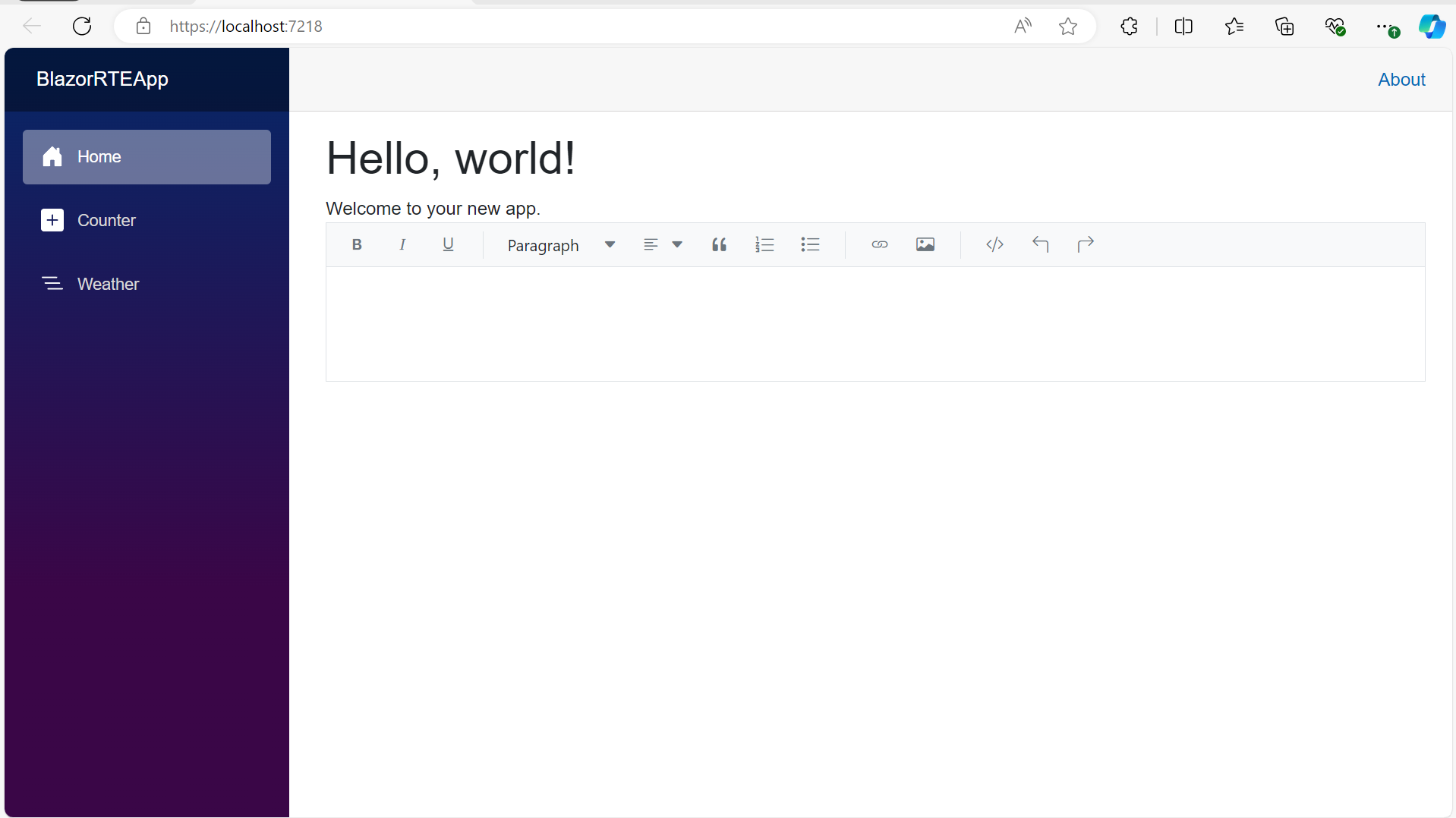
Refer to the following output image.
Integrating Rich Text Editor to a Blazor app
## Resources
For more details, refer to the Blazor Rich Text Editor demos on the [web](https://blazor.syncfusion.com/demos/rich-text-editor/overview)
and [GitHub](https://github.com/SyncfusionExamples/Blazor-Getting-Started-Examples/tree/main/RichTextEditor)
.
## Conclusion
Thanks for reading! Syncfusion’s [Blazor Rich Text Editor](https://www.syncfusion.com/blazor-components/blazor-rich-text-editor)
stands out as the best with its extensive features, customization options, and user-friendly interface. Whether you are looking for a free solution or a premium editor, plenty of options are available to meet your needs.
Existing customers can download the new version of Essential Studio® on the [License and Downloads](https://www.syncfusion.com/account)
page. If you are not a Syncfusion customer, try our 30-day [free trial](https://www.syncfusion.com/downloads)
to experience our incredible features.
You can also contact us through our [support forums](https://www.syncfusion.com/forums)
, [support portal](https://support.syncfusion.com/)
, or [feedback portal](https://www.syncfusion.com/feedback)
. We are always happy to assist you!
## Related Blogs
[Integrate Azure OpenAI with Blazor Maps for Smarter, AI-Powered Mapping](https://www.syncfusion.com/blogs/post/azure-openai-blazor-maps)
[Forecast Stock Market Trends with AI-Powered Blazor Candle Charts](https://www.syncfusion.com/blogs/post/ai-powered-blazor-candle-chart)
[Blazor Upgrade: Syncfusion’s New SpeechToText Component](https://www.syncfusion.com/blogs/post/new-blazor-speech-to-text-component)
[Build Blazor Apps Faster with Syncfusion’s UI Kit – Say Goodbye to UI Headaches](https://www.syncfusion.com/blogs/post/syncfusion-essential-ui-kit-for-blazor)