---
title: "Adding RTL Support to Your PDF in Xamarin"
published_at: "2018-06-29T11:30:00+00:00"
modified_at: "2025-12-15T13:49:32+00:00"
url: "https://www.syncfusion.com/blogs/post/adding-rtl-support-to-your-pdf-in-xamarin"
excerpt: "In this blog explores how to add RTL Support to Your PDF in Xamarin."
taxonomy_category:
- ".NET"
- "C#"
- "PDF"
taxonomy_post_tag:
- "ASP.NET Core"
- "bi-directional"
- "File Formats"
- "PDF"
- "RTL"
- "unicode"
- "Xamarin"
---
# Adding RTL Support to Your PDF in Xamarin
[George Livingston](https://www.syncfusion.com/blogs/author/georgelivingston)

Syncfusion [Essential PDF](https://www.syncfusion.com/pdf-framework/net)
is a .NET PDF library from the Essential Studio® 2018 Volume 2 release (16.2) that can be used to draw right-to-left (RTL) and bi-directional (Bidi) text in a PDF document.
## What is right-to-left support?
In a right-to-left script, writing starts from the right side of the PDF page and continues to the left. The most commonly used RTL scripts are Arabic, Hebrew, Persian, and Urdu.
مرحبا بالعالم
There are also languages which have more than one script and can be written either right-to-left or left-to-right, such as Sindhi or Kurdish.
## What is bi-directional support?
Bi-directional text contains both right-to-left and left-to-right formats. For instance, a line may contain both Arabic and English texts. As you might imagine, there are several possibilities when dealing with Bidi text. Arabic text is written from right-to-left, but numbers are generally written left-to-right.
هناك 10 تفاحات
## Adding RTL support to your PDF
While this post deals with the overall understanding of right-to-left, left-to-right, and bi-directional text, a little bit of code can help to understand how things works in the PDF.
1. Create a cross-platform app in Xamarin.Forms.
2. Select the Blank App template and the .NET Standard option under Code Sharing Strategy.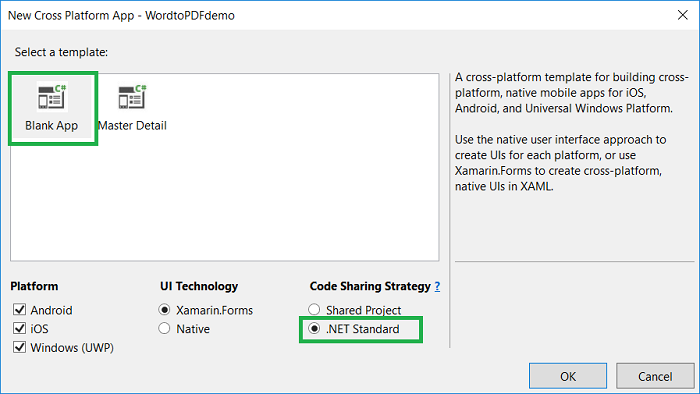
3. Add the [Syncfusion.Xamarin.PDF](https://www.nuget.org/packages/Syncfusion.Xamarin.Pdf/) NuGet packages as a reference to the .Net Standard project in your Xamarin application.
4. Since the PDF standard font does not support Unicode character, you will need to add the TrueType font file to the assets folder in the .NET Standard project. Right click the font, select properties, and set its build action as embedded resource.
5. Add a button in the MainPage.xaml file.``` //xamarin.com/schemas/2014/forms" >:x="http://schemas.microsoft.com/winfx/2009/xaml" >:local="clr-namespace:RTLSample" x:Class="RTLSample.MainPage"> ```
6. Add the following code with the onButtonClicked method in the MainPage.xaml.cs file.``` //Create a new PDF document. PdfDocument document = new PdfDocument(); //Add a new PDF page. PdfPage page = document.Pages.Add(); //Load font. Stream fontStream = typeof(App).GetTypeInfo().Assembly.GetManifestResourceStream("RTLDemo.Assets.arial.ttf"); //Create PDF TrueType font. PdfFont pdfFont = new PdfTrueTypeFont(fontStream, 12); //String format PdfStringFormat format = new PdfStringFormat(); //Set the format as right to left. format.TextDirection = PdfTextDirection.RightToLeft; //Set the alignment. format.Alignment = PdfTextAlignment.Right; SizeF pageSize = page.GetClientSize(); page.Graphics.DrawString("مرحبا بالعالم!", pdfFont, PdfBrushes.Black, new Syncfusion.Drawing.RectangleF(0, 0, pageSize.Width, pageSize.Height), format); MemoryStream ms = new MemoryStream(); //Save the document. document.Save(ms); //Close the document document.Close(true); ms.Position = 0; if (Device.OS == TargetPlatform.WinPhone || Device.OS == TargetPlatform.Windows) Xamarin.Forms.DependencyService.Get().Save("RTLText.pdf", "application/pdf", ms); else Xamarin.Forms.DependencyService.Get().Save("RTLText.pdf", "application/pdf", ms); ``` 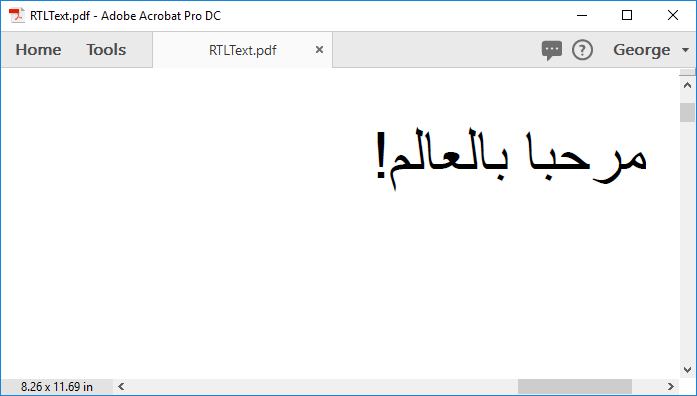
## GitHub reference
You can find the sample for [adding RTL text to PDF](https://github.com/SyncfusionExamples/Draw-RTL-text-in-PDF)
in the GitHub repository.
## Wrapping up
Your application now supports generating a PDF with RTL and Bidi texts using Essential PDF. Take a moment to peruse the documentation, where you’ll find other options and features, all with accompanying code examples.
If you are new to our PDF library, it is highly recommended that you follow our [Getting Started guide](https://help.syncfusion.com/file-formats/pdf/getting-started)
.
If you’re already a Syncfusion user, you can download the product setup [here](https://www.syncfusion.com/account/downloads/studio/licensed/16_2_0_41)
. If you’re not yet a Syncfusion user, you can download a free, 30-day trial [here](https://www.syncfusion.com/downloads/fileformats)
.
If you have any questions or require clarifications about these features, please let us know in the comments below. You can also contact us through our [support forum](https://www.syncfusion.com/forums)
or [Direct-Trac](https://www.syncfusion.com/support/directtrac/)
. We are happy to assist you!
*If you like this blog post, we think you’ll also like the following free e-books:*
- *[ASP.NET Core Succinctly](https://www.syncfusion.com/ebooks/asp_net_core_succinctly)*
- *[.NET Core Succinctly](https://www.syncfusion.com/ebooks/net_core_succinctly)*
- *[Statistics Using Excel Succinctly](https://www.syncfusion.com/ebooks/statistics)*
- *[PDF Succinctly](https://www.syncfusion.com/ebooks/pdf)*