---
title: "Integrate ASP.NET Core DataGrid With Boilerplate and Perform CRUD Actions"
published_at: "2025-02-03T11:55:47+00:00"
modified_at: "2026-06-23T08:38:25+00:00"
url: "https://www.syncfusion.com/blogs/post/add-datagrid-in-netcore-boilerplate"
excerpt: "Learn how to integrate Syncfusion ASP.NET Core DataGrid with the ASP.NET Boilerplate framework for building robust and scalable web apps."
taxonomy_category:
- ".NET Core"
- "ASP.NET Core"
- "Data Grid"
taxonomy_post_tag:
- "ASP.NET Core"
- "CRUD"
- "DataGrid"
- "development"
- "UI Components"
- "Web"
---
# Integrate ASP.NET Core DataGrid With Boilerplate and Perform CRUD Actions
[Maithiliy K](https://www.syncfusion.com/blogs/author/maithiliyk)

**TL;DR:** Learn how to integrate Syncfusion ASP.NET Core DataGrid into an ASP.NET Boilerplate project. This blog walks you through setting up the project, configuring CRUD operations, and adding powerful data functionalities like filtering, sorting, and searching.
[ABP (ASP.NET Boilerplate)](https://aspnetboilerplate.com/)
is an application framework designed to simplify the development of modern web applications. It features a modular architecture and built-in dependency injection, and it supports patterns like Unit of Work and Repository. It includes automatic API generation, multi-tenancy, robust authorization and authentication, and localization support. It also provides auditing, logging, and code generation tools and integrates with popular UI frameworks like Angular, React, and Blazor, offering a foundation for building scalable and maintainable apps.
As the web development landscape evolves, developers constantly seek efficient and feature-rich solutions to enhance their apps. In ASP.NET development, ASP.NET Boilerplate has emerged as a popular framework for building robust and scalable web apps.
In this blog, we’ll learn how to integrate Syncfusion [ASP.NET Core DataGrid](https://www.syncfusion.com/aspnet-core-ui-controls/grid)
with ASP.NET Boilerplate framework.
## Create an ASP.NET Boilerplate project
### Step 1: Install Abp CLI
Ensure the Abp CLI is installed globally on your machine. If not, install it using the following command.
```
dotnet tool install -g Volo.Abp.Cli
```
### Step 2: Create a new project
In your preferred folder, create a new project with your preferred name using the following command.
```
abp new SyncfusionGrid -csf
```
### Step 3: Ensure version compatibility
After successfully creating the project, open the solution file. To prevent errors, ensure that the Abp CLI version and all source project versions are the same or lower than the CLI version. If your project Abp package version is higher, update the CLI version by running the following command.
```
abp cli update --version x.x.x
```
### Step 4: Configure connection strings
Configure the appropriate connection strings in the **appsettings.json** file for both **[projectname].Web** and **[projectname].DbMigration** projects. Afterward, right-click on the ** DbMigration** project and select the option, ** Set as Start-up Project.**
**[projectname].DbMigration/**** appsettings.json &** **[projectname].Web/**** appsettings.json**
```
{
. . .
"ConnectionStrings": {
"Default": "Server=XXXXX;Database=SyncfusionGrid;Trusted_Connection=True;TrustServerCertificate=True"
},
. . .
}
```
### Step 5: Run the project
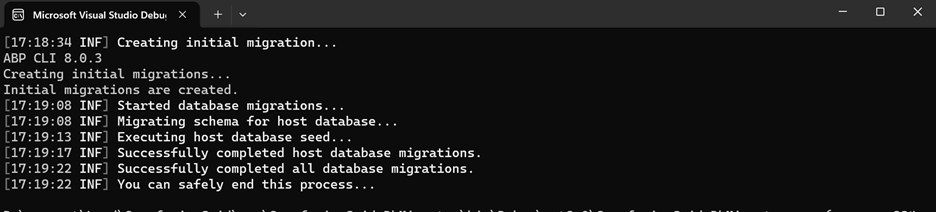
Run the project. It may take some time to migrate the ABP database to your database.
### Step 6: Configure XSRF-TOKEN
Since the POST request is used to call the URL method in the **index.cs** page, we need to configure ** XSRF-TOKEN**and add the following code on the **[projectname]WebModule.cs** file of the **[projectname].Web** project.
For more details, refer to the [How to Render Grid in ASP.NET Core Razor Page?](https://support.syncfusion.com/kb/article/10443/how-to-render-grid-in-asp-net-core-razor-page)
.
**[projectname]WebModule.cs**
```
public override void ConfigureServices(ServiceConfigurationContext context)
{
. . . . . .
// Need to add the codes below.
context.Services.AddAntiforgery(o => o.HeaderName = "XSRF-TOKEN");
}
```
Additionally, in the **Index.cshtml** file, add the ** AntiForgeryToken** in the razor page as follows.
```
@Html.AntiForgeryToken()
```
### Step 7: Set the web project as Start-up
Right-click on the **[projectname].Web** project and select ** Set as Start-up Project**.
Simplify ASP.NET Core DataGrid Development
Spend less time building grid features from scratch. Syncfusion ASP.NET Core DataGrid includes ready-to-use support for data binding, paging, sorting, filtering, editing, and exporting.
[Start Building Today](https://www.syncfusion.com/aspnet-core-ui-controls/grid)
## Install the Syncfusion ASP.NET Core package
Let’s start by installing the Syncfusion package. Right-click on the **[projectname].Web.csproj** file, open **Manage NuGet Packages,** and search for ** Syncfusion.EJ2.AspNet.Core** and then install it.
Alternatively, you can use the Package Manager Console. Ensure that the default project is set to **src/[projectname].Web** of the ASP.NET Boilerplate framework, and run the following command to install the EJ2 core package:
```
Install-Package Syncfusion.EJ2.AspNet.Core -Version x.x.x
```
**[projectname].Web.csproj**
![\[projectname\].Web.csproj](https://www.syncfusion.com/blogs/wp-content/uploads/2025/02/projectname.Web_.csproj.png)
## Add Syncfusion ASP.NET Core Tag Helper
Open the **~/Pages/_ViewImports.cshtml** file and add the Syncfusion.EJ2 TagHelper.
**~/Pages/_ViewImports.cshtml**
```
@* add Syncfusion.EJ2 TagHelper. *@
@addTagHelper *, Syncfusion.EJ2
```
## Include stylesheet and script resources
In the **~/Pages/Index.cshtml** file, add a link for the EJ2 stylesheet and scripts.
**~/Pages/Index.cshtml**
```
```
## Register Syncfusion Script Manager
Register the script manager **** at the **@section scripts** of the Razor page.
**~/Pages/Index.cshtml**
```
@section scripts {
}
```
## Troubleshoot: Render Grid rows without data
By default, ASP.NET Core returns JSON results in **camelCase** format, which can also alter grid field names. To resolve this issue, we need to add ** DefaultContractResolver** in the ** Program.cs** file.
For this, we need to install the **Microsoft.AspNetCore.Mvc.NewtonsoftJson** package using the Package Manager Console or NuGet Package Manager.
**Program.cs**
```
builder.Services.AddMvc().AddNewtonsoftJson(options =>
{
options.SerializerSettings.ContractResolver = new DefaultContractResolver();
});
```
For more details, refer to the [Troubleshooting grid rows without data](https://ej2.syncfusion.com/aspnetcore/documentation/grid/data-binding/data-binding#troubleshoot-grid-render-rows-without-data)
.
## Adding Syncfusion DataGrid
Now, insert the following grid code in the **~/Pages/Index.cshtml** file. This example links the data using the [customAdaptor](https://ej2.syncfusion.com/aspnetcore/documentation/grid/data-binding/remote-data#custom-adaptor)
concept by extending **UrlAdaptor.** This approach involves sending a post request to retrieve data from the server and execute additional grid actions.
The Syncfusion ASP.NET Core Grid component supports various server-side data operations, such as searching, sorting, filtering, aggregation, and paging. These operations can be managed using the [PerformSearching](https://help.syncfusion.com/cr/aspnetcore-js2/Syncfusion.EJ2.Base.QueryableOperation.html#Syncfusion_EJ2_Base_QueryableOperation_PerformSearching__1_System_Linq_IQueryable___0__System_Collections_Generic_List_Syncfusion_EJ2_Base_SearchFilter__)
, [PerformFiltering](https://help.syncfusion.com/cr/aspnetcore-js2/Syncfusion.EJ2.Base.QueryableOperation.html#Syncfusion_EJ2_Base_QueryableOperation_PerformFiltering__1_System_Linq_IQueryable___0__System_Collections_Generic_List_Syncfusion_EJ2_Base_WhereFilter__System_String_)
, [PerformSorting](https://help.syncfusion.com/cr/aspnetcore-js2/Syncfusion.EJ2.Base.QueryableOperation.html#Syncfusion_EJ2_Base_QueryableOperation_PerformSorting__1_System_Linq_IQueryable___0__System_Collections_Generic_List_Syncfusion_EJ2_Base_Sort__)
, [PerformTake](https://help.syncfusion.com/cr/aspnetcore-js2/Syncfusion.EJ2.Base.QueryableOperation.html#Syncfusion_EJ2_Base_QueryableOperation_PerformTake__1_System_Linq_IQueryable___0__System_Int32_)
, and [PerformSkip](https://help.syncfusion.com/cr/aspnetcore-js2/Syncfusion.EJ2.Base.QueryableOperation.html#Syncfusion_EJ2_Base_QueryableOperation_PerformSkip__1_System_Linq_IQueryable___0__System_Int32_)
methods from the **Syncfusion.EJ2.AspNet.Core** package. Let’s explore how to manage these data operations using the ** UrlAdaptor.**
In your API service project, add the **Syncfusion.EJ2.AspNet.Core** package through the NuGet Package Manager in Visual Studio (** Tools → NuGet Package Manager → Manage NuGet Packages for Solution**).
To access [DataManagerRequest](https://help.syncfusion.com/cr/aspnetcore-js2/Syncfusion.EJ2.Base.DataManagerRequest.html)
and [QueryableOperation](https://help.syncfusion.com/cr/aspnetcore-js2/Syncfusion.EJ2.Base.QueryableOperation.html)
, import the **Syncfusion.EJ2.Base** in your controller page.
**~/Pages/Index.cshtml**
```
```
In the **~/Pages/Index.js** file, add the following JavaScript code:
```
window.customAdaptor = new ej.data.UrlAdaptor();
customAdaptor = ej.base.extend(customAdaptor, {
processResponse: function (data, ds, query, xhr, request, changes) {
request.data = JSON.stringify(data);
return ej.data.UrlAdaptor.prototype.processResponse.call(this, data, ds, query, xhr, request, changes);
}
});
function onLoad() {
this.dataSource = new ej.data.DataManager({
url: '/Index?handler=GridDataOperationHandler',
insertUrl: "/Index?handler=GridInsertPostHandler",
updateUrl: "/Index?handler=GridUpdatePostHandler",
removeUrl: "/Index?handler=GridRemovePostHandler",
adaptor: customAdaptor
});
this.dataSource.dataSource.headers = [
{ 'XSRF-TOKEN': $("input:hidden[name='__RequestVerificationToken']").val() }
];
}
```
## Handling search operations
To implement search functionality, ensure your API endpoint supports custom search criteria. Implement the searching logic on the server side using the [PerformSearching](https://help.syncfusion.com/cr/aspnetcore-js2/Syncfusion.EJ2.Base.QueryableOperation.html#Syncfusion_EJ2_Base_QueryableOperation_PerformSearching__1_System_Linq_IQueryable___0__System_Collections_Generic_List_Syncfusion_EJ2_Base_SearchFilter__)
method from the [QueryableOperation](https://help.syncfusion.com/cr/aspnetcore-js2/Syncfusion.EJ2.Base.QueryableOperation.html)
class. This allows the custom data source to undergo searching based on the criteria specified in the incoming [DataManagerRequest](https://help.syncfusion.com/cr/aspnetcore-js2/Syncfusion.EJ2.Base.DataManagerRequest.html)
object.
In **Pages/Index.cshtml.cs** file, you can manage grid data operations like in the following code example.
```
// All data operations except crud post.
public JsonResult OnPostGridDataOperationHandler([FromBody] DataManagerRequest dm)
{
IEnumerable DataSource = orddata.ToList();
DataOperations operation = new DataOperations();
if (dm.Search != null && dm.Search.Count > 0)
{
DataSource = operation.PerformSearching(DataSource, dm.Search); // Search
}
return dm.RequiresCounts
? new JsonResult(new { result = DataSource, count = count })
: new JsonResult(DataSource);
}
```
## Handling filtering operations
To handle filtering operations, ensure that your API endpoint supports custom filtering criteria. Implement the filtering logic on the server side using the [PerformFiltering](https://help.syncfusion.com/cr/aspnetcore-js2/Syncfusion.EJ2.Base.QueryableOperation.html#Syncfusion_EJ2_Base_QueryableOperation_PerformFiltering__1_System_Linq_IQueryable___0__System_Collections_Generic_List_Syncfusion_EJ2_Base_WhereFilter__System_String_)
method from the [QueryableOperation](https://help.syncfusion.com/cr/aspnetcore-js2/Syncfusion.EJ2.Base.QueryableOperation.html)
class. This allows the custom data source to undergo filtering based on the criteria specified in the incoming [DataManagerRequest](https://help.syncfusion.com/cr/aspnetcore-js2/Syncfusion.EJ2.Base.DataManagerRequest.html)
object.
**Pages/Index.cshtml.cs**
```
// All data operations except crud post.
public JsonResult OnPostGridDataOperationHandler([FromBody] DataManagerRequest dm)
{
IEnumerable DataSource = orddata.ToList();
DataOperations operation = new DataOperations();
if (dm.Where != null && dm.Where.Count > 0) // Filtering
{
DataSource = operation.PerformFiltering(DataSource, dm.Where, dm.Where[0].Operator);
}
return dm.RequiresCounts
? new JsonResult(new { result = DataSource, count = count })
: new JsonResult(DataSource);
}
```
## Handling sorting operations
For sorting operations, ensure that your API endpoint supports custom sorting criteria. Implement the sorting logic on the server side using the [PerformSorting](https://help.syncfusion.com/cr/aspnetcore-js2/Syncfusion.EJ2.Base.QueryableOperation.html#Syncfusion_EJ2_Base_QueryableOperation_PerformSorting__1_System_Linq_IQueryable___0__System_Collections_Generic_List_Syncfusion_EJ2_Base_Sort__)
method from the [QueryableOperation](https://help.syncfusion.com/cr/aspnetcore-js2/Syncfusion.EJ2.Base.QueryableOperation.html)
class. This allows the custom data source to undergo sorting based on the criteria specified in the incoming [DataManagerRequest](https://help.syncfusion.com/cr/aspnetcore-js2/Syncfusion.EJ2.Base.DataManagerRequest.html)
object.
**Pages/Index.cshtml.cs**
```
// All data operations except crud post.
public JsonResult OnPostGridDataOperationHandler([FromBody] DataManagerRequest dm)
{
IEnumerable DataSource = orddata.ToList();
DataOperations operation = new DataOperations();
if (dm.Sorted != null && dm.Sorted.Count > 0) // Sorting
{
DataSource = operation.PerformSorting(DataSource, dm.Sorted);
}
int count = DataSource.Cast().Count();
if (dm.Skip != 0)
{
DataSource = operation.PerformSkip(DataSource, dm.Skip); // Paging
}
if (dm.Take != 0)
{
DataSource = operation.PerformTake(DataSource, dm.Take); // Paging
}
return dm.RequiresCounts
? new JsonResult(new { result = DataSource, count = count })
: new JsonResult(DataSource);
}
```
## Handling paging operations
For paging, ensure that your API endpoint supports custom paging criteria. Implement the paging logic on the server side using the [PerformTake](https://help.syncfusion.com/cr/aspnetcore-js2/Syncfusion.EJ2.Base.QueryableOperation.html#Syncfusion_EJ2_Base_QueryableOperation_PerformTake__1_System_Linq_IQueryable___0__System_Int32_)
and [PerformSkip](https://help.syncfusion.com/cr/aspnetcore-js2/Syncfusion.EJ2.Base.QueryableOperation.html#Syncfusion_EJ2_Base_QueryableOperation_PerformSkip__1_System_Linq_IQueryable___0__System_Int32_)
methods from the [QueryableOperation](https://help.syncfusion.com/cr/aspnetcore-js2/Syncfusion.EJ2.Base.QueryableOperation.html)
class. This allows the custom data source to undergo paging based on the criteria specified in the incoming [DataManagerRequest](https://help.syncfusion.com/cr/aspnetcore-js2/Syncfusion.EJ2.Base.DataManagerRequest.html)
object.
**Pages/Index.cshtml.cs**
```
// All data operations except crud post.
public JsonResult OnPostGridDataOperationHandler([FromBody] DataManagerRequest dm)
{
IEnumerable DataSource = orddata.ToList();
DataOperations operation = new DataOperations();
int count = DataSource.Cast().Count();
if (dm.Skip != 0)
{
DataSource = operation.PerformSkip(DataSource, dm.Skip); // Paging
}
if (dm.Take != 0)
{
DataSource = operation.PerformTake(DataSource, dm.Take); // Paging
}
return dm.RequiresCounts
? new JsonResult(new { result = DataSource, count = count })
: new JsonResult(DataSource);
}
```
## Handling CRUD Operations
The ASP.NET Core DataGrid Component seamlessly integrates CRUD (Create, Read, Update, Delete) operations with server-side controller actions through specific properties: [insertUrl](https://help.syncfusion.com/cr/aspnetcore-js2/Syncfusion.EJ2.DataManager.html#Syncfusion_EJ2_DataManager_InsertUrl)
, [removeUrl](https://help.syncfusion.com/cr/aspnetcore-js2/Syncfusion.EJ2.DataManager.html#Syncfusion_EJ2_DataManager_RemoveUrl)
, [updateUrl](https://help.syncfusion.com/cr/aspnetcore-js2/Syncfusion.EJ2.DataManager.html#Syncfusion_EJ2_DataManager_UpdateUrl)
, [crudUrl](https://help.syncfusion.com/cr/aspnetcore-js2/Syncfusion.EJ2.DataManager.html#Syncfusion_EJ2_DataManager_CrudUrl)
, and [batchUrl](https://help.syncfusion.com/cr/aspnetcore-js2/Syncfusion.EJ2.DataManager.html#Syncfusion_EJ2_DataManager_BatchUrl)
. These properties enable the grid to communicate with the data service for every grid action, facilitating server-side operations.
### CRUD operations mapping
CRUD operations within the grid can be mapped to server-side controller actions using the following specific properties:
- **insertUrl:** Specifies the URL for inserting new data.
- **removeUrl:** Specifies the URL for removing existing data.
- **updateUrl:** Specifies the URL for updating existing data.
- **crudUrl:** Specifies a single URL for all CRUD operations.
- **batchUrl:** Specifies the URL for batch editing.
#### Insert operation
To insert a new record, utilize the [insertUrl](https://help.syncfusion.com/cr/aspnetcore-js2/Syncfusion.EJ2.DataManager.html#Syncfusion_EJ2_DataManager_InsertUrl)
property to specify the controller action mapping URL for the insert operation.
```
// normal insert post.
public JsonResult OnPostGridInsertPostHandler([FromBody] CRUDModel value)
{
orddata.Insert(0, value.Value);
return new JsonResult(value);
}
function onLoad() {
this.dataSource = new ej.data.DataManager({
url: '/Index?handler=GridDataOperationHandler',
insertUrl: "/Index?handler=GridInsertPostHandler",
// ... other properties
adaptor: customAdaptor
});
// ... additional code
}
```
#### Update operation
To update existing records, utilize the [updateUrl](https://help.syncfusion.com/cr/aspnetcore-js2/Syncfusion.EJ2.DataManager.html#Syncfusion_EJ2_DataManager_UpdateUrl)
property to specify the controller action mapping URL for the update operation.
```
// normal update post.
public JsonResult OnPostGridUpdatePostHandler([FromBody] CRUDModel value)
{
var data = orddata.Where(or => or.OrderID == value.Value.OrderID).FirstOrDefault();
if (data != null)
{
data.OrderID = value.Value.OrderID;
data.CustomerID = value.Value.CustomerID;
data.Freight = value.Value.Freight;
data.EmployeeID = value.Value.EmployeeID;
data.ShipCity = value.Value.ShipCity;
data.Verified = value.Value.Verified;
data.OrderDate = value.Value.OrderDate;
data.ShipName = value.Value.ShipName;
data.ShipCountry = value.Value.ShipCountry;
data.ShippedDate = value.Value.ShippedDate;
data.ShipAddress = value.Value.ShipAddress;
}
return new JsonResult(value);
}
function onLoad() {
this.dataSource = new ej.data.DataManager({
// ... other properties
updateUrl: "/Index?handler=GridUpdatePostHandler",
// ... additional code
adaptor: customAdaptor
});
// ... more code
}
```
#### Delete operation
To delete existing records, use the [removeUrl](https://help.syncfusion.com/cr/aspnetcore-js2/Syncfusion.EJ2.DataManager.html#Syncfusion_EJ2_DataManager_RemoveUrl)
property to specify the controller action mapping URL for the delete operation
In **Pages/Index.cshtml.cs**, you can perform grid data operations as follows:
```
// normal delete post.
public JsonResult OnPostGridRemovePostHandler([FromBody] CRUDModel value)
{
orddata.Remove(orddata.Where(or => or.OrderID == (Int64)value.Key).FirstOrDefault());
return new JsonResult(value);
}
function onLoad() {
this.dataSource = new ej.data.DataManager({
// ... other properties
removeUrl: "/Index?handler=GridRemovePostHandler",
adaptor: customAdaptor
});
// ... additional code
}
```
## A single method for performing all CRUD operations
Using the **crudUrl** property, the controller action mapping URL can be specified to perform all the CRUD operations on the server side using a single method instead of defining separate controller action methods for CRUD **(insert, update, and delete)** operations.
Refer to the following code example.
**~/Pages/Index.js**
```
window.customAdaptor = new ej.data.UrlAdaptor();
customAdaptor = ej.base.extend(customAdaptor, {
processResponse: function (data, ds, query, xhr, request, changes) {
request.data = JSON.stringify(data);
return ej.data.UrlAdaptor.prototype.processResponse.call(this, data, ds, query, xhr, request, changes);
}
});
function onLoad() {
this.dataSource = new ej.data.DataManager({
url: '/Index?handler=GridDataOperationHandler',
crudUrl: "/Index?handler=GridCrudPostHandler", // add only crud url here.
adaptor: customAdaptor
});
this.dataSource.dataSource.headers = [{ 'XSRF-TOKEN': $("input:hidden[name='__RequestVerificationToken']").val() }];
}
```
**~/Pages/Index.cshtml.cs**
```
// normal edit crud url post.
public JsonResult OnPostGridCrudPostHandler([FromBody] CRUDModel value)
{
// normal update post.
if (value.Action == "update")
{
var data = orddata.Where(or => or.OrderID == value.Value.OrderID).FirstOrDefault();
if (data != null)
{
data.OrderID = value.Value.OrderID;
data.CustomerID = value.Value.CustomerID;
data.Freight = value.Value.Freight;
data.EmployeeID = value.Value.EmployeeID;
data.ShipCity = value.Value.ShipCity;
data.Verified = value.Value.Verified;
data.OrderDate = value.Value.OrderDate;
data.ShipName = value.Value.ShipName;
data.ShipCountry = value.Value.ShipCountry;
data.ShippedDate = value.Value.ShippedDate;
data.ShipAddress = value.Value.ShipAddress;
}
}
// normal insert post.
else if (value.Action == "insert")
{
orddata.Insert(0, value.Value);
}
// normal delete post.
else if (value.Action == "remove")
{
orddata.Remove(orddata.Where(or => or.OrderID == (Int64)value.Key).FirstOrDefault());
}
return new JsonResult(value);
}
```
### Handling batch/bulk CRUD operations
To perform batch operation, define the edit **mode** as ** Batch** and specify the ** batchUrl** property in the DataManager. Use the ** add toolbar** button to insert a new row in batch editing mode. To edit a cell, double-click the desired cell and update the value as required. To delete a record, select the record and press the ** delete toolbar** button. Now, all CRUD operations will be executed in a single request.
**~/Pages/Index.cshtml**
```
// need to add batch mode.
. . . . . .
```
**~/Pages/Index.js**
```
// . . . . . . .
function onLoad() {
this.dataSource = new ej.data.DataManager({
url: '/Index?handler=GridDataOperationHandler',
batchUrl: "/Index?handler=GridBatchCrudPostHandler", // add only batch crud url here.
adaptor: customAdaptor
});
this.dataSource.dataSource.headers = [{ 'XSRF-TOKEN': $("input:hidden[name='__RequestVerificationToken']").val() }];
}
```
**~/Pages/Index.cshtml.cs**
```
// Batch edit bulk crud url post.
public JsonResult OnPostGridBatchCrudPostHandler([FromBody] CRUDModel value)
{
if (value.Changed.Count > 0)
{
for (int i = 0; i < value.Changed.Count; i++)
{
var data = orddata.Where(or => or.OrderID == value.Changed[i].OrderID).FirstOrDefault();
if (data != null)
{
data.OrderID = value.Changed[i].OrderID;
data.CustomerID = value.Changed[i].CustomerID;
data.Freight = value.Changed[i].Freight;
data.EmployeeID = value.Changed[i].EmployeeID;
data.ShipCity = value.Changed[i].ShipCity;
data.Verified = value.Changed[i].Verified;
data.OrderDate = value.Changed[i].OrderDate;
data.ShipName = value.Changed[i].ShipName;
data.ShipCountry = value.Changed[i].ShipCountry;
data.ShippedDate = value.Changed[i].ShippedDate;
data.ShipAddress = value.Changed[i].ShipAddress;
}
}
}
if (value.Added.Count > 0)
{
for (var i = 0; i < value.Added.Count; i++)
{
orddata.Insert(i, value.Added[i]);
}
}
if (value.Deleted.Count > 0)
{
for (var i = 0; i < value.Deleted.Count; i++)
{
orddata.Remove(orddata.Where(or => or.OrderID == value.Deleted[i].OrderID).FirstOrDefault());
}
}
return new JsonResult(value);
}
```
Refer to the following image.

Integrating ASP.NET Core DataGrid in Boilerplate and performing CRUD actions
## GitHub reference
For more details, refer to the [integrating ASP.NET Core DataGrid in ASP.NET Boilerplate GitHub demo](https://github.com/SyncfusionExamples/asp-dotnet-core-grid-integrate-with-asp-dotnet-boilerplate)
.
## Conclusion
Thanks for reading! In conclusion, integrating Syncfusion [ASP.NET Core DataGrid](https://www.syncfusion.com/aspnet-core-ui-controls/grid)
with ASP.NET Boilerplate provides developers with a potent combination for building robust and scalable web apps. By harnessing the capabilities of the DataGrid, developers can streamline their development workflows and deliver compelling user experiences.
Throughout this exploration, we’ve witnessed how our DataGrid serves as a cornerstone for displaying and managing tabular data effectively within ASP.NET Boilerplate apps.
For existing customers, the new version of Essential Studio® is available for download from the [License and Downloads](https://www.syncfusion.com/account/downloads)
page. If you are not a Syncfusion customer, try our 30-day [free trial](https://www.syncfusion.com/downloads)
to check out our available features.
You can contact us through our [support forum](https://www.syncfusion.com/forums)
, [support portal](https://support.syncfusion.com)
, or [feedback portal](https://www.syncfusion.com/feedback)
. We are here to help you succeed!
## Related blogs
- [Handling CSV Files in ASP.NET Core Web APIs](https://www.syncfusion.com/blogs/post/handling-csv-files-in-asp-net-core-web-apis)
- [How to Implement Passkey in ASP.NET Core with Fido2-net-lib?](https://www.syncfusion.com/blogs/post/passkey-in-asp-dotnet-core-with-fido2)
- [Enhance User Experience: Preserve ASP.NET Core Grid Layout Settings](https://www.syncfusion.com/blogs/post/preserve-aspdotnet-core-grid-layout)
- [Creating an ASP.NET Core CRUD Web API with Dapper and PostgreSQL](https://www.syncfusion.com/blogs/post/asp-dotnet-core-crud-web-api-dapper-postgresql)