Interactive WPF OLAP Chart Control
- Slice and dice an OLAP cube and its data.
- Wide range of chart types such as bar chart, column chart, pie chart, line chart, etc.
- Provides drill-down capability with multiple-level labels (grouping labels).

.NET 10 support now available
Trusted by the world’s leading companies

Overview
The WPF OLAP chart control organizes and summarizes business data and displays results in a graphic format.

Data binding
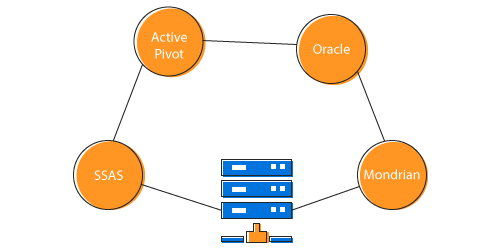
The WPF OLAP chart control enables you to retrieve multidimensional data from SSAS or any XML/A provider. Following is the list of data sources our OLAP controls widely support:
- SSAS
- Mondrian
- Active Pivot
- Oracle
Slice and dice
With the slice and dice feature, you can create a new view for end users by selecting dimensions and measures from the OLAP cube and filtering them.

Key performance indicators (KPIs)
KPIs are collections of calculations associated with a measure group that evaluates business success. Typically, these calculations are a combination of multi-dimensional expressions (MDX) or calculated members. Four different types of KPI indicators available are:
- Goal
- Status
- Trend
- Value
Named sets
The named sets are MDX expressions that return a set of dimension members, which can be defined and saved as a part of the OLAP cube definition. Named sets simplify MDX queries and provide useful aliases for complex, typically used, set expressions.

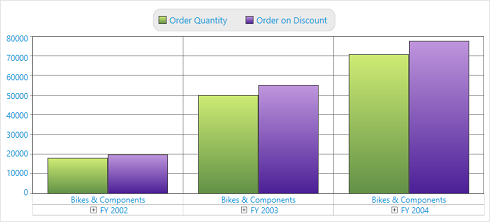
Calculated members and measures
You can now create and display dimensions and measures on your own.
Chart types
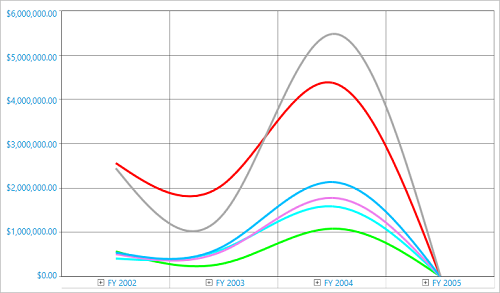
The WPF OLAP chart control common chart types are: column, stacking column, 100% stacking column, bar, stacking bar, 100% stacking bar, area, stacking area, spline area, step area, line, spline, rotated spline, step line, scatter, pie. Each chart type is easily configurable with built-in support for creating stunning visual effects.

Drill down and drill up
There is built-in support for drilling down (expand) and drilling up (collapse) to visualize the chart information in both abstract and detailed views.

Drill member
This option delivers a detailed view of any selected level member while drilling down and shows an abstract view after drilling up.
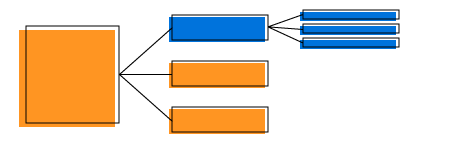
Drill position
You can drill only the current position of a selected level member, excluding others.
Filtering
With built-in filtering options, you can easily filter and visualize data.


Sorting
Sorting feature supports ordering series based on measure values.
Paging
Extensive support has been provided to load and render a large amount of data without any performance constraint through a pager.


Legend
A color code helps to differentiate chart series items. The legend has labels beside each color to present some detail about the series.
Axes and series

Series customization
Users can customize chart series colors, the border color, and the border width of the control.

Point labels
The point labels provide information about a data point with the help of adornments in a series.

Axis labels
There are customization options for the axis labels, including placement, label format, and rotation. There are also options for avoiding labels overlapping.

Series combinations
Provides support to plot different chart types in the same plot area.

Animation
Effects can be provided to chart series while rendering so the charts have a unique look.

Title
Provide captions for a chart and chart axes, describing the controls’ actual purpose in an application.

Watermark
The watermark provide faint imprints on the chart that can be either an image or text.
User interaction
Interaction features like zooming, panning, and tooltip are supported for a better user experience in the WPF OLAP Chart control.

Zooming
Users can take a close-up look at a data point plotted in a series at runtime with the zooming feature.

Panning
Users can click and drag the pointer across a zoomed-in chart to navigate to data points for better viewing.

Tooltip
Tooltip provide basic information about a series while the pointer is hovering over it.
Exporting and printing
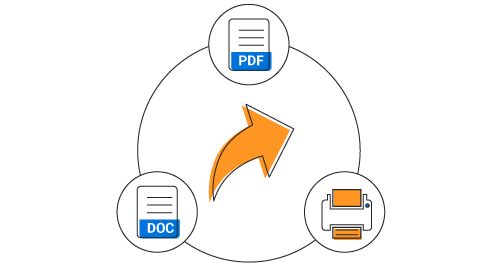
There is a rich set of options available for exporting data to Word, PDF, and image formats, and printing the same. Several options are also provided to customize the exporting and printing operations.
Save and load reports
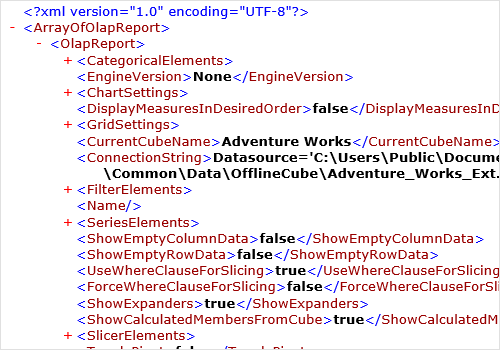
Settings in the WPF OLAP chart control can be serialized to an XML format and saved. Also, the saved report can be loaded back through the built-in deserialization options.
Globalization and localization

Globalization
Allows users from different locales to use the control by changing the date format, currency format, and number format to suit local preferences.

Right-to-left (RTL)
The text direction and layout of the control can be displayed in the right-to-left (RTL) direction.

Localization
Allows users to customize the text available in the user interface based on the local culture.
Custom style and themes

Built-in themes
Ships with a set of 14 stunning, built-in themes like Office365, Office2010, and Office2016 in light and dark patterns, Metro, etc.

Palette
Ships with a set of 23 built-in palettes like Earth Tone, Analog, Colorful, Nature, etc.

Custom styling
Customize the appearance of the control to any extent.

155+ WPF CONTROLS
ALL CONTROLS
SMART COMPONENTS
DATA VISUALIZATION
MODERN THEMES
LAYOUT
NAVIGATION
INPUT CONTROLS
BUTTON
BUSINESS INTELLIGENCE
DATA SCIENCE
MISCELLANEOUS
LISTS & DROPDOWNS
NOTIFICATION
FILE VIEWERS & EDITORS
CONVERSATIONAL UI
Build Document Workflows in WPF
Integrate a powerful PDF Viewer, rich DOCX Editor, and full‑featured Spreadsheet Editor into your WPF applications, alongside robust document processing libraries, to create smooth document experiences. Empower users to work with documents interactively while developers automate processing behind the scenes.
Our Customers Love Us
Having an excellent set of tools and a great support team, Syncfusion® reduces customers’ development time.Here are some of their experiences.

Excellent experience with Syncfusion!
Syncfusion is a product that makes life easier! I use it to create Blazor applications (server side and webassembly) and the controls speed up development a lot. Furthermore, if needed, it is possible to ask for direct support that is never long in coming!

Andrea Scarpante,

Sydea srl
The complete component set
It is the most complete component set available. Also very handy is the fact that there is a community edition, this gives me the opportunity to test thing at home without buying a separate license.

Johan Visser,

H and T Pawnbrokers
See Real Success Stories
Developers around the world trust Syncfusion’s Essential Studio to simplify complex projects and speed up delivery. With a vast library of UI controls, powerful SDKs, and reliable support, Essential Studio helps teams build enterprise-ready applications with confidence.
Read Our Customer StoriesIndustry
Software development
75% Cost reduction
50% Faster development

Industry
Utilities (oil and gas)

450+ hours saved
Streamlined processes and hours of development effort saved.

Advanced, flexible features
Empowered users through robust and versatile functionality.
Industry
Software and technology
1000+ of hours saved
Accelerated development with enterprise-ready UI components.

Efficient file management
Streamlined workflows with document libraries without building them from scratch.
Industry
Software and technology

2 Years of delay avoided
Two years of delays prevented with proactive planning.

On-time delivery
Projects delivered on schedule using trusted controls.
Industry
IT services and IT consulting

Improved performance
Large datasets handled with easy customization and quick debugging.

Highly customizable
Plug-and-play controls with quick template integration.
Industry
Professional services
Instant access
Quick availability of features and resources.
Reduced dependencies
Fewer dependencies for faster development.
Rated by users across the globe



Syncfusion WPF Resources
Learning
 Documentation
 Documentation


Awards
Greatness—it’s one thing to say you have it, but it means more when others recognize it. Syncfusion® is proud to hold the following industry awards.