Thursday Feb 18, 2010 at 02:04 AM
| Posted by:
jayn
| Category:
WPF
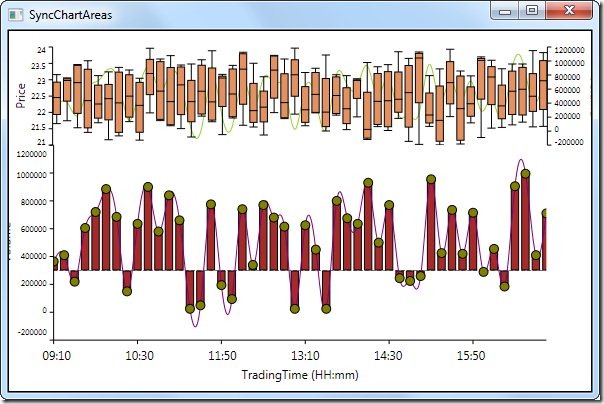
Essential Chart for WPF now supports SyncChartAreas. Multiple ChartAreas are used to visualize the graphs side by side. With this new feature - SyncChartAreas, ChartAreas could be aligned across one primary x-axis. Please refer to the below XAML:
<syncfusion:Chart Name="syncChart" Background="Transparent">
<syncfusion:SyncChartAreas>
<!--Common Primary X-axis-->
<syncfusion:SyncChartAreas.PrimaryAxis>
<syncfusion:ChartAxis Name="timeAxis" RangeCalculationMode="ConsistentAcrossChartTypes" RangePadding="None" ValueType="DateTime" LabelDateTimeFormat="HH:mm"
syncfusion:ChartArea.ShowGridLines="False" Header="TradingTime (HH:mm)"/>
</syncfusion:SyncChartAreas.PrimaryAxis>
<!--SyncChartAreas-->
<syncfusion:SyncChartAreas.Areas>
<!--Top Chart Area-->
<syncfusion:ChartArea Name="priceArea" Background="Transparent" HorizontalAlignment="Stretch" VerticalAlignment="Stretch" Width="Auto">
<syncfusion:ChartSeries Name="priceSeries" Type="Spline" Interior="YellowGreen" DataSource="{Binding}" BindingPathX="Time" BindingPathsY="Volume"/>
<syncfusion:ChartSeries Name="priceHiLoSeries" Type="BoxAndWhisker" Label="Price" ShowEmptyPoints="False" StrokeThickness="1"
DataSource="{Binding}" BindingPathX="Time" BindingPathsY="High,Low,Open,Close"/>
</syncfusion:ChartArea>
<!--Bottom Chart Area-->
<syncfusion:ChartArea Name="volumeArea" Grid.Row="1" Padding="0" Background="Transparent">
<syncfusion:ChartSeries Name="volumeColumnSeries" Interior="Brown" DataSource="{Binding}" BindingPathX="Time" BindingPathsY="Volume"/>
<syncfusion:ChartSeries Name="volumeLineSeries" Type="Spline" Interior="Purple" DataSource="{Binding}" BindingPathX="Time" BindingPathsY="Volume"/>
<syncfusion:ChartSeries Name="volumeScatterSeries" Interior="Olive" Type="Scatter" DataSource="{Binding}" BindingPathX="Time" BindingPathsY="Volume"/>
</syncfusion:ChartArea>
</syncfusion:SyncChartAreas.Areas>
</syncfusion:SyncChartAreas>
</syncfusion:Chart>
By default, SyncChartArea uses the StackPanel to layout the ChartAreas. This could be replaced with any custom panels using the ItemsPanelTemplate. The following XAML uses Grid panel to lay out the ChartAreas with the proportional sizing.
<!--Custom panel for sync chart areas-->
<syncfusion:SyncChartAreas.AreasPanel>
<ItemsPanelTemplate>
<Grid>
<Grid.RowDefinitions>
<RowDefinition Height="0.3*"/>
<RowDefinition Height="0.7*"/>
</Grid.RowDefinitions>
</Grid>
</ItemsPanelTemplate>
</syncfusion:SyncChartAreas.AreasPanel>
Screenshot:

A demo sample can be downloaded from this link: SyncChartAreas
Thanks!